· EEM332
EEM332 Mikroişlemciler: 8086 Mimarisi, Yazmaçlar ve Sayı Sistemleri
EEM332 – Mikroişlemciler · 24.02.2003 · 18.10.2026
Bu yazı, Başkent Üniversitesi EEM332 Mikroişlemciler ders arşivindeki ilgili notları ve uygulamaları bir araya getiriyor (2003–2015). 8086/8088 tarihi, yazmaçlar, segmentler, bayraklar ve ikili-onaltılı sayı gösterimi. Belgelerin PDF arşiv kopyaları ve varsa kaynak kodları yazının sonunda ZIP olarak indirilebilir.
CPU02_2013
EEM332 Lecture2. History of Microprocessor Introduction to Intel 8086/8088 Registers of 8086 Simple instructions
8086 Microprocessor History
1959: first IC's 1971: µP 4004 4Bit Intel (~2000 Tr.) 1972: µP 8008 8Bit Intel (~5000 Tr.) 1974: µP 8080 8Bit Intel (~6000 Tr.) 1974: µP 6800 8Bit Motorola 1975: µP Z80 8Bit Zilog 1976: µP 9900 16Bit Texas Instruments 1978: µP 8086 16Bit Intel (50.000 Tr) 1982: µP 8286 16Bit Intel (100.000 Tr.) 1985: µP 80386 16Bit Intel (300.000 Tr.) 1989: µP 80486 16Bit Intel (10 Tr.) 1993: µP 80586 16Bit Intel (5·106 Tr.) ...
BRIEF HISTORY OF THE x86 FAMILY evolution from 8080/8085 to 8086
In 1978, Intel Corporation introduced the 16-bit 8086 microprocessor, a majorimprovement over the previous generation 8080/8085 series. The 8086 capacity of 1 megabyte of memory exceeded the 8080/8085 maximum of 64K bytes of memory. 8080/8085 was an 8-bit system, which could work on only 8 bits of data at a time. Data larger than 8 bits had to be broken into 8-bit pieces to be processed by the
CPU.
8086 was a pipelined processor, as opposed to the nonpipelined 8080/8085
BRIEF HISTORY OF THE x86 FAMILY evolution from 8080/8085 to 8086
The microprocessor is typically a single VLSI (Very Large-Scale Integration) chip
MAXIMUM MINIMUM
MAXIMUM MINIMUM
MODE MODE
MODE MODE
GND 1 40 Vcc GND 1 40 Vcc
AD14 AD15
A14 A15
AD13 A16,S3
A13 A16,S3
AD12 A17,S4
AD11 A18,S5 Dta Bus A11 A12 A17,S4
A18,S5
AD10 A19,S6
AD9 /BHE,S7
16 bit 8 bit A10 A19,S6 A9 high /SS0
AD8 MN,/MX
A8 MN,/MX
AD7 /RD
AD7 /RD
AD6 /RQ,/GT0 HOLD
8086 AD6 /RQ,/GT0 HOLD
AD5 /RQ,/GT1 HLDA
AD5
8088 /RQ,/GT1 HLDA
AD4 /LOCK /WR
AD4 /LOCK /WR
AD3 /S2 IO/M
AD3 /S2 IO/M
AD2 /S1 DT/R
AD2 /S1 DT/R
AD1 /S0 /DEN
AD1 /S0 /DEN
AD0 QS0 ALE
AD0 QS0 ALE
NMI QS1 /INTA
NMI QS1 /INTA
INTR /TEST
INTR /TEST
CLK                     READY
CLK                      READY
GND 20 21 RESET
GND 20 21 RESET
Internal structure is same
Bus Interface Unit
Execution Unit (EU).
The BIU accesses memory and peripherals, while the EU executes instructions previously fetched.
The 8086 has two parts, the Bus Interface Unit (BIU) and the Execution Unit (EU).
The BIU fetches instructions, reads and writes data, and computes the 20-bit address.
The EU decodes and executes the instructions using the 16-bit
ALU.
- The BIU contains the following registers:
IP - the Instruction Pointer CS – the Code Segment Register DS - the Data Segment Register SS - the Stack Segment Register ES - the Extra Segment Register
Software Model of the 8088/8086 Microprocessor
The status register, SR, with nine of its bits implement for status and control flags. The memory address space is 1 Mbytes and the I/O
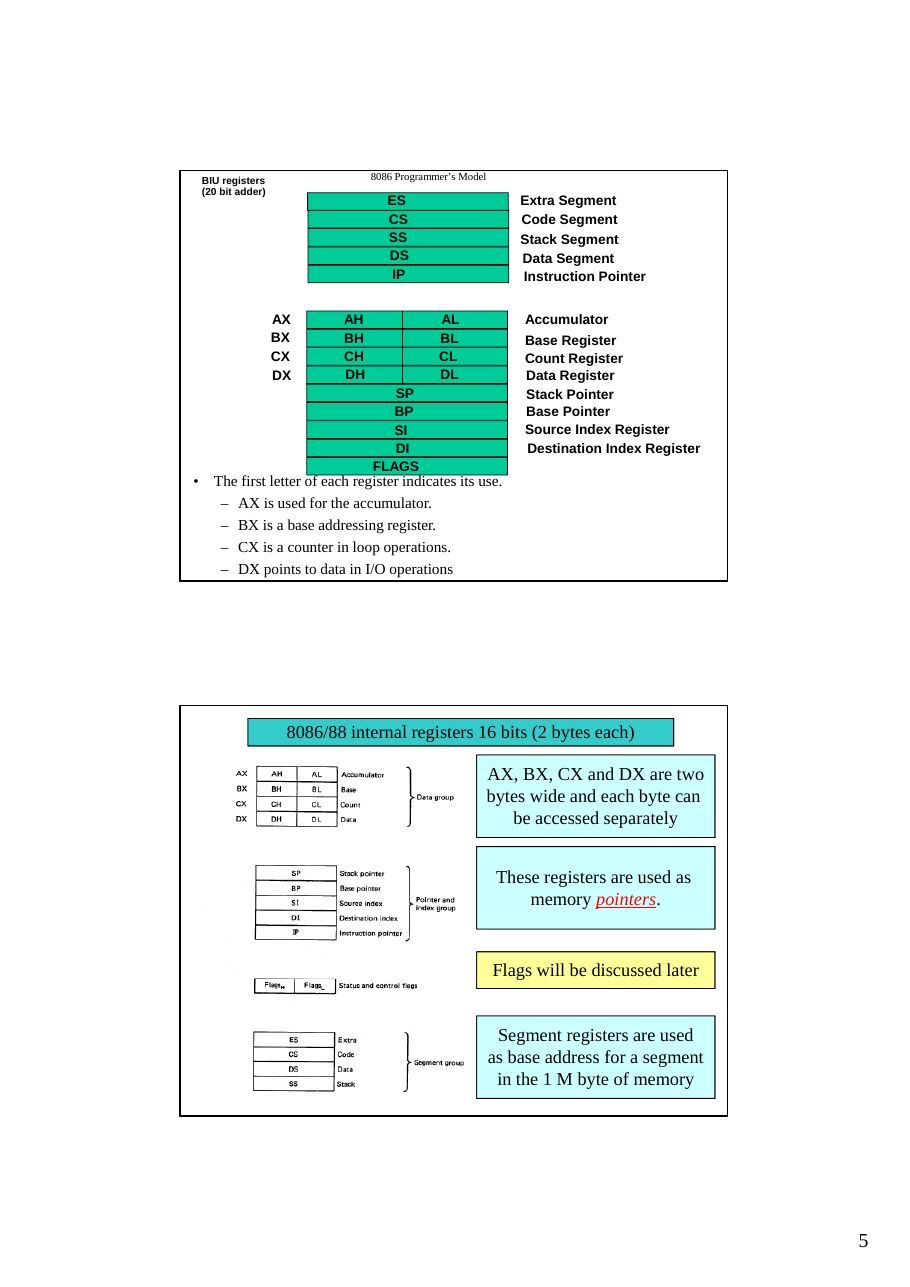
address space is 64 Kbytes in length.BIU registers 8086 Programmer’s Model (20 bit adder) ES Extra Segment CS Code Segment SS Stack Segment DS Data Segment IP Instruction Pointer
AX AH AL Accumulator BX BH BL Base Register CX CH CL Count Register DX DH DL Data Register SP Stack Pointer BP Base Pointer SI Source Index Register DI Destination Index Register
FLAGS
- The first letter of each register indicates its use.
- AX is used for the accumulator.
- BX is a base addressing register.
- CX is a counter in loop operations.
- DX points to data in I/O operations
8086/88 internal registers 16 bits (2 bytes each)
AX, BX, CX and DX are two bytes wide and each byte can be accessed separately
These registers are used as memory pointers.
Flags will be discussed later
Segment registers are used as base address for a segment
in the 1 M byte of memoryData Registers
The 8086/8088 Microprocessors: Registers
- Registers
- Registers are in the CPU and are referred to by specific names
- Data registers
- Hold data for an operation to be performed
- There are 4 data registers (AX, BX, CX, DX)
- Low and High bytes of the data registers (AX, BX, CX, DX) can be accessed
separately
- AH, BH, CH, DH are the high bytes
- AL, BL, CL, and DL are the low bytes
- Address registers
- Hold the address of an instruction or data element
- Segment registers (CS, DS, ES, SS)
- Pointer registers (SP, BP, IP)
- Index registers (SI, DI)
- Status register
- Keeps the current status of the processor
- On an IBM PC the status register is called the FLAGS register
- In total there are fourteen 16-bit registers in an 8086/8088
Pointer and Index Registers
- Contain the offset addresses of memory locations
- Can also be used in arithmetic and other operations
- SP: Stack pointer
- Used with SS to access the stack segment
- BP: Base Pointer
- Primarily used to access data on the stack
- Can be used to access data in other segments
- SI: Source Index register
- is required for some string operations
- When string operations are performed, the SI register points to
memory locations in the data segment which is addressed by the DS register. Thus, SI is associated with the DS in string operations.
Segment Registers - CS, DS, SS and ES
- Are Address registers
- Store the memory addresses of instructions and data
- Memory Organization
- Each byte in memory has a 20 bit address starting with 0 to 220-1 or 1
meg of addressable memory
- Addresses are expressed as 5 hex digits from 00000 - FFFFF
- Problem: But 20 bit addresses are TOO BIG to fit in 16 bit registers!
- Solution: Memory Segment
- Block of 64K (65,536) consecutive memory bytes
- A segment number is a 16 bit number
- Segment numbers range from 0000 to FFFF
- Within a segment, a particular memory location is specified with an offset
- An offset also ranges from 0000 to FFFF
Generating a Memory Address
- The BIU has a dedicated
adder for determiningphysical memory addresses
Segments
AddressSegment Starting address is segment 0H register value shifted 4 places to the left.
CODE
64K Data
STACK SegmentDATA
EXTRA CS:0
64K Code Segment Segment Registers
Segments are < or = 64K, can overlap, start at an address that ends in 0H. 0FFFFFH
MEMORY
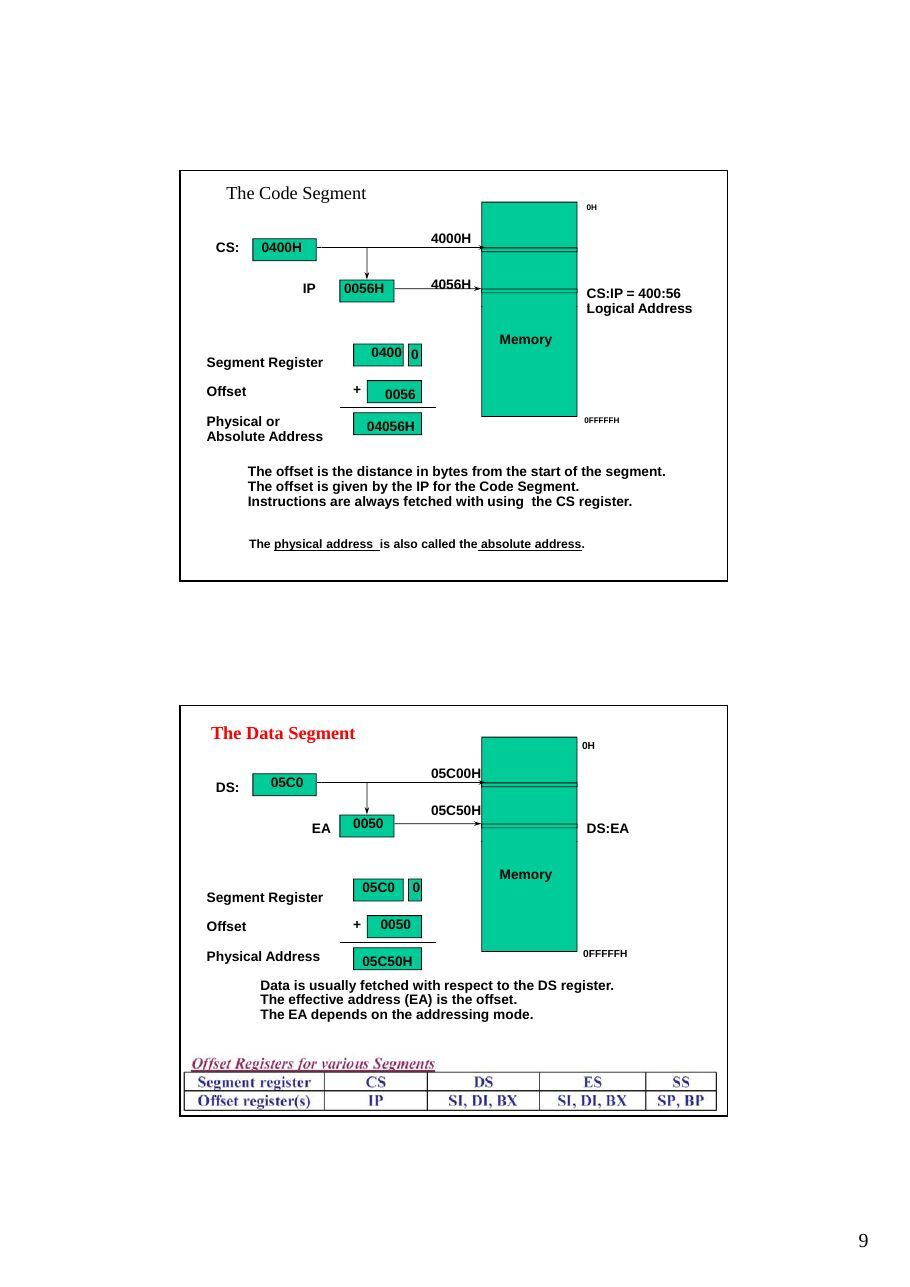
The Code Segment
0H
4000H
CS: 0400H
IP 0056H 4056H
CS:IP = 400:56
Logical Address
Memory 0400 0 Segment Register
Offset + 0056 Physical or 04056H
0FFFFFH
Absolute Address
The offset is the distance in bytes from the start of the segment. The offset is given by the IP for the Code Segment. Instructions are always fetched with using the CS register.
The physical address is also called the absolute address.
The Data Segment
0H
05C00H
DS: 05C0
05C50H
EA 0050 DS:EA
Memory
05C0 0
Segment Register
Offset + 0050
Physical Address 0FFFFFH
05C50H
Data is usually fetched with respect to the DS register. The effective address (EA) is the offset. The EA depends on the addressing mode.
The Stack Segment
0H
0A00 0A000H
SS
0A100H
SP 0100 SS:SP
Memory
0A00 0
Segment Register
Offset + 0100
0FFFFFH
Physical Address 0A100H The offset is given by the SP register. The stack is always referenced with respect to the stack segment register. The stack grows toward decreasing memory locations. The SP points to the last or top item on the stack.
- Logical Address is specified as segment:offset
- Physical address is obtained by shifting the segment address 4 bits to the left and adding the
offset address
- Thus the physical address of the logical address A4FB:4872 is A4FB0+ 4872 = A9822
INTRODUCTION TO PROGRAM SEGMENTS
A typical Assembly language program consists of
at least three segments
A code segment - which contains the Assembly language instructions that perform the tasks that the program was designed to accomplish. A data segment - used to store information (data) to be processed by the instructions in the code segment. A stack segment - used by the CPU to store information temporarily. The stack is a section of RAM,
A segment is an area of memory that includes up to 64K bytes, and begins on an
address evenly divisible by 16 (such an address ends in 0H)
8085 addressed a maximum of 64K of physical memory, since it had only 16 pins for address lines. (216 = 64K) Limitation was carried into 8088/86 design for compatibility.
In 8085 there was 64K bytes of memory for all code, data, and stack information.
In 8088/86 there can be up to 64K bytes in each category.
The code segment, data segment, and stack segment.
The Stack
- The stack is implemented for temporary storage of information such as
data or addresses.
- The stack is 64KBytes long and is organized from a software point of
view as 32K words.
- The contents of the SP and BP registers are used as offsets into the stack
segment memory while the
- segment base value is in the SS register. Push instructions (PUSH) and
pop instructions (POP)- Top of the stack (TOS) and bottom of the stack (BOS)
- The 8088 can push word-wide data and address information onto the
stack from registers or memory.
- Many stacks can exist but only one is active at a time.
- As data is pushed onto the stack it is decremented.
- As data is popped off the stack into the CPU, it is incremented.
Examples of ass. Language fo 8086
INTRODUCTION TO ASSEMBLY PROGRAMMING
Example for MOV instruction
This program first loads CL with value 55H, then moves this value around to various registers inside the CPU.
The use of 16-bit registers is shown here
Values cannot be loaded directly into any segment register (CS, DS, ES, or SS). To load a value into a segment register, load it to a non-segment register, then move it to the segment register
Flag register Many Assembly language instructions alter flag register bits & some instructions function differently based on the information in the flag register. The flag register is a 16-bit register sometimes referred to as the status register. Although 16 bits wide, only some of the bits are used. The rest are either undefined or reserved by Intel.
Carry flag Overflow Direction Parity flag
Interrupt enable Auxiliary flag 6 are status flags 3 are control flag Trap Zero
Sign Status flags (called conditional flags ): They are set according to some results of arithmetic operation. You do not need to alter the value yourself. Control flags: Used to control some operations of the MPU. These flags are to be set by you in order to achieve some specific purposes.
CF, the Carry Flag: This flag is set whenever there is a carry out, either from d7 after an 8-bit operation, or from d15 after a 16-bit data operation. PF, the Parity Flag: After certain operations, the parity of the result’s low-order byte is checked. If the byte has an even number of 1s, the parity flag is set to 1; otherwise, it is
cleared.AF, the Auxiliary Carry Flag: If there is a carry from d3 to d4 of an operation this bit is set to 1, otherwise cleared (set to 0). ZF, the Zero Flag: The ZF is set to 1 if the result of the arithmetic or logical operation is zero, otherwise, it is cleared (set to 0). SF, the Sign Flag: MSB is used as the sign bit of the binary representation of the signed numbers.After arithmetic or logical operations the MSB is copied into SF to indicate the sign of the result. TF, the Trap Flag: When this flag is set it allows the program to single step, meaning to execute one instruction at a time. Used for debugging purposes. IF, Interrupt Enable Flag: This bit is set or cleared to enable or disable only the external interrupt requests. DF, the Direction Flag: This bit is used to control the direction of the string operations. OF, the Overflow Flag: This flag is set whenever the result of a signed number operation is too large, causing the high-order bit to overflow into the sign bit.
Not: the zero is used flag to implement program loops.The status register, also called the flags register, indicate conditions that are produced as the result of executing an instruction. Only nine bits of the register are implemented. Six of these bits represent status flags and the other three bits represent control flags The 8088 provides instructions within its instruction set that are able to use these flags to alter the sequence in which the program is executed.
- As an example, to add 5 bytes of data, a counter can be used to keep track of
how many times the loop needs to be repeated.
Each time the addition is performed the counter is decremented and the zero flag is checked. When the counter becomes zero, the zero flag is set (ZF = 1) and the loop is stopped.
cpu02_08
8086 Microprocessor History
1959: first IC's 1971: µP 4004 4Bit Intel (~2000 Tr.) 1972: µP 8008 8Bit Intel (~5000 Tr.) 1974: µP 8080 8Bit Intel (~6000 Tr.) 1974: µP 6800 8Bit Motorola 1975: µP Z80 8Bit Zilog 1976: µP 9900 16Bit Texas Instruments 1978: µP 8086 16Bit Intel (50.000 Tr) 1982: µP 8286 16Bit Intel (100.000 Tr.) 1985: µP 80386 16Bit Intel (300.000 Tr.) 1989: µP 80486 16Bit Intel (10 Tr.) 1993: µP 80586 16Bit Intel (5·10 Tr.) ...
History of Intel’s Microprocessors
- Intel 4004
- 1971, 4-bit
- Intel 8008
- 1972, 8-bit
- Originally designed for Datapoint Corp. as a CRT display controller
- Intel 8080
- 1974, April - Altair 8800, 1975, MITS( 256 bytes of Mem, $395)
- Apple II -- Steve Jobs and Steve Wozniak 1976, Apple 사 설립
- Bill Gates and a fellow student : BASIC, 1975 --> Microsoft
- Intel 8086/8088
- 1978, 16 bit: 8088, 1979, 8-bit external bus
- IBM PC ; 1981
- 29,000 Trs
- Intel 80286
- 1982, 16-bit architecture
- 24-bit addressing, memory protection and virtual memory
- 16 MB of physical MEM and 1 GB of virtual mem
- 130,000 Trs onto a single chip
- IBM PC/AT in 1984, IBM PS/2 Model 50 and 60
- Intel 80386
- 1985, 32 bits
- 3~5 MIPS (7 MIPS on the 25 MHz chip)
- memory paging and enhanced I/O permission features
- 4GB programming model
- Intel 80486
- 1989 Spring COMDEX show -> 1990 June : actual release
- 1,200,000 Trs
- 386+387+8K data and instruction cache, paging and MMU
- Pentium
- 1993
- 110 MIPS on 66 Mhz Chip
- 16 KB on-chip cache and 64 bit data bus
- superscalar technology (two instructions/clock)
- 3.1 million transistors
- Pentium Pro
- 1995, Superscalar(three-way issue)
- 5.5 million Trs in the CPU core + 15.5 million Trs in the secondary cache
8K data, 8K instr cache
- 256 KB SRAM secondary cache
- 200 SPECint92 at 133 MHz
- 2.9 V, 0.6 micron BICMOS
- Pentium II
- Pentium Pro + MMX, 1997
- 233, 266, upto 450 MHz
- 7.5 million Trs in CPU
- 512KB in secondary cache
- Pentium III
- 1999
- Pentium Pro + MMX + Internet Streaming SIMD Instructions
- 0.25 micron, 9.5 million Trs
- 600 MHz, 550 MHz,...
- 32 K(16K/16K) non-blocking level 1 cache
MAXIMUM MINIMUM
MAXIMUM MINIMUM
MODE MODE
MODE MODE
GND 1 40 Vcc GND 1 40 Vcc
A14 A15
AD14 AD15
A13 A16,S3
AD13 A16,S3
A12 A17,S4
AD12 A17,S4
A11 A18,S5
AD11 A18,S5
A10 A19,S6
AD10 A19,S6
A9 high /SS0
AD9 /BHE,S7
A8 MN,/MX
AD8 MN,/MX
AD7 /RD
AD7 /RD
AD6 /RQ,/GT0 HOLD
AD6
8086
/RQ,/GT0 HOLD
AD5
8088 /RQ,/GT1 HLDA
AD5 /RQ,/GT1 HLDA
AD4 /LOCK /WR
AD4 /LOCK /WR
AD3 /S2 IO/M
AD3 /S2 IO/M
AD2 /S1 DT/R
AD2 /S1 DT/R
AD1 /S0 /DEN
AD1 /S0 /DEN
AD0 QS0 ALE
AD0 QS0 ALE
NMI QS1 /INTA
NMI QS1 /INTA
INTR /TEST
INTR /TEST
CLK                     READY
CLK                     READY
GND 20 21 RESET
GND 20 21 RESET
Software Model of the 8088/8086 Microprocessor
The status register, SR, with nine of its bits implement for status and control flags. The memory address space is 1 Mbytes and the I/O
address space is 64 Kbytes in length.- The 8086 has two parts, the Bus Interface Unit (BIU) and the
Execution Unit (EU).
- The BIU fetches instructions, reads and writes data, and computes the
20-bit address.
- The EU decodes and executes the instructions using the 16-bit ALU.
- The BIU contains the following registers:
IP - the Instruction Pointer CS – the Code Segment Register DS - the Data Segment Register SS - the Stack Segment Register ES - the Extra Segment Register
Bus Interface Unit
Execution Unit (EU).
8086 Programmer’s Model
ES Extra Segment BIU registers (20 bit adder) CS Code Segment SS Stack Segment DS Data Segment IP Instruction Pointer
AX AH AL Accumulator BX BH BL Base Register CX CH CL Count Register DX DH DL Data Register SP Stack Pointer BP Base Pointer SI Source Index Register DI Destination Index Register
FLAGS
8086/88 internal registers 16 bits (2 bytes each)
AX, BX, CX and DX are two bytes wide and each byte can be accessed separately
These registers are used as memory pointers.
Flags will be discussed later
Segment registers are used as base address for a segment
in the 1 M byte of memoryData Registers
The 8086/8088 Microprocessors: Registers
- Registers
- Registers are in the CPU and are referred to by specific names
- Data registers
- Hold data for an operation to be performed
- There are 4 data registers (AX, BX, CX, DX)
- Address registers
- Hold the address of an instruction or data element
- Segment registers (CS, DS, ES, SS)
- Pointer registers (SP, BP, IP)
- Index registers (SI, DI)
- Status register
- Keeps the current status of the processor
- On an IBM PC the status register is called the FLAGS register
- In total there are fourteen 16-bit registers in an 8086/8088
Data Registers: AX, BX, CX, DX
- Instructions execute faster if the data is in a register
- AX, BX, CX, DX are the data registers
- Low and High bytes of the data registers can be accessed
separately
- AH, BH, CH, DH are the high bytes
- AL, BL, CL, and DL are the low bytes
- Data Registers are general purpose registers but they also
perform special functions
- AX
- Accumulator Register
- Preferred register to use in arithmetic, logic and data transfer instructions
because it generates the shortest Machine Language Code
- Must be used in multiplication and division operations
- Must also be used in I/O operations
- BX .Base Register
- Also serves as an address register
- Used in array operations
- Used in Table Lookup operations (XLAT)
- CX : Count register
- Used as a loop counter
- Used in shift and rotate operations
- DX : Data register
- Used in multiplication and division
- Also used in I/O operations
DI: Destination Index register is also required for some string operations. When string operations are performed, the DI register points to memory locations in the
data segment which is addressed by the ES register. Thus, DI isassociated with the ES in string operations. The SI and the DI registers may also be used to access data stored in arrays
Pointer and Index Registers
- Contain the offset addresses of memory locations
- Can also be used in arithmetic and other operations
- SP: Stack pointer
- Used with SS to access the stack segment
- BP: Base Pointer
- Primarily used to access data on the stack
- Can be used to access data in other segments
- SI: Source Index register
- is required for some string operations
- When string operations are performed, the SI register points to
memory locations in the data segment which is addressed by the DS register. Thus, SI is associated with the DS in string operations.
Segment Registers - CS, DS, SS and ES
- Are Address registers
- Store the memory addresses of instructions and data
- Memory Organization
- Each byte in memory has a 20 bit address starting with 0 to 220-1 or 1
meg of addressable memory
- Addresses are expressed as 5 hex digits from 00000 - FFFFF
- Problem: But 20 bit addresses are TOO BIG to fit in 16 bit registers!
- Solution: Memory Segment
- Block of 64K (65,536) consecutive memory bytes
- A segment number is a 16 bit number
- Segment numbers range from 0000 to FFFF
- Within a segment, a particular memory location is specified with an offset
- An offset also ranges from 0000 to FFFF
Generating a Memory
Address- The BIU has a dedicated
adder for determiningphysical memory addresses
Segments
AddressSegment Starting address is segment 0H register value shifted 4 places to the left.
CODE
64K Data
STACK SegmentDATA
EXTRA CS:0
64K Code Segment Segment Registers
Segments are < or = 64K, can overlap, start at an address that ends in 0H. 0FFFFFH
MEMORY
The Code Segment
0H
4000H
CS: 0400H
IP 0056H 4056H
CS:IP = 400:56
Logical Address
Memory 0400 0 Segment Register
Offset + 0056
Physical or 04056H
0FFFFFH
Absolute Address
The offset is the distance in bytes from the start of the segment. The offset is given by the IP for the Code Segment. Instructions are always fetched with using the CS register.
The physical address is also called the absolute address.
The Data Segment
0H
05C00H
DS: 05C0
05C50H
EA 0050 DS:EA
Memory
05C0 0
Segment Register
Offset + 0050
Physical Address 0FFFFFH
05C50H
Data is usually fetched with respect to the DS register. The effective address (EA) is the offset. The EA depends on the addressing mode.
The Stack Segment
0H
0A00 0A000H
SS
0A100H
SP 0100 SS:SP
Memory
0A00 0
Segment Register
Offset + 0100
0FFFFFH
Physical Address 0A100H The offset is given by the SP register. The stack is always referenced with respect to the stack segment register. The stack grows toward decreasing memory locations. The SP points to the last or top item on the stack.
- Logical Address is specified as segment:offset
- Physical address is obtained by shifting the segment address 4 bits to the left and adding the
offset address
- Thus the physical address of the logical address A4FB:4872 is A4FB0+ 4872 = A9822
The Stack
- The stack is implemented for temporary storage of information such as
data or addresses.
- The stack is 64KBytes long and is organized from a software point of
view as 32K words.
- The contents of the SP and BP registers are used as offsets into the stack
segment memory while the
- segment base value is in the SS register. Push instructions (PUSH) and
pop instructions (POP)- Top of the stack (TOS) and bottom of the stack (BOS)
- The 8088 can push word-wide data and address information onto the
stack from registers or memory.
- Many stacks can exist but only one is active at a time.
Assembly
Flags in flag register
Carry flag Overflow Direction Parity flag
Interrupt enable Auxiliary flag 6 are status flags 3 are control flag Trap Zero
Sign
Status flags
They are set according to some results of arithmetic operation. You do not need to alter the value yourself.
Control flags
Used to control some operations of the MPU. These flags are to be set by you in order to achieve some specific purposes.
CF, the Carry Flag: This flag is set whenever there is a carry out, either from d7 after an 8-bit operation, or from d15 after a 16-bit data operation. PF, the Parity Flag: After certain operations, the parity of the result’s low-order byte is checked. If the byte has an even number of 1s, the parity flag is set to 1; otherwise, it is
cleared.AF, the Auxiliary Carry Flag: If there is a carry from d3 to d4 of an operation this bit is set to 1, otherwise cleared (set to 0). ZF, the Zero Flag: The ZF is set to 1 if the result of the arithmetic or logical operation is zero, otherwise, it is cleared (set to 0). SF, the Sign Flag: MSB is used as the sign bit of the binary representation of the signed numbers.After arithmetic or logical operations the MSB is copied into SF to indicate the sign of the result. TF, the Trap Flag: When this flag is set it allows the program to single step, meaning to execute one instruction at a time. Used for debugging purposes. IF, Interrupt Enable Flag: This bit is set or cleared to enable or disable only the external interrupt requests. DF, the Direction Flag: This bit is used to control the direction of the string operations. OF, the Overflow Flag: This flag is set whenever the result of a signed number operation is too large, causing the high-order bit to overflow into the sign bit.
The status register, also called the flags register, indicate conditions that are produced as the result of executing an instruction. Only nine bits of the register are implemented. Six of these bits represent status flags and the other three bits represent control flags The 8088 provides instructions within its instruction set that are able to use these flags to alter the sequence in which the program is executed.
Data Types
The most significant bit of a signed integer is a sign bit. A zero in this bit position identifies a positive number.
The 8088 can also process data that is coded as binary-coded decimal (BCD) numbers.
cpu03-06
8086 Microprocessor History
1959: first IC's 1971: µP 4004 4Bit Intel (~2000 Tr.) 1972: µP 8008 8Bit Intel (~5000 Tr.) 1974: µP 8080 8Bit Intel (~6000 Tr.) 1974: µP 6800 8Bit Motorola 1975: µP Z80 8Bit Zilog 1976: µP 9900 16Bit Texas Instruments 1978: µP 8086 16Bit Intel (50.000 Tr) 1982: µP 8286 16Bit Intel (100.000 Tr.) 1985: µP 80386 16Bit Intel (300.000 Tr.) 1989: µP 80486 16Bit Intel (106 Tr.) 1993: µP 80586 16Bit Intel (5·106 Tr.) ...
History of Intel’s Microprocessors
- Intel 4004
- 1971, 4-bit
- Intel 8008
- 1972, 8-bit
- Originally designed for Datapoint Corp. as a CRT display controller
- Intel 8080
- 1974, April - Altair 8800, 1975, MITS( 256 bytes of Mem, $395)
- Apple II -- Steve Jobs and Steve Wozniak 1976, Apple 사 설립
- Bill Gates and a fellow student : BASIC, 1975 --> Microsoft
- Intel 8086/8088
- 1978, 16 bit: 8088, 1979, 8-bit external bus
- IBM PC ; 1981
- 29,000 Trs
- Intel 80286
- 1982, 16-bit architecture
- 24-bit addressing, memory protection and virtual memory
- 16 MB of physical MEM and 1 GB of virtual mem
- 130,000 Trs onto a single chip
- IBM PC/AT in 1984, IBM PS/2 Model 50 and 60
- Intel 80386
- 1985, 32 bits
- 3~5 MIPS (7 MIPS on the 25 MHz chip)
- memory paging and enhanced I/O permission features
- 4GB programming model
- Intel 80486
- 1989 Spring COMDEX show -> 1990 June : actual release
- 1,200,000 Trs
- 386+387+8K data and instruction cache, paging and MMU
- Pentium
- 1993
- 110 MIPS on 66 Mhz Chip
- 16 KB on-chip cache and 64 bit data bus
- superscalar technology (two instructions/clock)
- 3.1 million transistors
- Pentium Pro
- 1995, Superscalar(three-way issue)
- 5.5 million Trs in the CPU core + 15.5 million Trs in the secondary cache
8K data, 8K instr cache
- 256 KB SRAM secondary cache
- 200 SPECint92 at 133 MHz
- 2.9 V, 0.6 micron BICMOS
- Pentium II
- Pentium Pro + MMX, 1997
- 233, 266, upto 450 MHz
- 7.5 million Trs in CPU
- 512KB in secondary cache
- Pentium III
- 1999
- Pentium Pro + MMX + Internet Streaming SIMD Instructions
- 0.25 micron, 9.5 million Trs
- 600 MHz, 550 MHz,...
- 32 K(16K/16K) non-blocking level 1 cache
8086 Microprocessor
16-bit Arithmetic Logic Unit
- 16-bit data bus
(8088 has 8-bit data bus)
- 20-bit address bus -
220 = 1,048,576 = 1 meg
8086 Architecture
- The 8086 has two parts, the Bus Interface Unit (BIU) and the
Execution Unit (EU).
- The BIU fetches instructions, reads and writes data, and computes the
20-bit address.
- The EU decodes and executes the instructions using the 16-bit ALU.
- The BIU contains the following registers:
IP - the Instruction Pointer CS - the Code Segment Register DS - the Data Segment Register SS - the Stack Segment Register ES - the Extra Segment Register
The BIU fetches instructions using the CS and IP, written CS:IP, to contruct the 20-bit address. Data is fetched using a segment register (usually the DS)
and an effective address (EA) computed by the EU depending on the
addressing mode.
80386/80486/Pentium Registers
The ax, bx, cx, dx, si, di, bp, sp, flags, and ip 32 bits registers of the 8068 were all extended to 32 bits. The 80386 calls these new 32 bit versions EAX,
EBX, ECX, EDX, ESI, EDI, EBP, ESP,
EFLAGS, and EIP Memory segments can be as large as 4GB
8086 Programmer’s Model
ES Extra Segment BIU registers CS Code Segment (20 bit adder) SS Stack Segment DS Data Segment IP Instruction Pointer
AX AH AL Accumulator BX BH BL Base Register CX CH CL Count Register DX DH DL Data Register SP Stack Pointer BP Base Pointer SI Source Index Register DI Destination Index Register
FLAGS
8086/88 8086/88internal internalregisters registers16 16bits bits(2 (2bytes byteseach) each)
AX, BX, CX and DX are two bytes wide and each byte can be accessed separately
These registers are used as memory pointers.
Flags will be discussed later
Segment registers are used as base address for a segment
in the 1 M byte of memoryThe 8086/8088 Microprocessors: Registers
- Registers
- Registers are in the CPU and are referred to by specific names
- Data registers
- Hold data for an operation to be performed
- There are 4 data registers (AX, BX, CX, DX)
- Address registers
- Hold the address of an instruction or data element
- Segment registers (CS, DS, ES, SS)
- Pointer registers (SP, BP, IP)
- Index registers (SI, DI)
- Status register
- Keeps the current status of the processor
- On an IBM PC the status register is called the FLAGS register
- In total there are fourteen 16-bit registers in an 8086/8088
Data Registers: AX, BX, CX, DX
- Instructions execute faster if the data is in a register
- AX, BX, CX, DX are the data registers
- Low and High bytes of the data registers can be accessed
separately
- AH, BH, CH, DH are the high bytes
- AL, BL, CL, and DL are the low bytes
- Data Registers are general purpose registers but they also
perform special functions
- AX
- Accumulator Register
- Preferred register to use in arithmetic, logic and data transfer instructions
because it generates the shortest Machine Language Code
- Must be used in multiplication and division operations
- Must also be used in I/O operations
- BX
- Base Register
- Also serves as an address register
- Used in array operations
- Used in Table Lookup operations (XLAT)
- CX
- Count register
- Used as a loop counter
- Used in shift and rotate operations
- DX
- Data register
- Used in multiplication and division
- Also used in I/O operations
Pointer and Index Registers
- Contain the offset addresses of memory locations
- Can also be used in arithmetic and other operations
- SP: Stack pointer
- Used with SS to access the stack segment
- BP: Base Pointer
- Primarily used to access data on the stack
- Can be used to access data in other segments
- SI: Source Index register
- is required for some string operations
- When string operations are performed, the SI register points to
memory locations in the data segment which is addressed by the DS register. Thus, SI is associated with the DS in string operations.
- DI: Destination Index register
- is also required for some string operations.
- When string operations are performed, the DI register points to
memory locations in the data segment which is addressed by the ES register. Thus, DI is associated with the ES in string operations.
- The SI and the DI registers may also be used to access data
stored in arrays
Segment Registers - CS, DS, SS and ES
- Are Address registers
- Store the memory addresses of instructions and data
- Memory Organization
- Each byte in memory has a 20 bit address starting with 0 to 2 20-1 or 1
meg of addressable memory
- Addresses are expressed as 5 hex digits from 00000 - FFFFF
- Problem: But 20 bit addresses are TOO BIG to fit in 16 bit registers!
- Solution: Memory Segment
- Block of 64K (65,536) consecutive memory bytes
- A segment number is a 16 bit number
- Segment numbers range from 0000 to FFFF
- Within a segment, a particular memory location is specified with an offset
- An offset also ranges from 0000 to FFFF
Intel Memory Address Generation
- The BIU has a dedicated adder for determining physical
memory addresses
- If the data segment starts at location 1000h and a data reference
- contains the address 29h where is the actual data?
Offset Value (16 bits)
Segment Register (16 bits) 0000
2 9
AdderOffset: 0000000000101001
Segment 0 0 0 1 0 0 0 0 0 0 0 0 0 0 0 00 0 0 0 : Physical Address (20 Bits)
Address: 0 0 0 1 0 0 0 0 0 0 0 0 0 0 1 01 0 0 1Segments
Address
0H
Segment Starting address is segment
register value shifted 4 places to the left.
CODE
64K Data
STACK SegmentDATA
EXTRA CS:0
64K Code Segment Segment Registers
Segments are < or = 64K, can overlap, start at an address that ends in 0H. 0FFFFFH
MEMORY
The Code Segment
0H
4000H
CS: 0400H
IP 0056H 4056H
CS:IP = 400:56
Logical Address
Memory 0400 0 Segment Register
Offset + 0056 Physical or 04056H 0FFFFFH Absolute Address
The offset is the distance in bytes from the start of the segment. The offset is given by the IP for the Code Segment. Instructions are always fetched with using the CS register.
The physical address is also called the absolute address.
The Data Segment
0H
05C00H
DS: 05C0
05C50H
EA 0050 DS:EA
Memory
05C0 0
Segment Register
Offset + 0050
Physical Address 05C50H 0FFFFFH
Data is usually fetched with respect to the DS register. The effective address (EA) is the offset. The EA depends on the addressing mode.
The Stack Segment
0A00 0A000H 0H
SS
0A100H
SP 0100 SS:SP
Memory
0A00 0
Segment Register
Offset + 0100
Physical Address 0A100H 0FFFFFH
The offset is given by the SP register. The stack is always referenced with respect to the stack segment register. The stack grows toward decreasing memory locations. The SP points to the last or top item on the stack.
- Logical Address is specified as segment:offset
- Physical address is obtained by shifting the segment address 4 bits to the left and adding the
offset address
- Thus the physical address of the logical address A4FB:4872 is A4FB0+ 4872 = A9822
LOGICAL ADDRESS PHYSICAL ADDRESS
Segment Beginning Last Beginning Last Number Address Address Address Address
0000 0000:0000 0000:FFFF 00000 0FFFF
0001 0001:0000 0001:FFFF 00010 1000F
0002 0002:0000 0002:FFFF 00020 1001F
0003 0003:0000 0003:FFFF 00030 1002F
. . . . . . . . . . . . . . .
FFFF FFFF:0000 FFFF:FFFF FFFF0 0FFEF
Flags Flags in
in flagflag register register
Carry flag Overflow Direction Parity flag Interrupt enable Auxiliary flag Trap Zero
6 are status flags Sign 3 are control flag
Flag Register
- Conditional flags:
- They are set according to some results of arithmetic operation. You do
not need to alter the value yourself.- Control flags:
- Used to control some operations of the MPU. These flags are to be set
by you in order to achieve some specific purposes. Flag O D I T S Z A P C
Bit no. 15 14 13 12 11 9 8 7 6 5 4 3 2 1 0
- CF (carry) Contains carry from leftmost bit following
arithmetic, also contains last bit from a shift or rotate operation.
Flag Register
- OF (overflow) Indicates overflow of the
leftmost bit during arithmetic.
- DF (direction) Indicates left or right for
moving or comparing string data.- IF (interrupt) Indicates whether external
interrupts are being processed or ignored.
- TF (trap) Permits operation of the processor
in single step mode.- SF (sign) Contains the resulting sign of an
arithmetic operation (1=negative)
- ZF (zero) Indicates when the result of
arithmetic or a comparison is zero. (1=yes)
- AF (auxiliary carry) Contains carry out of
bit 3 into bit 4 for specialized arithmetic.
- PF (parity) Indicates the number of 1 bits
that result from an operation.
cpu02
Representation of Numbers and
Characters
Number Systems
- A. Decimal
- B. Binary
- C. Hexadecimal
- Is a short-hand notation for binary
- Consists of 16 digits: 0, 1, 2, 3, 4, 5, 6, 7, 8, 9, A, B, C,
D, E, F
- Note: Yu's book use:
- 101d to represent decimal
- 101b to represent binary
- 101h to represent hexadecimal
Conversion between number systems
- A. Binary to Decimal
- B. Decimal to Binary
- C. Hexadecimal to Decimal
- D. Decimal to Hexadecimal
- E. Binary to Hex
- F. Hex to Binary
- Note: we will learn addition and subtraction in
hexadecimal only
Terminology
- MSB - most significant bit is bit 15 in a word or bit 7 in a
byte
- LSB - least significant bit is bit 0 in both a word and a byte
(If the LSB of an integer is 0, the integer is even. If its LSB is a 1, the integer is odd)
Representing Integers- Unsigned Integers
- Integers that are never negative
- Memory addresses, counters, and ASCII character codes are stored
as unsigned numbers
- No bit is needed to represent the sign bit
- Largest unsigned integer in a byte is 11111111b or 255 or 28 -1;
in a word it is 1111111111111111b or 65,535 or 216 - 1- Signed Integers
- In a signed number the MSB is the sign. The number is positive if
the MSB is a 0 and the number is negative if the MSB is a One's complement in binary
- flip all the bits from 0 to 1 or from 1 to 0
- Two's complement in binary -
- get one's complement and then add 1 (that is, flip all the
bits and then add 1)
Representing Positive and Negative Numbers in Hex- Positive numbers - straight conversion to hex
- Negative numbers are stored in two's complement form
- To get the two's complement form of a number in hex:
- First: Represent the number as if it were positive
- Second: Subtract it from FF(byte) or FFFF(word)
- Third: Add 1
- Examples:
-97 as a word is FFFF -0061
FF9E
+ 1
FF9F = -97
-97 as a byte is FF -61
9E
+1
9F = - 97
Advantage of Storing Numbers in 2’s Complement Form
- Advantage of storing numbers in 2's complement form is
that subtraction can be accomplished by bit complementation and addition
- Circuits for complementation and addition are easy to
design
- Also the same addition circuit can be used for subtraction
as well. Hence, no separate circuit is needed for subtration
Interpreting Signed and Unsigned Bytes and Words in Memory as Decimal Numbers
- Unsigned
- Straight translation from binary or hex to decimal
- Signed numbers
- First determine the sign of the number by looking at its MSB. If
its 0, its positive and you can do a straight translation from binary
or hex to decimal- If its MSB is a 1, its negative and you must Re-complement it!
- Since everything you see in memory will be expressed in
hexadecimal, you won't "see" the MSB. Instead, you will see a hex digit. Therefore, if the first hex digit of a signed word or a byte is 0 to 7, the number is positive. If the first hex digit of a signed word or a byte is 8 to F, the number is negative. Why?
Identifying Positive Integers in Hex First Hex Digit Expressed in Binary 0 0000 1 0001 2 0010 3 0011 4 0100 5 0101 6 0110 7 0111
- In all of the above cases, the MSB is 0!
- Therefore, if the first hex digit of a signed word or a byte is
0 to 7, the number is positive.
Identifying Negative Integers in Hex First Hex Digit Expressed in Binary 8 1000 9 1001
A 1010
B 1011
C 1100
D 1101
E 1110
F 1111
- In all of the above cases, the MSB is 1 !
- Therefore, if the first hex digit of a signed word or a byte is
8 to F, the number is positive
How to Interpret a Negative Integer Given in Hex
- Re-complement the number in hex. To do that,
- First: Subtract the byte or word from FF or FFFF respectively
- Second: Add 1
- Interpret your hex answer as a decimal answer and place a
minus sign in front of your answer!
- Example: What signed number does the byte AAh
represent?
FF
-AA Subtract from all F's + 1 Add 1 56h Interpret your HEX answer as a decimal number So the answer is: -86
How to Interpret a Negative Integer Given in Binary
- Re-complement the number in binary. To do that,
- First: Flip all the bits
- Second: Add 1
- Interpret your binary answer as a decimal answer and place a
minus sign in front of your answer!
- Example: What signed number does the byte 11111000b
represent?Flip all bits 00000111b
Add 1 00001000bSo the answer is: -8
Range of Integers
- The range of signed values that can be stored in a byte is
from -128 to 127
- The range of signed values that can be stored in a word is
from -32,768 to 32,767
Character Representation
- Code chosen for IBM PC is the ASCII code
- 7 bit code
- 27 or 128 possible values
- stored in a byte
- 95 ASCII codes are printable (32 to 126)
- 0 to 31 and 127 are used for control purposes
- IBM PC uses an extended character set using an 8 bit code
thus in can represent 28 or 256 possible values
- ASCII keyboard
- Each key pressed is stored in ASCII code
- Today on IBM PC, each key is assigned a unique number called a
scan code to handle the many control and function keys in addition to the ASCII character keys
ASCII Codes for Capital Letters
- Capital Letters of the Alphabet (41 - 5A)
A - 41 J - 4A Q - 51 Z - 5A
B - 42 K - 4B R - 52
C - 43 L - 4C S - 53
D - 44 M - 4D T - 54
E - 45 N - 4E U - 55
F - 46 0 - 4F V - 56
G - 47 P - 50 W - 57
H - 48 X - 58
I - 49 Y - 59
ASCII Codes for Lower Case Letters
- Lower case letters of the alphabet (61-7A)
a - 61 j - 6A q - 71 z - 7A b - 62 k - 6B r - 72 c - 63 l - 6C s - 73 d - 64 m - 6D t - 74 e - 65 n - 6E u - 75 f - 66 o - 6F v - 76 g - 67 p - 70 w - 77 h - 68 x - 78 i - 69 y - 79
ASCII Codes for Digits and Special Characters
- Digits (30-39)
0 - 30 3 - 33 6 - 36 9 - 39 1 - 31 4 - 34 7 - 37 2 - 32 5 - 35 8 - 38
- Special Characters
space - 20 ! - 21
+ - 2B
- - 2D
- See pages 442-443 in Yu's book for the complete ASCII
CODE chart
Practice Problems on ASCII Code
- Interpret this: 31 32 33 20 4F 41 4B 20 53 54 52 45 45 54
- Interpret this: 49 53 4E 27 54 20 54 48 49 53 20 46 55 4E 21
Homework - Number System Review
Conversion
1. Convert from decimal to binary
a. 43 b. 167
2. Convert from binary to decimal
a. 1101100b b. 1100011b
3. Convert from decimal to hexadecimal
a. 6242 b. 12321
4. Convert from hexadecimal to decimal
a. 4BFh b. A2F7h
5. Convert from binary to hexadecimal
a. 110010011110b b. 100001011b
6. Convert from hexadecimal to binary
a. FADh b. 265Ch c. BE98h
Homework: Data Representations Set 1 Problems Note: Express all answers to problems 1-9 in HEXADECIMAL
1. How do you represent 231 as an unsigned byte? ___________
2. How do you represent 110 as a signed byte? ___________
3. How do you represent -103 as a signed byte? ___________
4. How do you represent 64785 as an unsigned word? _______
5. How do you represent 1600 as a signed word? ___________
6. How do you represent -160 as a signed word? _________
7. How do you represent +7623 as a character string?_________
8. How do you represent -632 as a character string? _______
9. How do you represent WOW! as a character string? _______
Homework: Hex to Decimal or Character - Set 1 You are looking at a dump. Therefore, the values in problems 10-16 are expressed in HEXADECIMAL. Express your answers to problems 10-16 in
decimal or character form:10. You know 8E is an unsigned byte. What number does it represent? ______
11. You know 8E is a signed byte. What number does it represent? _________
12. You know 7E is a signed byte. What number does it represent? _________
13. You know 34A2 is an unsigned word (PV). What number does
it represent? _________
14. You know 34A2 is a signed word (PV). What number does it
represent? _________15. You know 3452 is a signed word (PV). What number does it
represent? _________16. You know 5745 is a character string. What value does it
represent? _________Homework: Hex to Decimal or Character - Set 1 (cont’d) You are looking at a dump. Therefore, the values in problems 10-16 are expressed in HEXADECIMAL. Express your anwers to problems 10-16 in
decimal or character form:
Answers
10. You know 8E is an unsigned byte. What number does it represent? 142
11. You know 8E is a signed byte. What number does it represent? -114
12. You know 7E is a signed byte. What number does it represent? 126
13. You know 34A2 is an unsigned word (PV). What number does
it represent? 41524
14. You know 34A2 is a signed word (PV). What number does it
represent? -2401215. You know 3452 is a signed word (PV). What number does it
represent? 2104416. You know 5745 is a character string. What value does it
represent? WEHOMEWORK: Data Representations - Set 2 LV: Logical View PV: Physical View Express all answers to problems 1-9 in HEXADECIMAL
1. How do you represent 195 as an unsigned byte? ___________
2. How do you represent 101 as a signed byte? ___________
3. How do you represent -119 as a signed byte? ___________
4. How do you represent 42623 as an unsigned word? (LV)______
5. How do you represent 32001 as a signed word? (LV)__________
6. How do you represent -1675 as a signed word? (LV) _________
7. How do you represent +25 as a character string?_______
8. How do you represent -413 as a character string? _______
9. How do you represent (TEST) as a character string? ______
Hex to Decimal or Character: Set 2 You are looking at a dump. Therefore, the values in problems 10-16 are expressed in HEXADECIMAL. Express your answers to problems 10-16 in
decimal or character form:10. You know 95 is an unsigned byte. What number does it represent? ____
11. You know 95 is a signed byte. What number does it represent? _____
12. You know 7F is a signed byte. What number does it represent? _____
13. You know 1DB1 is an unsigned word (PV). What number does
it represent? ______
14. You know 1DB1 is a signed word (PV). What number does it
represent? ______15. You know 6C73 is a signed word (PV). What number does it
represent? ______16. You know 4D41 is a character string. What value does it
represent? ______cpu02-06
Representation of Numbers and
Characters
Number Systems
- A. Decimal
- B. Binary
- C. Hexadecimal
- 0, 1, 2, 3, 4, 5, 6, 7, 8, 9, A, B, C, D, E, F
- Note: • MSB - most significant bit
- 101d to represent decimal is bit 15 in a word or bit 7
- 101b to represent binary in a byte
- 101h to represent hexadecimal
- Conversion between number systems
- LSB - least significant bit
- A. Binary to Decimal is bit 0 in both a word and
- B. Decimal to Binary
a byte (If the LSB of an
- C. Hexadecimal to Decimal
- D. Decimal to Hexadecimal
integer is 0, the integer is
- E. Binary to Hex even. If its LSB is a 1, the
- F. Hex to Binary integer is odd)
- Note: we will learn addition and subtraction in hexadecimal only
Representing Integers- Unsigned Integers
- Integers that are never negative
- Memory addresses, counters, and ASCII character codes are stored
as unsigned numbers
- No bit is needed to represent the sign bit
- Largest unsigned integer in a byte is 11111111b or 255 or 28 -1;
in a word it is 1111111111111111b or 65,535 or 216 - 1- Signed Integers
- In a signed number the MSB is the sign. The number is positive if
the MSB is a 0 and the number is negative if the MSB is a One's complement in binary
- flip all the bits from 0 to 1 or from 1 to 0
- Two's complement in binary -
- get one's complement and then add 1 (that is, flip all the
bits and then add 1)
Representing Positive and Negative Numbers in Hex- Positive numbers - straight conversion to hex
- Negative numbers are stored in two's complement form
- To get the two's complement form of a number in hex:
- First: Represent the number as if it were positive
- Second: Subtract it from FF(byte) or FFFF(word)
- Third: Add 1
- Examples:
-97 as a word is FFFF -0061
FF9E
+ 1
FF9F = -97
-97 as a byte is FF -61
9E
+1
9F = - 97
Advantage of Storing Numbers in 2’s Complement Form
- Advantage of storing numbers in 2's complement form is
that subtraction can be accomplished by bit complementation and addition
- Circuits for complementation and addition are easy to
design
- Also the same addition circuit can be used for subtraction
as well. Hence, no separate circuit is needed for subtration
Interpreting Signed and Unsigned Bytes and Words in Memory as Decimal Numbers
- Unsigned
- Straight translation from binary or hex to decimal
- Signed numbers
- First determine the sign of the number by looking at its MSB. If
its 0, its positive and you can do a straight translation from binary
or hex to decimal- If its MSB is a 1, its negative and you must Re-complement it!
- Since everything you see in memory will be expressed in
hexadecimal, you won't "see" the MSB. Instead, you will see a hex digit. Therefore, if the first hex digit of a signed word or a byte is 0 to 7, the number is positive. If the first hex digit of a signed word or a byte is 8 to F, the number is negative. Why?
Identifying Positive Integers in Hex First Hex Digit Expressed in Binary 0 0000 1 0001 2 0010 3 0011 4 0100 5 0101 6 0110 7 0111
- In all of the above cases, the MSB is 0!
- Therefore, if the first hex digit of a signed word or a byte is
0 to 7, the number is positive.
Identifying Negative Integers in Hex First Hex Digit Expressed in Binary 8 1000 9 1001
A 1010
B 1011
C 1100
D 1101
E 1110
F 1111
- In all of the above cases, the MSB is 1 !
- Therefore, if the first hex digit of a signed word or a byte is
8 to F, the number is positive
How to Interpret a Negative Integer Given in Hex
- Re-complement the number in hex. To do that,
- First: Subtract the byte or word from FF or FFFF respectively
- Second: Add 1
- Interpret your hex answer as a decimal answer and place a
minus sign in front of your answer!
- Example: What signed number does the byte AAh
represent?
FF
-AA Subtract from all F's + 1 Add 1 56h Interpret your HEX answer as a decimal number So the answer is: -86
How to Interpret a Negative Integer Given in Binary
- Re-complement the number in binary. To do that,
- First: Flip all the bits
- Second: Add 1
- Interpret your binary answer as a decimal answer and place a
minus sign in front of your answer!
- Example: What signed number does the byte 11111000b
represent?Flip all bits 00000111b
Add 1 00001000bSo the answer is: -8
- Range of Integers
- The range of signed values that can be stored in a byte is
from -128 to 127
- The range of signed values that can be stored in a word is
from -32,768 to 32,767
Character Representation
- Code chosen for IBM PC is the ASCII code
- 7 bit code
- 27 or 128 possible values
- stored in a byte
- 95 ASCII codes are printable (32 to 126)
- 0 to 31 and 127 are used for control purposes
- IBM PC uses an extended character set using an 8 bit code
thus in can represent 28 or 256 possible values
- ASCII keyboard
- Each key pressed is stored in ASCII code
- Today on IBM PC, each key is assigned a unique number called a
scan code to handle the many control and function keys in addition to the ASCII character keys
ASCII Codes for Capital Letters
- Capital Letters of the Alphabet (41 - 5A)
A - 41 J - 4A Q - 51 Z - 5A
B - 42 K - 4B R - 52
C - 43 L - 4C S - 53
D - 44 M - 4D T - 54
E - 45 N - 4E U - 55
F - 46 0 - 4F V - 56
G - 47 P - 50 W - 57
H - 48 X - 58
I - 49 Y - 59
ASCII Codes for Lower Case Letters
- Lower case letters of the alphabet (61-7A)
a - 61 j - 6A q - 71 z - 7A b - 62 k - 6B r - 72 c - 63 l - 6C s - 73 d - 64 m - 6D t - 74 e - 65 n - 6E u - 75 f - 66 o - 6F v - 76 g - 67 p - 70 w - 77 h - 68 x - 78 i - 69 y - 79
ASCII Codes for Digits and Special Characters
- Digits (30-39)
0 - 30 3 - 33 6 - 36 9 - 39 1 - 31 4 - 34 7 - 37 2 - 32 5 - 35 8 - 38
- Special Characters
space - 20 ! - 21
+ - 2B
- - 2D
- See pages 442-443 in Yu's book for the complete ASCII
CODE chart
Homework - Number System Review
Conversion
1. Convert from decimal to binary
a. 43 b. 167
2. Convert from binary to decimal
a. 1101100b b. 1100011b
3. Convert from decimal to hexadecimal
a. 6242 b. 12321
4. Convert from hexadecimal to decimal
a. 4BFh b. A2F7h
5. Convert from binary to hexadecimal
a. 110010011110b b. 100001011b
6. Convert from hexadecimal to binary
a. FADh b. 265Ch c. BE98h
Homework: Data Representations Set 1 Problems Note: Express all answers to problems 1-9 in HEXADECIMAL
1. How do you represent 231 as an unsigned byte? ___________
2. How do you represent 110 as a signed byte? ___________
3. How do you represent -103 as a signed byte? ___________
4. How do you represent 64785 as an unsigned word? _______
5. How do you represent 1600 as a signed word? ___________
6. How do you represent -160 as a signed word? _________
7. How do you represent +7623 as a character string?_________
8. How do you represent -632 as a character string? _______
9. How do you represent WOW! as a character string? _______
Practice Problems on ASCII Code
- Interpret this: 31 32 33 20 4F 41 4B 20 53 54 52 45 45 54
- Interpret this: 49 53 4E 27 54 20 54 48 49 53 20 46 55 4E 21
Homework: Hex to Decimal or Character - Set 1 You are looking at a dump. Therefore, the values in problems 10-16 are expressed in HEXADECIMAL. Express your answers to problems 10-16 in
decimal or character form:10. You know 8E is an unsigned byte. What number does it represent? ______
11. You know 8E is a signed byte. What number does it represent? _________
12. You know 7E is a signed byte. What number does it represent? _________
13. You know 34A2 is an unsigned word (PV). What number does
it represent? _________
14. You know 34A2 is a signed word (PV). What number does it
represent? _________15. You know 3452 is a signed word (PV). What number does it
represent? _________16. You know 5745 is a character string. What value does it
represent? _________Homework: Hex to Decimal or Character - Set 1 (cont’d) You are looking at a dump. Therefore, the values in problems 10-16 are expressed in HEXADECIMAL. Express your anwers to problems 10-16 in
decimal or character form:
Answers
10. You know 8E is an unsigned byte. What number does it represent? 142
11. You know 8E is a signed byte. What number does it represent? -114
12. You know 7E is a signed byte. What number does it represent? 126
13. You know 34A2 is an unsigned word (PV). What number does
it represent? 41524
14. You know 34A2 is a signed word (PV). What number does it
represent? -2401215. You know 3452 is a signed word (PV). What number does it
represent? 2104416. You know 5745 is a character string. What value does it
represent? WEHOMEWORK: Data Representations - Set 2 LV: Logical View PV: Physical View Express all answers to problems 1-9 in HEXADECIMAL
1. How do you represent 195 as an unsigned byte? ___________
2. How do you represent 101 as a signed byte? ___________
3. How do you represent -119 as a signed byte? ___________
4. How do you represent 42623 as an unsigned word? (LV)______
5. How do you represent 32001 as a signed word? (LV)__________
6. How do you represent -1675 as a signed word? (LV) _________
7. How do you represent +25 as a character string?_______
8. How do you represent -413 as a character string? _______
9. How do you represent (TEST) as a character string? ______
Hex to Decimal or Character: Set 2 You are looking at a dump. Therefore, the values in problems 10-16 are expressed in HEXADECIMAL. Express your answers to problems 10-16 in
decimal or character form:10. You know 95 is an unsigned byte. What number does it represent? ____
11. You know 95 is a signed byte. What number does it represent? _____
12. You know 7F is a signed byte. What number does it represent? _____
13. You know 1DB1 is an unsigned word (PV). What number does
it represent? ______
14. You know 1DB1 is a signed word (PV). What number does it
represent? ______15. You know 6C73 is a signed word (PV). What number does it
represent? ______16. You know 4D41 is a character string. What value does it
represent? ______