· EEM332
EEM332 Mikroişlemciler: Veri Aktarımı, Aritmetik ve Mantık Komutları
EEM332 – Mikroişlemciler · 16.03.2005 · 18.10.2026
Bu yazı, Başkent Üniversitesi EEM332 Mikroişlemciler ders arşivindeki ilgili notları ve uygulamaları bir araya getiriyor (2005–2015). MOV, LDS, XLAT, ADD, SUB, çarpma, bölme, mantık işlemleri, kaydırma ve döndürme komutları. Belgelerin PDF arşiv kopyaları ve varsa kaynak kodları yazının sonunda ZIP olarak indirilebilir.
CPU04_08
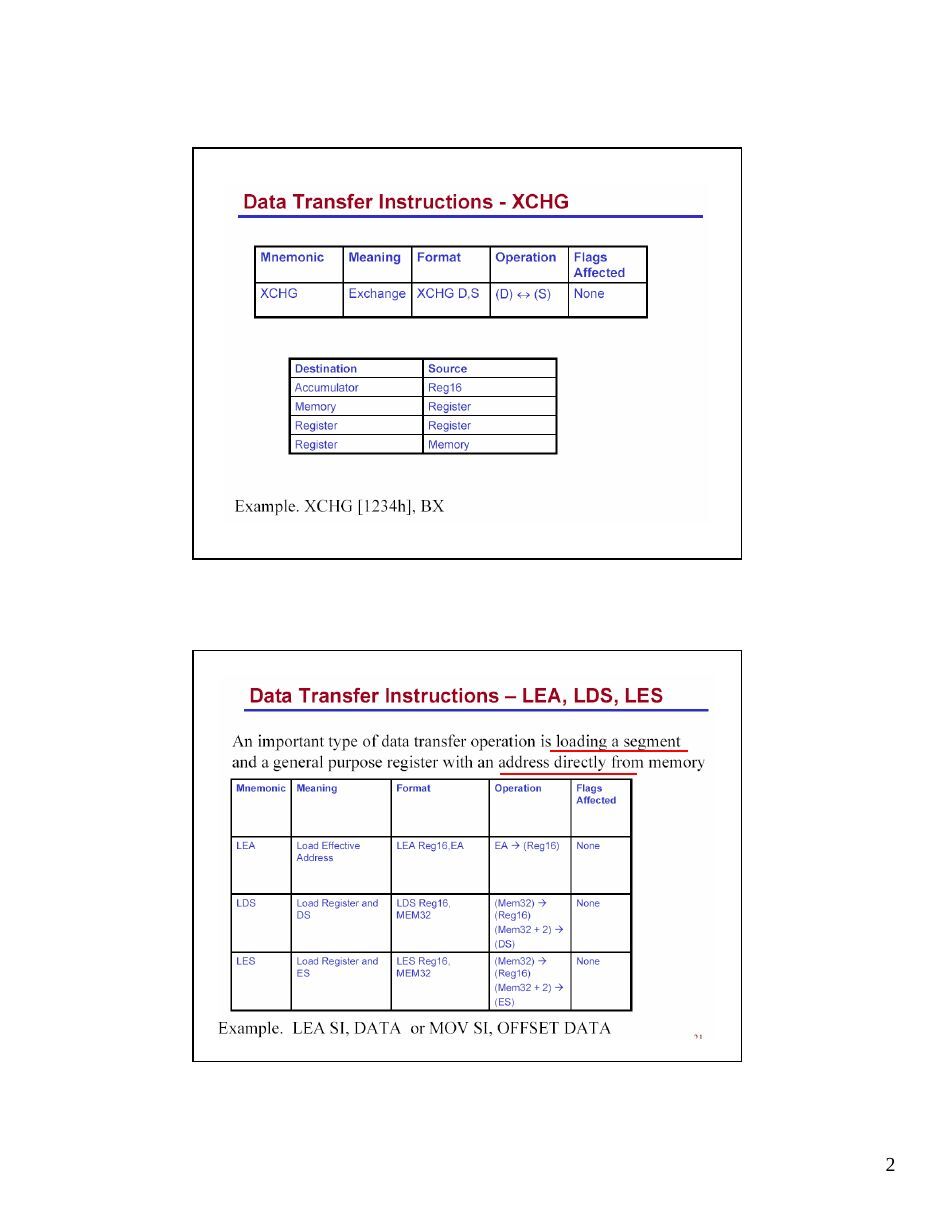
LDS : Load Data Segment....
After..
XLAT :Traslate instruction
Arithmetic : Addition ; Decimal arithmetic
Subtraction; Multiplication; Division
AAA (adjust after addition)
ASCII, unpacked decimal AAS (adjust after subtraction) ASCII, unpacked decimal
AAM (adjust after multip..)unpacked decimal
AAD (adjust before division)unpacked decimal
DAA ( adjust after addition)packed decimal
DAS ( adjust after subtraction)packed decimal
Decimal arithmetic : Storing decimal numbers 12345ASCII format: 31 32 33 34 35
unpacked BCD: 01 02 03 04 05 packed decimal: 01 23 45
Flag Register and ADD instruction
- Example
mov ah, 0                 ; AX = 00 ??
mov al, "9"     ;        AX = 00 39
add al, "3"     ;        AX = 00 6C
aaa             ;        AX = 01 02
or ax, 3030h ; AX = 31 32- We have the answer in ASCII decimal
- Slower than normal binary adds
- May be faster than converting ASCII decimal to binary, adding,
and converting back to ASCII decimal0010 0101 1100 > 9
Subtraction:1. Take the 2’s complement of the subtrahend (source operand)
2. Add it to the minuend (destination operand)
3. Invert the carry
If the CF=0, the result is positive and the destination has the result. If the CF=1, the result is negative and the destination has the 2’s complement of the result. NOT
and INC increment instructions can be used to change it.Flags Affected: OF, SF, ZF, AF, PF, CF
’15’
MOV AX,0105H ;      AX=0105 unpacked BCD for 15
MOV CL,06          ; CL=06H
SUB AL,CL          ; 5-6=-1 (FFH)
AAS ;FFH in AL is adjusted to 09 and
;AH is decremented leaving AX=0009ASCII to Unpacked BCD Conversion
ASCII to packed BCD Conversion
mov BL,0FEh
mov AL,0E5h
mul BL- BL contains 254, AL contains 229
- After MUL
- AX contains 0E336h (58166d)
- CF=OF=1 (result requires a word)
- SF, AF, PF, and ZF are undefined
mov BL,0FEh
mov AL,0E5h
imul BL
- BL contains -2, AL contains -27
- After IMUL
- AX contains 0036h (54d)
- CF=OF=0 (result still fits in byte)
- SF, AF, PF, and ZF are undefined
AL=20 H……..32
CL= 80 H…….128
MUL CL ………AX= 1000------------------------------------------ IMUL CL ………….AX=F000
AL=95
AX=2711 H………10001 dBL=10 BL=32 H…………..50 d
DIV BL
Div BL….. …….. AX=01C8
AL=09 ; AH=05
Examples of MUL and IMUL
- AX = 1h and BX = FFFFh, then:
- Instruction Result DX AX CF/OF
mul bx 65535 0000 FFFF 0 imul bx -1 FFFF FFFF 0
AX = FFFFh and BX = FFFFh, then
- Instruction Result DX AX CF/OF
mul bx 4294836225 FFFE 0001 1 imul bx 1 0000 0001 0
- AL = 30h and BL = 4h, then:
- Instruction Result AH AL CF/OF
mul bl 192 00 C0 0 imul bl 192 00 C0 1
- AL = 80h and BL = FFh, then
- Instruction Result AH AL CF/OF
mul bl 32640 7F 80 1 imul bl 128 00 80 1
Examples of DIV and IDIV
- DX = 0000h, AX = 0005h, BX = FFFEh:
- Instruction Quot. Rem. AX DX
div bx 0 5 0000 0005 idiv bx -2 1 FFFE 0001
- DX = FFFFh, AX = FFFBh, BX = 0002h:
- Instruction Quot. Rem. AX DX
div bx Divide Overflow idiv bx -2 -1 FFFE FFFF
- Example 1
Before the instruction executes
DX:???? AX: 0002 BX: 0010 (16) CF/OF:?
IMUL BX multiplies the contents of AX by BX placing the 32 bit answer in DX:AX
After the instruction executes
DX:0000 AX: 0020 (32) BX: 0010 CF/OF:0 (Result fits in AX)
- Example 2
Before the instruction executes
DX:???? AX: 0003 BX: 7000 (28672) CF/OF:?
IMUL BX multiplies the contents of AX by BX placing the 32 bit answer in DX:AX
After the instruction executes
DX:0001 AX: 5000 BX: 7000 CF/OF:1
(Result [86016] does not fit in AX)
CBW Instruction
- This instruction converts the signed 8-bit number in AL
into a signed 16-bit number in AX
- NOTE: Use this instruction only with signed arithmetic!!
- Syntax: CBW
If bit 7 of AL is a 1, the instruction will place FF in AH. If bit 7 of AL is a 0, the instruction will place 00 in AH. No flags are affected by this instruction.
- Examples:
Before: AX:??40 (64) CBW converts the signed 8-bit number in AL to a 16-bit signed number in AX After: AX:0040 (64)
Example: ADDOverflow problem in signed number operations When using signed numbers Overflow problem can arise after an operation. This problem arises if the result in a register after an operation is too large. In such a case CPU sets the OF (Overflow Flag). The programmer must consider the overflow case.
When the OF is set in 8-bit operations
In 8-bit signed number operations, OF is set to 1 is either of the following two conditions occurs:1. There is a carry out from D6 to D7, but no carry out from D7 (CF=0).
2. There is a carry out from D7 (CF=1), but no carry out from D6 to D7.
CBW ; Convert signed Byte to signed Word CBW will copy D7 (the sign flag) of AL to all bits of AH. Notice that the operand is assumed to be AL and the contents of AH is destroyed.
MOV AL,+96 ;AL = 0110 0000CBW ;now AH= 0000 0000 and AL=0110 0000
MOV AL,–2 ;AL = 1111 1110CBW ;now AH= 1111 1111 and AL=1111 1110
Cpu05_08
Logic Instructions Truth tables for AND, OR, XOR, NOT
0 AND 0 = 0 0 OR 0 = 0 0 XOR 0 = 0
0 AND 1 = 0 0 OR 1 = 1 0 XOR 1 = 1
1 AND 0 = 0 1 OR 0 = 1 1 XOR 0 = 1
NOT 0 = 1 ; NOT 1 = 01 AND 1 = 1 1 OR 1 = 1 1 XOR 1 = 0
- OR
- If you OR in a 1 bit, you force the result to be a 1 bit
- If you OR in a 0 bit, you do not change the original bit
- Thus OR can be used to turn bits on (SET a bit)
- AND
- If you AND in a 1 bit, you do not change the original bit
- If you AND in a 0 bit, you force the result to be a 0 bit
- Thus AND can be used to turn bits off (CLEAR bits)
- XOR
- If you XOR a bit with itself, you force the result to be a 0 bit
- If you XOR a 0 bit, you do not change the original bit
- If you XOR a 1 bit, you flip the state of the original bit
- Thus XOR can be used to COMPLEMENT individual bits or to CLEAR a
group of bits
- NOT
- NOT flips the state of the original bits
- Thus NOT can be used to COMPLEMENT all the bits in an
operand
- To modify bits in the destination field, you usually
construct a source bit pattern called a MASK field
- The MASK field can be expressed in Binary, Hex, or
Decimal. NOT: 1’s complementLogic inversion
- AND and OR instructions are often used to mask
out data- a mask value is used to force certain bits to zero NEG: 2’s complement
or one within some other value Logic inversion + 1- a mask typically affects certain bits and leaves
other bits unaffected
- AND forces selected bits to zero AND CL,
0Fh
- OR forces selected bits to one
OR CL, 0FhLogic examples
AL 1100 1010 AL 0011 0101
NOT AL BL 0110 1101AL 0011 0101 OR AL, BL
AL 0111 1101
AL 0011 0101
BL 0110 1101 AL 0011 0101
AND AL, BL BL 0000 1111AL 0010 0101 OR AL, BL
AL 0011 1111
AL 0011 0101
BL 0000 1111 AL 0011 0101
AND AL, BL BL 0110 1101AL 0000 0101 XOR AL, BL
AL 0101 1000
1. Before the instruction executes: AX: 8935
AND AX,0000h A MASK of 0000000000000000b is ANDedwith the AX register After the instruction executes: AX: 0000
2. Before the instruction executes: AL: 01
OR AL,40h A MASK of 01000000b is ORed withthe AL register After the instruction executes: AL: 41
3. Before the instruction executes: AX: 7849
XOR AX,AX The AX register is XORed with itselfAfter the instruction executes: AX: 0000
4. Convert the ASCII digit in AL to a pure number (remember the ASCII codes
for 0-9 are 30h-39h)
SUB     AL,30h or
AND AL,00001111b or
AND AL,Of h
5. Convert the digit in AL to its ASCII code
OR AL,00110000b or
OR AL,30h or
ADD AL,30h
6. Convert the upper case letter at CHAR to its corresponding lower case letter
OR CHAR,00100000b or
OR CHAR,20h or
ADD CHAR,20h
Shift left
- Syntax: SHL reg, count (immediate count)
SHL reg, CL (count stored in CL)- moves each bit of the operand one bit position to the left the number of
times specified by the count operand
- zeros fill vacated positions at the L.O. bit
- H.O. bit shifts into the carry flag
- a quick way to multiply by two
- useful in packing data, e.g., consider two nibbles in AL and AH that we want to
combine
shl ah, 4
or al,ah- the 8086 and 8088 allow an immediate shift of 1 only
C Register
SHL 0Shift right
- Syntax: SHR reg, count (immediate count)
SHR reg, CL (count stored in CL)- moves each bit of the operand one bit position to the right the number
of times specified by the count operand
- zeros fill vacated positions at the H.O. bit
- L.O. bit shifts into the carry flag
- a quick way to divide by two
- useful in unpacking data, e.g., suppose you want to extract the two nibbles
in the AL register, leaving the H.O. nibble in AH and the L.O. nibble in
AL
mov ah, al
shr ah, 4
and al, 0Fh                                  Register            C
SHL 0- the 8086 and 8088 allow an immediate shift of 1 only
Shift arithmetic right
- Syntax: SAR reg, count (immediate count)
SAR reg, CL (count stored in CL)- moves each bit of the operand one bit position to the left the number of times specified by the count
operand
- H.O. bit replicates
- L.O. bit shifts into the carry flag
- main purpose is to perform a signed division by some power of two
mov ax, -15
sar ax, 1 ; result is -8- In 80286 and later you can use SAR to sign extend one register into another
mov ah, al
sar ah, 7
if AL contains 1111 0001 then AX will be 1111 1111 1111 0001 after execution
Register C
SARExamples
1. Shift the contents of register AX to the left by 3 bits
Before: AX: 0001 CL:??
MOV CL,3   ;Puts a 3 into register CL
SHL AX,CL ;Shifts register AX 3 bits to the left
After: AX: 0008 CL:03
2. Multiply the contents of BX by 2
Before: BX: 0001
SAL BX,1 ;Shifts register BX 1 bit to the leftAfter: BX: 0002
AX =091A
Rotate through carry L/R
- Syntax: RCL reg, count (immediate count)
RCL reg, CL (count stored in CL)- rotates bits to the left, through the carry flag
- bit in the carry flag is written back into bit zero on the right
- Syntax: RCR reg, count (immediate count)
RCR reg (count stored in CL)- rotates bits to the right, through the carry flag
- bit in the carry flag is written back into the H.O. bit on the left
RCRRCLRotate left/right
- Syntax: ROL reg, count (immediate count)
ROL reg, CL (count stored in CL)- rotates bits to the left
- H.O. bit goes to carry flag and L.O. bit
- Syntax: ROR reg, count (immediate count)
ROR reg (count stored in CL)- rotates bits to the right
- L.O. bit goes to carry flag and H.O. bit
ROL ROR- mov ah,40h ;ah = 0100 0000b
- rol ah,1 ;ah = 1000 0000b, CF = 0
- rol ah,1 ;ah = 0000 0001b, CF = 1
- rol ah,1 ;ah = ____________b,
CF = ___
- mov ax,1234h ;ax = 0001 0010 0011
0100b = 1234h
- ror ax,4 ;ax = 4123h
- ror ax,4 ;ax = 3412h
- ror ax,4 ;ax = 2341h
OR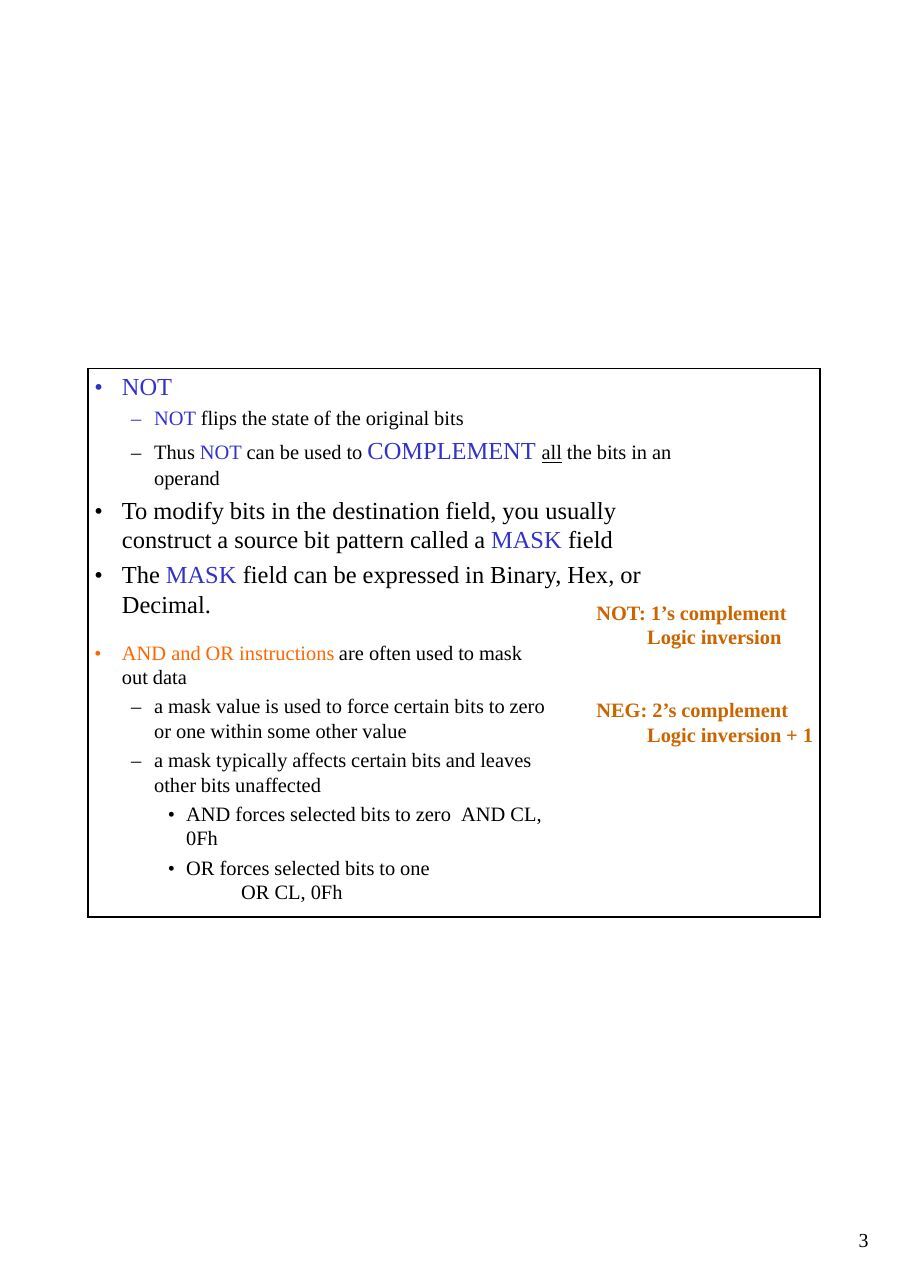
CPU05_06
XLAT :Traslate instruction
LDS : Load Data Segment....
After..
Arithmetic
- Addition ;Subtraction; Multiplication; Division
Decimal arithmetic- Many computers can do decimal arithmetic.
- Storing decimal numbers 12345
- ASCII format: 31 32 33 34 35
- unpacked BCD: 01 02 03 04 05
- packed decimal: 01 23 45
Decimal arithmetic- AAA (adjust after addition)
ASCII, unpacked decimal
- AAS (adjust after subtraction)
ASCII, unpacked decimal
- AAM (adjust after multiplication)
unpacked decimal
- AAD (adjust before division)
unpacked decimal
- DAA (decimal adjust after addition)
packed decimal
- DAS (decimal adjust after subtraction)
packed decimal
- Example
mov ah, 0                 ; AX = 00 ??
mov al, "9"     ;        AX = 00 39
add al, "3"     ;        AX = 00 6C
aaa             ;        AX = 01 02
or ax, 3030h ; AX = 31 32- We have the answer in ASCII decimal
- Slower than normal binary adds
- May be faster than converting ASCII decimal to binary, adding,
and converting back to ASCII decimalneg Two's complement negate Syntax: neg op register or memory Action: op = 0 - op Flags Affected: OF, SF, ZF, AF, PF, CF
mov BL,0FEh
mov AL,0E5h
mul BL- BL contains 254, AL contains 229
- After MUL
- AX contains 0E336h (58166d)
- CF=OF=1 (result requires a word)
- SF, AF, PF, and ZF are undefined
mov BL,0FEh
mov AL,0E5h
imul BL
- BL contains -2, AL contains -27
- After IMUL
- AX contains 0036h (54d)
- CF=OF=0 (result still fits in byte)
- SF, AF, PF, and ZF are undefined
AL=20 H……..32
CL= 80 H…….128
MUL CL ………AX= 1000------------------------------------------ IMUL CL ………….AX=F000
AL=95
AX=2711 H………10001 dBL=10 BL=32 H…………..50 d
DIV BL
Div BL….. …….. AX=01C8
AL=09 ; AH=05
Examples of MUL and IMUL
- Say that AX = 1h and BX = FFFFh, then:
- Instruction Result DX AX CF/OF
mul bx 655350000 FFFF 0imul bx -1 FFFF FFFF 0
- Say that AX = FFFFh and BX = FFFFh,
then
- Instruction Result DX AX CF/OF
mul bx 4294836225 FFFE 0001 1imul bx 1 0000 0001 0
Examples of MUL and IMUL (cont.)
- AL = 30h and BL = 4h, then:
- Instruction ResultAH AL CF/OF
mul bl 192 00 C0 0imul bl 192 00 C0 1
- AL = 80h and BL = FFh, then
- Instruction ResultAH AL CF/OF
mul bl 326407F 80 1imul bl 128 00 80 1
Examples of DIV and IDIV
- DX = 0000h, AX = 0005h, BX = FFFEh:
- Instruction Quot. Rem. AX DX
div bx 0 5 0000 0005idiv bx -2 1 FFFE 0001
- DX = FFFFh, AX = FFFBh, BX = 0002h:
- Instruction Quot. Rem. AX DX
div bx Divide Overflowidiv bx -2 -1 FFFE FFFF
- Example 1
Before the instruction executes
DX:???? AX: 0002 BX: 0010 (16) CF/OF:?
IMUL BX multiplies the contents of AX by BX placing the 32 bit answer in DX:AX
After the instruction executes
DX:0000 AX: 0020 (32) BX: 0010 CF/OF:0 (Result fits in AX)
- Example 2
Before the instruction executes
DX:???? AX: 0003 BX: 7000 (28672) CF/OF:?
IMUL BX multiplies the contents of AX by BX placing the 32 bit answer in DX:AX
After the instruction executes
DX:0001 AX: 5000 BX: 7000 CF/OF:1
(Result [86016] does not fit in AX)
CBW Instruction
- This instruction converts the signed 8-bit number in AL
into a signed 16-bit number in AX
- NOTE: Use this instruction only with signed arithmetic!!
- Syntax: CBW
If bit 7 of AL is a 1, the instruction will place FF in AH. If bit 7 of AL is a 0, the instruction will place 00 in AH. No flags are affected by this instruction.
- Examples:
Before: AX:??40 (64) CBW converts the signed 8-bit number in AL to a 16-bit signed number in AX After: AX:0040 (64)
cpu07_06
Compare operands CF ZF Destination > source 0 0 Destination = source 0 1 Destination < source 1 0
String and String-Handling Instructions Autoindexing for string instruction – CLD and STD instructions
Cpu06
Logic Instructions Truth tables for AND, OR, XOR, NOT
0 AND 0 = 0 0 OR 0 = 0 0 XOR 0 = 0
0 AND 1 = 0 0 OR 1 = 1 0 XOR 1 = 1 NOT 0 = 1 ; NOT 1 = 0
1 AND 0 = 0 1 OR 0 = 1 1 XOR 0 = 1
1 AND 1 = 1 1 OR 1 = 1 1 XOR 1 = 0
- OR
- If you OR in a 1 bit, you force the result to be a 1 bit
- If you OR in a 0 bit, you do not change the original bit
- Thus OR can be used to turn bits on (SET a bit)
- AND
- If you AND in a 1 bit, you do not change the original bit
- If you AND in a 0 bit, you force the result to be a 0 bit
- Thus AND can be used to turn bits off (CLEAR bits)
- XOR
- If you XOR a bit with itself, you force the result to be a 0 bit
- If you XOR a 0 bit, you do not change the original bit
- If you XOR a 1 bit, you flip the state of the original bit
- Thus XOR can be used to COMPLEMENT individual bits or to CLEAR a group of bits
- NOT
- NOT flips the state of the original bits
- Thus NOT can be used to COMPLEMENT all the bits in an
operand
- To modify bits in the destination field, you usually
construct a source bit pattern called a MASK field
- The MASK field can be expressed in Binary, Hex, or
Decimal. For example, the following three mask fields areall equivalent
01000000b in Binary is the same as 40h in Hex is the same as 64 in Decimal NOT: 1’s complement Logic inversion
AND and OR instructions are often used to mask out data- a mask value is used to force certain bits to zero or one within some other value
- a mask typically affects certain bits and leaves other bits unaffected NEG: 2’s complement
- AND forces selected bits to zero AND CL, 0Fh Logic inversion + 1
- OR forces selected bits to one OR CL, 0Fh
Shift right
- Syntax: SHR reg, count (immediate count)
SHR reg, CL (count stored in CL)- moves each bit of the operand one bit position to the right the number of times specified by the count
operand
- zeros fill vacated positions at the H.O. bit
- L.O. bit shifts into the carry flag
- a quick way to divide by two
- useful in unpacking data, e.g., suppose you want to extract the two nibbles in the AL register,
leaving the H.O. nibble in AH and the L.O. nibble in AL
mov ah, al
shr ah, 4
and al, 0Fh- the 8086 and 8088 allow an immediate shift of 1 only
Register C
SHL 01. Shift the contents of register AX to the left by 3 bits
Before: AX: 0001 CL:??
MOV CL,3   ;Puts a 3 into register CL
SHL AX,CL ;Shifts register AX 3 bits to the left
After: AX: 0008 CL:03
2. Multiply the contents of BX by 2
Before: BX: 0001
SAL BX,1 ;Shifts register BX 1 bit to the leftAfter: BX: 0002
Rotate through carry L/R
- Syntax: RCL reg, count (immediate count)
RCL reg, CL (count stored in CL)- rotates bits to the left, through the carry flag
- bit in the carry flag is written back into bit zero on the right
- Syntax: RCR reg, count (immediate count)
RCR reg (count stored in CL)- rotates bits to the right, through the carry flag
- bit in the carry flag is written back into the H.O. bit on the l eft
RCL RCRCpu06_06
Logic Instructions Truth tables for AND, OR, XOR, NOT
0 AND 0 = 0 0 OR 0 = 0 0 XOR 0 = 0
0 AND 1 = 0 0 OR 1 = 1 0 XOR 1 = 1 NOT 0 = 1 ; NOT 1 = 0
1 AND 0 = 0 1 OR 0 = 1 1 XOR 0 = 1
1 AND 1 = 1 1 OR 1 = 1 1 XOR 1 = 0
- OR
- If you OR in a 1 bit, you force the result to be a 1 bit
- If you OR in a 0 bit, you do not change the original bit
- Thus OR can be used to turn bits on (SET a bit)
- AND
- If you AND in a 1 bit, you do not change the original bit
- If you AND in a 0 bit, you force the result to be a 0 bit
- Thus AND can be used to turn bits off (CLEAR bits)
- XOR
- If you XOR a bit with itself, you force the result to be a 0 bit
- If you XOR a 0 bit, you do not change the original bit
- If you XOR a 1 bit, you flip the state of the original bit
- Thus XOR can be used to COMPLEMENT individual bits or to CLEAR a group of bits
- NOT
- NOT flips the state of the original bits
- Thus NOT can be used to COMPLEMENT all the bits in an
operand
- To modify bits in the destination field, you usually
construct a source bit pattern called a MASK field
- The MASK field can be expressed in Binary, Hex, or
Decimal. For example, the following three mask fields areall equivalent
01000000b in Binary is the same as 40h in Hex is the same as 64 in Decimal NOT: 1’s complement Logic inversion
AND and OR instructions are often used to mask out data- a mask value is used to force certain bits to zero or one within some other value
- a mask typically affects certain bits and leaves other bits unaffected NEG: 2’s complement
- AND forces selected bits to zero AND CL, 0Fh Logic inversion + 1
- OR forces selected bits to one OR CL, 0Fh
Logic examples
AL 1100 1010 AL 0011 0101
NOT AL BL 0110 1101AL 0011 0101 OR AL, BL
AL 0111 1101
AL 0011 0101
BL 0110 1101 AL 0011 0101
AND AL, BL BL 0000 1111AL 0010 0101 OR AL, BL
AL 0011 1111
AL 0011 0101
BL 0000 1111 AL 0011 0101
AND AL, BL BL 0110 1101AL 0000 0101 XOR AL, BL
AL 0101 1000
1. Before the instruction executes: AX: 8935
AND AX,0000h A MASK of 0000000000000000b is ANDedwith the AX register After the instruction executes: AX: 0000
2. Before the instruction executes: AL: 01
OR AL,40h A MASK of 01000000b is ORed withthe AL register After the instruction executes: AL: 41
3. Before the instruction executes: AX: 7849
XOR AX,AX The AX register is XORed with itselfAfter the instruction executes: AX: 0000
4. Convert the ASCII digit in AL to a pure number (remember the ASCII codes
for 0-9 are 30h-39h)
SUB     AL,30h or
AND AL,00001111b or
AND AL,Ofh
5. Convert the digit in AL to its ASCII code
OR AL,00110000b or
OR AL,30h or
ADD AL,30h
6. Convert the upper case letter at CHAR to its corresponding lower case letter
OR CHAR,00100000b or
OR CHAR,20h or
ADD CHAR,20h
Shift left
- Syntax: SHL reg, count (immediate count)
SHL reg, CL (count stored in CL)- moves each bit of the operand one bit position to the left the number of times specified by the count
operand
- zeros fill vacated positions at the L.O. bit
- H.O. bit shifts into the carry flag
- a quick way to multiply by two
- useful in packing data, e.g., consider two nibbles in AL and AH that we want to combine
shl ah, 4
or al,ah- the 8086 and 8088 allow an immediate shift of 1 only
C Register
SHL 0Shift right
- Syntax: SHR reg, count (immediate count)
SHR reg, CL (count stored in CL)- moves each bit of the operand one bit position to the right the number of times specified by the count
operand
- zeros fill vacated positions at the H.O. bit
- L.O. bit shifts into the carry flag
- a quick way to divide by two
- useful in unpacking data, e.g., suppose you want to extract the two nibbles in the AL register,
leaving the H.O. nibble in AH and the L.O. nibble in AL
mov ah, al
shr ah, 4
and al, 0Fh- the 8086 and 8088 allow an immediate shift of 1 only
Register C
SHL 0Shift arithmetic right
- Syntax: SAR reg, count (immediate count)
SAR reg, CL (count stored in CL)- moves each bit of the operand one bit position to the left the number of times specified by the count
operand
- H.O. bit replicates
- L.O. bit shifts into the carry flag
- main purpose is to perform a signed division by some power of two
mov ax, -15
sar ax, 1 ; result is -8- In 80286 and later you can use SAR to sign extend one register into another
mov ah, al
sar ah, 7
if AL contains 1111 0001 then AX will be 1111 1111 1111 0001 after execution
Register C
SAR1. Shift the contents of register AX to the left by 3 bits
Before: AX: 0001 CL:??
MOV CL,3    ;Puts a 3 into register CL
SHL AX,CL     ;Shifts register AX 3 bits to the left
After: AX: 0008 CL:03
2. Multiply the contents of BX by 2
Before: BX: 0001
SAL BX,1 ;Shifts register BX 1 bit to the leftAfter: BX: 0002
Rotate through carry L/R
- Syntax: RCL reg, count (immediate count)
RCL reg, CL (count stored in CL)- rotates bits to the left, through the carry flag
- bit in the carry flag is written back into bit zero on the right
- Syntax: RCR reg, count (immediate count)
RCR reg (count stored in CL)- rotates bits to the right, through the carry flag
- bit in the carry flag is written back into the H.O. bit on the left
RCL RCRRotate left/right
- Syntax: ROL reg, count (immediate count)
ROL reg, CL (count stored in CL)- rotates bits to the left
- H.O. bit goes to carry flag and L.O. bit
- Syntax: ROR reg, count (immediate count)
ROR reg (count stored in CL)- rotates bits to the right
- L.O. bit goes to carry flag and H.O. bit
ROL ROR- mov ah,40h ;ah = 0100 0000b
- rol ah,1 ;ah = 1000 0000b, CF = 0
- rol ah,1 ;ah = 0000 0001b, CF = 1
- rol ah,1 ;ah = ____________b,
CF = ___
- mov ax,1234h ;ax = 0001 0010 0011
0100b = 1234h
- ror ax,4 ;ax = 4123h
- ror ax,4 ;ax = 3412h
- ror ax,4 ;ax = 2341h