· EEM332
EEM332 Mikroişlemciler: Giriş-Çıkış, 8255 ve Kesmeler
EEM332 – Mikroişlemciler · 18.04.2005 · 18.10.2026
Bu yazı, Başkent Üniversitesi EEM332 Mikroişlemciler ders arşivindeki ilgili notları ve uygulamaları bir araya getiriyor (2005–2016). Bellek eşlemeli ve yalıtılmış giriş-çıkış, polling, kesme servis yordamları ve programlanabilir çevrebirimler. Belgelerin PDF arşiv kopyaları ve varsa kaynak kodları yazının sonunda ZIP olarak indirilebilir.
cpu08_2013
EEM332 Lecture8
Input/Output instructions of 8086 Polling/Interrup
Basic Input/Output Ports
Memory mapped I/O
- Devices and memory share an address space
- I/O looks just like memory read/write
- No special commands for I/O
- Large selection of memory access commands available
Isolated I/O • Communicating with I/O devices using IN and OUT instructions is referred to isolated I/O.
- Separate address spaces • However, there are many microprocessors, such as the
- Need I/O or memory select lines new RISC processors, that do not have IN and OUT inst
- Special commands for I/O • In such cases these microprocessors use what is called
memory-mapped I/O.
- Limited set • In memory-mapped I/O, a memory location is assigned to
be an input or output port.
8088/8086 INPUT/OUTPUT INSTRUCTIONS (Isolated)
- All x86 microprocessors, from the 8088 to the Pentium, can access external
devices called ports using I/0 instructions.
- The x86 CPU is one of the few processors that have I/O space in addition to
memory space.
- Memory can contain both opcodes and data
- I/O ports contain data only. Two instructions: “OUT” and “IN”.
- These instructions can send data from the accumulator (AL or AX) to ports
or bring data from ports into the accumulator.- In accessing ports, we can use an 8-bit or 16-bit data port.
Format Inputting data Outputting data Adress rang
(1) IN dast,source OUT dest, source 00 – FF
IN AL, port # OUT port #, AL A0 –A7(2) MOV DX, port # MOV DX, port # 0000 – FFFF
IN AL, DX OUT DX, AL A0- A15Example : In a given 8088-based system, port
address 22H is an input port for monitoring thetemperature. Write Assembly language instructions to monitor that port continuously for the temperature of 100 degrees. If it reaches 100, then BH should contain ‘Y’. Solution: (format(1)..256 port)
BACK: IN AL,22H ;get the temperature from port # 22H
CMP AL,100 ;is temp = 100?
JNZ BACK ;if not, keep monitoring
MOV BH,’Y’      ;temp = 100, load ‘Y’ into BH
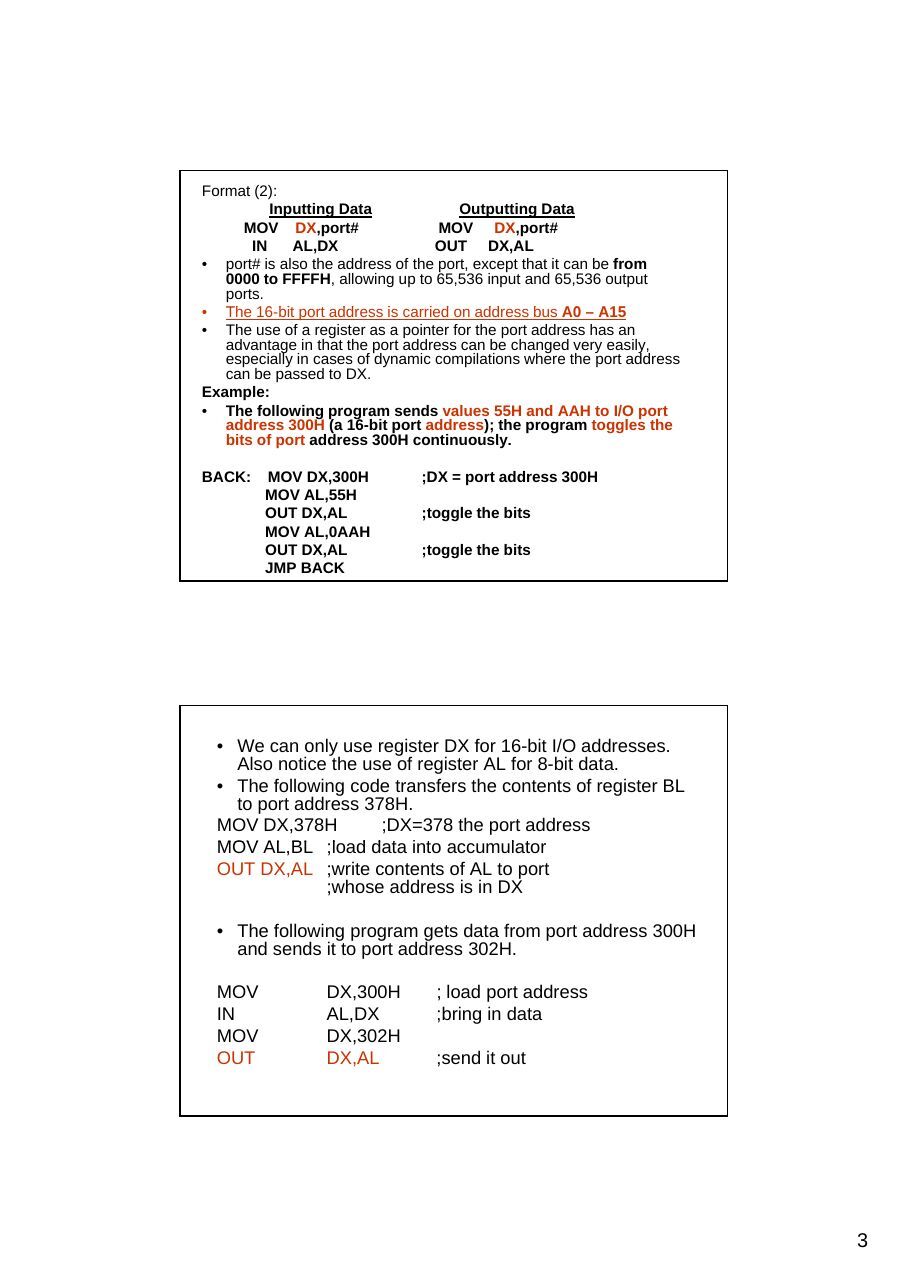
Format (2)
Inputting Data Outputting Data
MOV DX,port#                 MOV DX,port#
IN AL,DX OUT DX,AL- port# is also the address of the port, except that it can be from
0000 to FFFFH, allowing up to 65,536 input and 65,536 output ports.
- The 16-bit port address is carried on address bus A0 – A15
- The use of a register as a pointer for the port address has an
advantage in that the port address can be changed very easily, especially in cases of dynamic compilations where the port address can be passed to DX.
Example
- The following program sends values 55H and AAH to I/O port
address 300H (a 16-bit port address); the program toggles thebits of port address 300H continuously.
BACK:    MOV DX,300H           ;DX = port address 300H
MOV AL,55H
OUT DX,AL             ;toggle the bits
MOV AL,0AAH
OUT DX,AL             ;toggle the bits
JMP BACK- We can only use register DX for 16-bit I/O addresses.
Also notice the use of register AL for 8-bit data.
- The following code transfers the contents of register BL
to port address 378H.
MOV DX,378H         ;DX=378 the port address
MOV AL,BL ;load data into accumulator
OUT DX,AL ;write contents of AL to port
;whose address is in DX- The following program gets data from port address 300H
and sends it to port address 302H.MOV DX,300H ; load port address
IN AL,DX ;bring in data
MOV DX,302H
OUT DX,AL ;send it outADDRESS DECODING AND DESIGN- In every computer, whenever data is sent out by the CPU via the
data bus, the data must be latched by the receiving device.
- While memories have an internal latch to grab the data, a latching
system must be designed for simple I/O ports.
- The 74LS373 can be used for this purpose.
- The concept of address bus decoding for I/O instructions is exactly
the same as for memory. The following are the steps
1. The control signals IOR and lOW are used along with the decoder.
2. For an 8-bit port address, A0 – A7 is decoded.
3. If the port address is 16-bit (using DX), A0 - Al5 is decoded.
Examples: Simple ports
Design for “OUT 99H,AL”
EXAMPLES:Input port By using Buffer (74LS244)
The design of “IN AL,9FH” using the 74LS244 as a tri-state buffer is depicted below.
Input port design using the Octal buffer74LS244
- When data is coming in by way of a
data bus, it must come in through a three-state (tri-state) buffer.
- A tri-state buffer is internal and
therefore invisible.
- For the simple input ports we use
the 74LS244 chip.
- 1G and 2G each control only 4 bits
of the 74LS244, they both must be activated for the 8-bit input
8255 PPI CHIP ( Parallel Peripheral Interface)
- One of the most widely used I/O
chips.
- It is a 40-pin DIP chip and has
three separately accessible ports, A, B, and C, which can be programmed, hence the name PPI (programmable peripheral interface).
- The individual ports can be
programmed to be input or output.
- They can also be changed
dynamically, in contrast to the 74LS244 and 74LS373, which are hard-wired.
Port A (PA0 – PA7) (8-bit port) 8255 PPI CHIP
- Port A can be programmed all as I/O port.
Port B (PB0 – PB7) (8-bit port)
- Port B can be programmed all as I/O port
Port C (PC0 – PC7) (8-bit port)
- Port C can programmed all as I/O. It can also
be split into two parts, CU (upper bits PC4 - PC7) and CL (lower bits PC0 – PC3). Each can be used for I/O individually. RD and WR
- If the 8255 is using peripheral I/O design, IOR
and lOW of the system bus are connected tothese two pins. If the port uses memory- mapped I/O, MEMR and MEMW activate them.
RESET
- This is an active-high signal input into the 8255
used to clear the control register. When RESET is activated, all ports are initialized as input ports. This pin must be connected to the RESET output of the system bus or ground, making it inactive. Like all IC input pins, it should not be left unconnected.
8255 PPI CHIP
A0, A1, and CS
- While CS (chip select) selects the
entire chip, address pins A0 and A1 select the specific port within the 8255.
- These three pins are used to access
ports A. B, C, or the control register, as shown in Table
CS A1 A0 Selects
0 0 0 Port A 0 0 1 Port B 0 1 0 Port C 0 1 1 Control Register
1 x x 8255 is not selected
Mode selection of the 8255A While ports A, B, and C are used for I/O data, it is the control register that must be programmed to select the operation mode of the three ports A, B, and C. The ports of the 8255 can be programmed in any of the following modes.
1. Mode 0, simple I/O mode. In this mode, any of the ports
A, B, CL, and CU can be programmed as input or output.
In this mode, all bits are out or all are in. In other words,there is no control of individual bits. Mode 0 is the most widely used mode in current system I/O interfacing design.
2. Mode 1. In this mode, ports A and B can be used as input
or output ports with handshaking capabilities. This mode is
not used due to timing incompatibility with devices such asthe printer.
3. Mode 2. In this mode, port A can be used as a bidirectional
I/O port with handshaking capabilities. This mode is rarely used.
4. BSR mode (Bit set/reset)
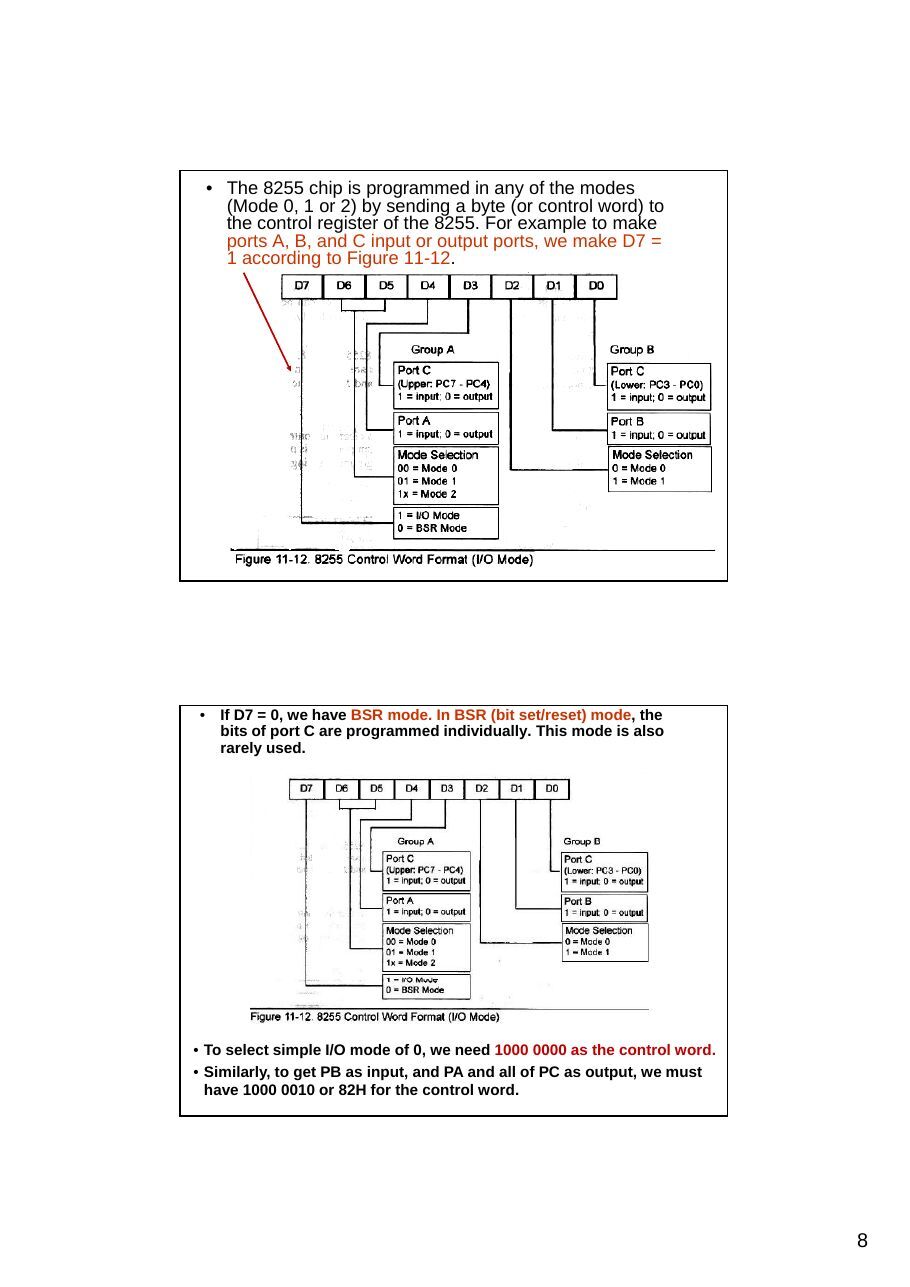
- The 8255 chip is programmed in any of the modes
(Mode 0, 1 or 2) by sending a byte (or control word) to the control register of the 8255. For example to make ports A, B, and C input or output ports, we make D7 = 1 according to Figure 11-12.
- If D7 = 0, we have BSR mode. In BSR (bit set/reset) mode, the
bits of port C are programmed individually. This mode is also rarely used.
- To select simple I/O mode of 0, we need 1000 0000 as the control word.
- Similarly, to get PB as input, and PA and all of PC as output, we must
have 1000 0010 or 82H for the control word.
Example 11-4: Find the control word if PA = out, PB = in, PC0- PC3 = in, and PC4 - PC7 = out. (Mode 0)
Solution
From Figure 11-12 we get the control word of 1000 0011 in binary or 83H
1 0 0 0 0 0 1 1 = 83H
(b) Find the control byte (word) for this configuration. Port A as input, B as output, and all the bits of port C as output. Solution: (Mode 0) (b) The control word is 90H, or 1001 0000.
1 0 0 1 0 0 0 0 = 90H
Example : The 8255 shown in Figure 11-13 is configured as follows: port A as input, B as output, and all the bits of port C as output. (Mode 0) (a) Find the port addresses assigned to A, B, C, and the control register. (b) Find the control byte (word) for this configuration. (Mode 0)
(a) Find the port addresses assigned to A, B, C, and the control register. (a) The port addresses are as follows: (See Table 11-3) CS A1 A0 Address Port (Mode 0) 11000100 0 0 310H Port A 11000100 0 1 311H Port B 11000100 1 0 312H Port C 11000100 1 1 313H Control register
Example 4-5 (Mode 0)
(Mode 0)
BSR Mode
BSR Example 4.7
Homework
Polling & Interrupts
- 2 techniques are available to service external devices:
- Polling
- Interrupts
Polling
- CPU periodically polls ALL external devices & takes
action if required
Interrupts
- external device indicates request for attention by
sending a signal via a control line
- it stops the current CPU activity and responds to the
device that requested attention
Polling
- if the frequency of polling is high – a significant overhead is
incurred on a CPU- If, however, the frequency of polling is low - events may be
undetected - data lost due to latency etc.
Polling Run Program
Interrogate device 1
- must be written
in the main program Action Yes Device(by a programmer, ? subroutine
in advance) NoInterrogate device 2
Action Yes Device ? subroutine
No
Interrogate device n
Action Yes Device ? subroutine
No
Interrupts Run Program Run Program
Interrupt Timer interrupt 0 service Timer response asserted Interrupt routine Program
return registers returnfrom stack Interrupt Emergency interrupt 1 service Emergency response asserted button routine interrupt programm
return registers returnfrom stack
(a) (b)
Three kinds
Software interrupts – initiated by the INT instruction Hardware interrupts – originate in peripheral hardware and : Internal interrupts Exceptions – occur in response to error states in the processor
cpu09_07
Basic Input/Output Ports
Memory mapped I/O
- Devices and memory share an address space
- I/O looks just like memory read/write
- No special commands for I/O
- Large selection of memory access commands available
Isolated I/O • Communicating with I/O devices using IN and OUT instructions is referred to as peripheral I/O or isolated I/O.
- Separate address spaces
- However, there are many microprocessors, such as the new
- Need I/O or memory select lines RISC processors, that do not have IN and OUT instructions.
- Special commands for I/O • In such cases these microprocessors use what is called
memory-mapped I/O.
- Limited set
- In memory-mapped I/O, a memory location is assigned to be
an input or output port.
8088/8086 INPUT/OUTPUT INSTRUCTIONS (Isolated)
- All x86 microprocessors, from the 8088 to the Pentium, can access external
devices called ports using I/0 instructions.
- The x86 CPU is one of the few processors that have I/O space in addition to
memory space.
- Memory can contain both opcodes and data
- I/O ports contain data only. Two instructions: “OUT” and “IN”.
- These instructions can send data from the accumulator (AL or AX) to ports
or bring data from ports into the accumulator.- In accessing ports, we can use an 8-bit or 16-bit data port.
Format Inputting data Outputting data Adress rang
(1) IN dast,source OUT dest, source 00 – FF
IN AL, port # OUT port #, AL A0 –A7(2) MOV DX, port # MOV DX, port # 0000 – FFFF
IN AL, DX OUT DX, AL A0- A15Example : In a given 8088-based system, port
address 22H is an input port for monitoring thetemperature. Write Assembly language instructions to monitor that port continuously for the temperature of 100 degrees. If it reaches 100, then BH should contain ‘Y’. Solution: (format(1)..256 port)
BACK: IN AL,22H ;get the temperature from port # 22H
CMP AL,100 ;is temp = 100?
JNZ BACK ;if not, keep monitoring
MOV BH,’Y’ ;temp = 100, load ‘Y’ into BHFormat (2)
Inputting Data Outputting Data
MOV DX,port# MOV DX,port#
IN AL,DX OUT DX,AL- port# is also the address of the port, except that it can be from
0000 to FFFFH, allowing up to 65,536 input and 65,536 output ports.
- The 16-bit port address is carried on address bus A0 – A15
- The use of a register as a pointer for the port address has an advantage in
that the port address can be changed very easily, especially in cases of dynamic compilations where the port address can be passed to DX.
Example
- The following program sends values 55H and AAH to I/O port address
300H (a 16-bit port address); the program toggles the bits of port
address 300H continuously.
BACK: MOV DX,300H ;DX = port address 300H
MOV AL,55H
OUT DX,AL ;toggle the bits
MOV AL,0AAH
OUT DX,AL ;toggle the bits
JMP BACK- We can only use register DX for 16-bit I/O addresses.
Also notice the use of register AL for 8-bit data.
- The following code transfers the contents of register BL
to port address 378H.
MOV DX,378H ;DX=378 the port address
MOV AL,BL ;load data into accumulator
OUT DX,AL ;write contents of AL to port
;whose address is in DX- The following program gets data from port address 300H
and sends it to port address 302H.
MOV            DX,300H         ; load port address
IN             AL,DX           ;bring in data
MOV            DX,302H
OUT            DX,AL           ;send it out
ADDRESS DECODING AND DESIGN- In every computer, whenever data is sent out by the CPU via the
data bus, the data must be latched by the receiving device.
- While memories have an internal latch to grab the data, a latching
system must be designed for simple I/O ports.
- The 74LS373 can be used for this purpose.
- The concept of address bus decoding for I/O instructions is exactly
the same as for memory. The following are the steps
1. The control signals IOR and lOW are used along with the decoder.
2. For an 8-bit port address, A0 – A7 is decoded.
3. If the port address is 16-bit (using DX), A0 - Al5 is decoded.
Design for “OUT 99H,AL”
EXAMPLES:Input port By using Buffer (74LS244)
The design of “IN AL,9FH” using the 74LS244 as a tri-state buffer is depicted below.
Input port design using the Octal buffer74LS244
- When data is coming in by way of a
data bus, it must come in through a three-state (tri-state) buffer.
- A tri-state buffer is internal and
therefore invisible.
- For the simple input ports we use
the 74LS244 chip.
- 1G and 2G each control only 4 bits
of the 74LS244, they both must be activated for the 8-bit input
8255 PPI CHIP
- One of the most widely used I/O
chips.
- It is a 40-pin DIP chip and has
three separately accessible ports, A, B, and C, which can be programmed, hence the name PPI (programmable peripheral interface).
- The individual ports can be
programmed to be input or output.
- They can also be changed
dynamically, in contrast to the 74LS244 and 74LS373, which are hard-wired.
Port A (PA0 – PA7) (8-bit port) 8255 PPI CHIP
- Port A can be programmed all as I/O port.
Port B (PB0 – PB7) (8-bit port)
- Port B can be programmed all as I/O port
Port C (PC0 – PC7) (8-bit port)
- Port C can programmed all as I/O. It can also
be split into two parts, CU (upper bits PC4 - PC7) and CL (lower bits PC0 – PC3). Each can be used for I/O individually. RD and WR
- If the 8255 is using peripheral I/O design, IOR
and lOW of the system bus are connected tothese two pins. If the port uses memory- mapped I/O, MEMR and MEMW activate them.
RESET
- This is an active-high signal input into the 8255 used
to clear the control register. When RESET is activated, all ports are initialized as input ports. This pin must be connected to the RESET output of the system bus or ground, making it inactive. Like all IC input pins, it should not be left unconnected. This pin can be grounded.
8255 PPI CHIP
A0, A1, and CS
- While CS (chip select) selects the
entire chip, address pins A0 and A1 select the specific port within the 8255.
- These three pins are used to access
ports A. B, C, or the control register, as shown in Table
CS A1 A0 Selects
0 0 0 Port A 0 0 1 Port B 0 1 0 Port C 0 1 1 Control Register
1 x x 8255 is not selected
Mode selection of the 8255A While ports A, B, and C are used for I/O data, it is the control register that must be programmed to select the operation mode of the three ports A, B, and C. The ports of the 8255 can be programmed in any of the following modes.
1. Mode 0, simple I/O mode. In this mode, any of the ports
A, B, CL, and CU can be programmed as input or output.
In this mode, all bits are out or all are in. In other words,there is no control of individual bits. Mode 0 is the most widely used mode in current system I/O interfacing design.
2. Mode 1. In this mode, ports A and B can be used as input
or output ports with handshaking capabilities. This mode is
not used due to timing incompatibility with devices such as
the printer.
3. Mode 2. In this mode, port A can be used as a bidirectional
I/O port with handshaking capabilities. This mode is rarely used.
4. BSR mode (Bit set/reset)
- The 8255 chip is programmed in any of the modes
(Mode 0, 1 or 2) by sending a byte (or control word) to the control register of the 8255. For example to make ports A, B, and C input or output ports, we make D7 = 1 according to Figure 11-12.
- If D7 = 0, we have BSR mode. In BSR (bit set/reset) mode, the
bits of port C are programmed individually. This mode is also rarely used.
- To select simple I/O mode of 0, we need 1000 0000 as the control
word.
- Similarly, to get PB as input, and PA and all of PC as output, we
must have 1000 0010 or 82H for the control word.
Example 11-4: Find the control word if PA = out, PB = in, PC0- PC3 = in, and PC4 - PC7 = out.
Solution
From Figure 11-12 we get the control word of 1000 0011 in binary or 83H
1 0 0 0 0 0 1 1 = 83H
(b) Find the control byte (word) for this configuration. Port A as input, B as output, and all the bits of port C as output.
Solution
(b) The control word is 90H, or 1001 0000.
1 0 0 1 0 0 0 0 = 90H
Example : The 8255 shown in Figure 11-13 is configured as follows: port A as input, B as output, and all the bits of port C as output. (a) Find the port addresses assigned to A, B, C, and the control register. (b) Find the control byte (word) for this configuration.
(a) Find the port addresses assigned to A, B, C, and the control register. (a) The port addresses are as follows: (See Table 11-3) CS A1 A0 Address Port 11000100 0 0 310H Port A 11000100 0 1 311H Port B 11000100 1 0 312H Port C 11000100 1 1 313H Control register
Example 4-5
Example 4-6
BSR Mode
BSR Example 4.7
Homework
Polling & Interrupts
- 2 techniques are available to service external devices:
- Polling
- Interrupts
Polling
- CPU periodically polls ALL external devices & takes action if required
- Interrupts:
- external device indicates request for attention by sending a signal via
a control line
- it stops the current CPU activity and responds to the device that
requested attention
Polling
- if the frequency of polling is high – a significant overhead is incurred
on a CPU
- If, however, the frequency of polling is low - events may be
undetected - data lost due to latency etc.
Polling Run Program
Interrogate device 1
- must be written
Yes
in the mainAction Device ? subroutine
program (by a No
Interrogate programmer, in device 2
advance) Action Yes Device ? subroutine
No
Interrogate device n
Action Yes Device ? subroutine
No
Interrupts Run Program Run Program
Interrupt Timer interrupt 0 service Timer response asserted Interrupt routine Program
return registers returnfrom stack Interrupt Emergency interrupt 1 service Emergency response asserted button routine interrupt programm
return registers returnfrom stack
(a) (b)
Three kinds
Software interrupts – initiated by the INT instruction Hardware interrupts – originate in peripheral hardware Exceptions – occur in response to error states in the processor
cpu09_06
Memory mapped I/O
- Devices and memory share an address space
- I/O looks just like memory read/write
- No special commands for I/O
- Large selection of memory access commands available
Isolated I/O • Communicating with I/O devices using IN and OUT instructions is referred to as peripheral I/O or isolated I/O.
- Separate address spaces
- However, there are many microprocessors, such as the new
- Need I/O or memory select lines RISC processors, that do not have IN and OUT instructions.
- Special commands for I/O • In such cases these microprocessors use what is called
memory-mapped I/O.
- Limited set
- In memory-mapped I/O, a memory location is assigned to be
an input or output port.
8088 INPUT/OUTPUT INSTRUCTIONS
- All x86 microprocessors, from the 8088 to the Pentium, can access external
devices called ports using I/0 instructions.
- The x86 CPU is one of the few processors that have I/O space in addition to
memory space.
- Memory can contain both opcodes and data
- I/O ports contain data only. Two instructions: “OUT” and “IN”.
- These instructions can send data from the accumulator (AL or AX) to ports
or bring data from ports into the accumulator.- In accessing ports, we can use an 8-bit or 16-bit data port.
Format Inputting data Outputting data Adress rang
(1) IN dast,source OUT dest, source 00 – FF
IN AL, port # OUT port #, AL A0 –A7(2) MOV DX, port # MOV DX, port # 0000 – FFFF
IN AL, DX OUT DX, AL A0- A158-bit data ports
- The 8-bit port uses the D0 - D7 data bus to
communicate with I/O devices.
Instructions OUT and IN have the following formats
Inputting Data Outputting Data
IN AL,port# OUT port#,ALport# is the address of the port and can be from 00 to FFH.
- This 8-bit address allows 256 input ports and 256
output ports.
- In this format, the 8-bit port address is carried on
address bus A0 - A7.
MOV AL,36H ;AL=36H
OUT 43H,AL ;send value 36H to port address 43HExample : In a given 8088-based system, port
address 22H is an input port for monitoring thetemperature. Write Assembly language instructions to monitor that port continuously for the temperature of 100 degrees. If it reaches 100, then BH should contain ‘Y’.
Solution
BACK: IN AL,22H ;get the temperature from port # 22H
CMP AL,100 ;is temp = 100?
JNZ BACK ;if not, keep monitoring
MOV BH,’Y’         ;temp = 100, load ‘Y’ into BH
Format
Inputting Data Outputting Data (2) MOV DX,port# MOV DX,port#
IN AL,DX OUT DX,AL- port# is also the address of the port, except that it can be from
0000 to FFFFH, allowing up to 65,536 input and 65,536 output ports.
- The 16-bit port address is carried on address bus A0 – A15
- The use of a register as a pointer for the port address has an advantage in
that the port address can be changed very easily, especially in cases of dynamic compilations where the port address can be passed to DX.
Example
- The following program sends values 55H and AAH to I/O port address
300H (a 16-bit port address); the program toggles the bits of port
address 300H continuously.
BACK: MOV DX,300H ;DX = port address 300H
MOV AL,55H
OUT DX,AL ;toggle the bits
MOV AL,0AAH
OUT DX,AL ;toggle the bits
JMP BACK- We can only use register DX for 16-bit I/O addresses.
Also notice the use of register AL for 8-bit data.
- The following code transfers the contents of register BL
to port address 378H.
MOV DX,378H ;DX=378 the port address
MOV AL,BL ;load data into accumulator
OUT DX,AL ;write contents of AL to port
;whose address is in DX- The following program gets data from port address 300H
and sends it to port address 302H.
MOV DX,300H ;load port address
IN AL,DX ;bring in data
MOV DX,302H
OUT DX,AL ;send it outADDRESS DECODING AND DESIGN- In every computer, whenever data is sent out by the
CPU via the data bus, the data must be latched by the receiving device.
- While memories have an internal latch to grab the data,
a latching system must be designed for simple I/O ports.
- The 74LS373 can be used for this purpose.
- The concept of address bus decoding for I/O instructions
is exactly the same as for memory. The following are the
steps
1. The control signals IOR and lOW are used along with the
decoder.2. For an 8-bit port address, A0 – A7 is decoded.
3. If the port address is 16-bit (using DX), A0 - Al5 is
decoded.Design for “OUT 99H,AL”
EXAMPLES
IN port design using the 74LS244- When data is coming in
by way of a data bus, it must come in through a three-state buffer.
- This is referred to as
tristated, which comes from the term tri-state buffer.
- A tri-state buffer is
internal and therefore invisible.
- For the simple input ports
we use the 74LS244 chip. See Figure 11-4.
- Notice that since 1G and
2G each control only 4 bits of the 74LS244, they 74LS244 Octal Buffer both must be activated for the 8-bit input
The design of “IN AL,9FH” using the 74LS244 as a tri-state buffer is depicted below.
8255 PPI CHIP
- One of the most widely used I/O
chips.
- It is a 40-pin DIP chip and has
three separately accessible ports, A, B, and C, which can be programmed, hence the name PPI (programmable peripheral interface).
- The individual ports can be
programmed to be input or output.
- They can also be changed
dynamically, in contrast to the 74LS244 and 74LS373, which are hard-wired.
8255 PPI CHIP
Port A (PA0 – PA7) (8-bit port)
- Port A can be programmed all as
input or all as output. Port B (PB0 – PB7) (8-bit port)
- Port B can be programmed all as
input or all as output. Port C (PC0 – PC7) (8-bit port)
- Port C can be all input or all
output. It can also be split into two parts, CU (upper bits PC4 - PC7) and CL (lower bits PC0 – PC3). Each can be used for input
or output. Any of PC0 to PC7 canbe programmed individually.
8255 PPI CHIP
RD and WR
- If the 8255 is using peripheral I/O
design, IOR and lOW of the system bus are connected to these two pins.
- If the port uses memory-mapped I/O,
MEMR and MEMW activate them.
RESET
- This is an active-high signal input
into the 8255 used to clear the control register. When RESET is activated, all ports are initialized as input ports. This pin must be connected to the RESET output of the system bus or ground, making it inactive. Like all IC input pins, it should not be left unconnected. This pin can be grounded.
8255 PPI CHIP
A0, A1, and CS
- While CS (chip select) selects the
entire chip, address pins A0 and A1 select the specific port within the 8255.
- These three pins are used to access
ports A. B, C, or the control register, as shown in Table
CS A1 A0 Selects
0 0 0 Port A 0 0 1 Port B 0 1 0 Port C 0 1 1 Control Register
1 x x 8255 is not selected
Mode selection of the 8255A While ports A, B, and C are used for I/O data, it is the control register that must be programmed to select the operation mode of the three ports A, B, and C. The ports of the 8255 can be programmed in any of the following modes.
1. Mode 0, simple I/O mode. In this mode, any of the ports A,
B, CL, and CU can be programmed as input or output. In this mode, all bits are out or all are in. In other words, there is no control of individual bits. Mode 0 is the most widely used mode in current system I/O interfacing design.
2. Mode 1. In this mode, ports A and B can be used as input
or output ports with handshaking capabilities. This mode is
not used due to timing incompatibility with devices such asthe printer.
3. Mode 2. In this mode, port A can be used as a bidirectional
I/O port with handshaking capabilities. This mode is rarely used.
- The 8255 chip is programmed in any of the modes
(Mode 0, 1 or 2) by sending a byte (or control word) to the control register of the 8255. For example to make ports A, B, and C input or output ports, we make D7 = 1 according to Figure 11-12.
- Notice from Figure 11-12 that we must set D7 = 1 to get the above
I/O modes of 0,1, and 2. If D7 = 0, we have BSR mode. In BSR (bit set/reset) mode, the bits of port C are programmed individually. This mode is also rarely used.
- To select simple I/O mode of 0, we need 1000 0000 as the control
word.
- Similarly, to get PB as input, and PA and all of PC as output, we must
have 1000 0010 or 82H for the control word.
Example 11-4: Find the control word if PA = out, PB = in, PC0- PC3 = in, and PC4 - PC7 = out.
Solution
From Figure 11-12 we get the control word of 1000 0011 in binary or 83H
1 0 0 0 0 0 1 1 = 83H
(b) Find the control byte (word) for this configuration. Port A as input, B as output, and all the bits of port C as output.
Solution
(b) The control word is 90H, or 1001 0000.
1 0 0 1 0 0 0 0 = 90H
Example : The 8255 shown in Figure 11-13 is configured as follows: port A as input, B as output, and all the bits of port C as output. (a) Find the port addresses assigned to A, B, C, and the control register. (b) Find the control byte (word) for this configuration.
(a) Find the port addresses assigned to A, B, C, and the control register. (a) The port addresses are as follows: (See Table 11-3) CS A1 A0 Address Port 11000100 0 0 310H Port A 11000100 0 1 311H Port B 11000100 1 0 312H Port C 11000100 1 1 313H Control register
Example 4-5
Example 4-6
BSR Mode
BSR Example 4.7
Homwork
Polling & Interrupts
- 2 techniques are available to service external devices:
- Polling
- Interrupts
Polling
- CPU periodically polls ALL external devices & takes action if required
- Interrupts:
- external device indicates request for attention by sending a signal via
a control line
- it stops the current CPU activity and responds to the device that
requested attention
Polling
- if the frequency of polling is high – a significant overhead is incurred
on a CPU
- If, however, the frequency of polling is low - events may be
undetected - data lost due to latency etc.
Polling Run Program
Interrogate device 1
- must be written
Action Yes Device
in the main ? subroutineprogram (by a No
Interrogate
programmer, in device 2
advance) Action Yes Device ? subroutine
- high level No
language used Interrogate device n
Action Yes Device ? subroutine
No
Interrupts Run Program Run Program
Interrupt Timer interrupt 0 Timer service response asserted Interrupt routine Program
return registers returnfrom stack Interrupt Emergency interrupt 1 Emergency response service asserted button routine programm interrupt
return registers returnfrom stack
(a) (b)
Three kinds
Software interrupts – initiated by the INT instruction Hardware interrupts – originate in peripheral hardware Exceptions – occur in response to error states in the processor
CPU11_07
Polling & Interrupts
- 2 techniques are available to service external devices:
- Polling
- Interrupts
- Polling: CPU periodically polls ALL external devices & takes
action if required. if the frequency of polling is high – a significant overhead is incurred on a CPU
- If, however, the frequency of polling is low - events may be
undetected - data lost due to latency etc.
- Interrupts: external device indicates request for attention by
sending a signal via a control line it stops the current CPU activity
and responds to the device that requested attentionInterrupt service routine (ISR) For every interrupt there must be a program associated with it. When an interrupt is invoked it si asked to run a program to perform a certain service. This program is commonly referred to as an interrupt service routine
(ISR).
Interrupts: a) Non-vectored (Microchip microcontrollers)
- uses fixed address in the memory at which the interrupt service
routine (ISR) is located
- when an interrupt occurs – a Program Counter register is loaded
with this address
- on completion, the last value in the Program Counter is restored and
the control is handed over back to the CPU b) Vectored ( 8086)
- Interrupt Vector:
- Is a pointer to a memory location whose content is a start address of the ISR
- The address of the vector itself is fixed but its content may be any address
value
- It offers flexibility to a programmer
- Vector is a pointer (address) into Interrupt Vector Table, IVT
- IVT is stored in memory from 0000:0000 to 0000:03ffh
The address pointer table is located at the lowaddress end of the memory
address space. It starts at (00000)16 and ends at (003FE)16. This representsthe first 1 Kbytes of memory.
In 80x86 PCs, the memory location to which an interrupt goes is always four times thevalue of the interrupt number. For example, INT 03 will go to adress 0000CH (4 x 3) = 12 = 0CH). Table is a parital list of the interrupt vactor table. For every interrupt there are allocated four bytes of memory in the interrupt vector table. Two bytes are for the IP and the other two are for the CS of the ISR. These four memory locations provide addresses of the interrupt service routine for which the interrupt was invoked. Thus the lowest 1024 bytes (256 x 4 = 1024) of memory space are set aside for the interrupt vector table and must not be used for any other function.
INT Physical Logical Regardless of source, they areNUMBER Adress Adress handled the same Each interrupt has a unique interrupt
INT 00 00000 0000:0000 number from 0 to 255. These arecalled interrupt vectors.
INT 01 00004 0000:0004
INT 02 00008 0000:0008 For each interrupt vector, there is anentry in the interrupt vector table.
INT 03 0000C 0000:000C The interrupt vector table is simply a
INT 04 00010 0000:0010 jump table containing segment:offset
addresses of procedures to handle
INT 05 00014 0000:0014 each interrupt… … … These procedures are called interrupt handlers or interrupt service
INT FF 003FC 0000:03FC routines (ISR’s)Run Program Interrupts Run Program
Interrupt Timer interrupt 0 service Timer response asserted Interrupt routine Program
return registers returnfrom stack Interrupt Emergency interrupt 1 service Emergency response asserted button routine interrupt programm
return registers returnfrom stack
In general there(a)are three kindsof interrupts in 8086: (b)- internal interrupts: – occur in response to error states in the processor
- Software interrupts – initiated by the INT instruction
- Hardware interrupts – originate in peripheral hardware
In the 8086/88 there are a total of 256 interrupts: INT 00, INT 01, , INT FFRegardless of source, they are handled the same –Each interrupt has a unique interrupt number from 0 to 255. These are called interrupt vectors. –For each interrupt vector, there is an entry in the interrupt vector table. –The interrupt vector table is simply a jump table containing segment:offset addresses of procedures to handle each interrupt –These procedures are called interrupt handlers or interrupt service routines (ISR’s)
internal interrupts: INT 00 to INT 04 which have predefined functions. They are INT 00 (divide error), INT 01 (single step), INT 03 (breakpoint), and INT 04 (signed number overflow). Sofware interrupts If an ISR is called upon as result of the execution of an 80x86 instruction such as ‘INT nn, it is referred to as a software interrupt since it was invoked from saftware, not from external hardware. IN IBM PC many of the interrupts in this category are used by the MS DOS operating system and BIOS to perform essential tasks that evey computer must provide to the system
and user.INT nn is 2 byte instruction. The first is opcode and the second byte is the interrupt number
0000:0000 IP LSB
0000:0001 OffsetIP MSB
0000:0002 Interrupt 0CS LSB
0000:0003 SegmentCS MSB
0000:0004
0000:0005 Offset
0000:0006 Interrupt 1 Given a Vector, where is the
0000:0007 Segment ISR address stored in memory ?Offset Type 4
Example: int 36h0000:03fcOffset = (544) = 216
0000:03fd Offset = 00d8h
0000:03fe Interrupt 255Example
0000:03ff Segment Find the physical and logical address in the interruptvactor table associated with
(a) INT 12H (b) INT 8 (a) The physical address for INT 12H are 00048H – 0004BH since (4 x 12H = 48H). that means that the physical memory locations 48H, 49H, 4AH, and 4BH are set aside for the CS and IP of the ISR belonging to INT 12H. the logical address is 0000:0048 –
0000:004BH.(b) For INT 8, we have 8 x 4 = 32 = 20H; therefore, memory address 00020H, 00021H, 00022H, and 00023H in the interrupt vector table hold the CS:IP of the INT 8 ISR. The logical address is 0000:0020H – 0000:0023H.
INT 00 (divide error)
MOV AL, 92
SUB BL,BL
DIV BLINT 01 (single step)
INT 02 nonmaskable interrupt: It is an active high input (5 volt) Adress 0008
INT 03 ( Breakpoint interrupt) Stop after execution of a group of instructionINT 04 (signed number overflow).There is an instruction associated with this, INTO (interrup on overflow).If this instruction is placed after a signed number arithmatic such IMUL or
ADD, the cpu will activate INT04 if OF = 1.IN case where OF = 0 the INTOis not execuated but is bypassed and acts as NOP (no operation) instruction.
MOV AL, DATA1
MOV BL,DATA2
ADD AL,BL
INTOInterrupts and flag register
In flag register, there are two bits that are associated with the interrup: IF(interrupt enable flag) and TF (trap flag). OF(overflow flag ) canbe used by interrupt
INT 01 (single step)
PUSHFAfter execution of each instruction, the 8086/88 automatically
POP AX
jumps to physical location 00004 to fetch the 4 bytes for CS:IPof the interrupt service routine, whose job is, among other AND AX; FEFFH
things, to dump the registers onto the screen. PUSH AX
Trap flag set or reset? POPF
Hardware interrupts. There pins in the 80x86 that are associated with hardware interrupts.
- INTR (interrupt request),
- NMI (nonmaskable interrupt),
- INTA (interrupt acknowledge)
INTR is an input signal into the CPU which can be masked (ignored) and unmasked through the use of instructions CLI and STI. NMI, which is also an input signal into the CPU, cannot be masked and unmasked using instructions CLI and STI, and for this reason it is called a nonmaskable interrupt. When either of these interrupts is activated, the 80x86 finishes the instruction which it is executing, pushes FR and the CS:IP of the next instruction onto the stack, then jumps to a fixed location in the interrupt vector table and fetches the CS:IP for the interrupt service routine (ISR) associated with that interrupt. At the
end of the ISR, the IRET instruction causes the CPU to get (pop) back its originalFR and CS: IP from the stack, thereby forcing the CPU to continue at the instruction where it left off when the interrupt came in.
Processing interrupts When the 8088/86 processes any interrupt (software or hardware), it goes through the following steps.
1. The flag registor (FR) is pushed onto the stack
2. IF (interrupt enable flag) and TF (trap flag) are both cleared (IF = 0 and TF = 0).
This masks (causes the system to ignore) interrupt requests from the INTR pin and disables single-stepping while the CPU is executing the interrupt service routine. Depending on the nature of the interrupt procedure, a programmer can unmask the INTR pin by the STI instruction.
3. The current CS is pushed onto the stack and SP is decremented by 2.
4. The current IP is pushed onto the stack and SP is decremented by 2.
5. The INT number (type) is multiplied by 4 to get the physical address of the location
within the vector table to fetch the CS and IP of the interrupt service routine.
6. From the new CS: IP, the CPU starts to fetch and execute instructions belonging to
the ISR program.
7. The last instruction of the interrupt service routine must be IRET, to get IP, CS, and
FR back from the srack and mack the CPU run the code where it left off.
External Hardware-Interrupt Sequence
Sequences of hardware interrupts with the 8259
1. After an IR is activated, the 8259 will respond by putting a high on INTR, thereby signaling the CPU for an interrupt
request.
2. The 8288 issues the first INTA to the 8259
3. The 8259 receives the first INTA and does internal housekeeping, which includes resolution of priority (if more than one
IR has been activated) and resolution of cascading.
4. The second INTA pulse makes the 8259 to put a single interrupt vector byte on the data bus which the 8088/86 will latch
in.5. The 8088/86 uses this byte to calculate the vector location, which is four times the value of the INT type.
INTR and NMI
The 80x86 processors have just two hardware interrupt pins. These are labeled INTR
and NMI. NMI is nonmaskable interrupt, which means it cannot be blocked-theprocessor must respond to it. For this reason the NMI input is usually reserved for critical system functions, for example, saving the processor state when a power failure is eminent. INTR, on the other hand, is maskable via the IF flag. The 82C59A is known as a programmable interrupt controller or PIC. The operation of the PIC is programmable under software control. The 82C59A can be cascaded to expand from 8 to 64 interrupt inputs. Programmable Interrupt Controller NMI Requesting (part of chipset) Device
NMI
8086 CPU Intel
INTR
Interrupt Logic 8259A
Divide Single PIC
int into Error StepSoftware Traps
8086 External Interrupt Connections and The 80x86 Interrupt Interface
INT Request (INTR)80x86 INT Acknowledge (INTA) Some device processor Data bus
INTR and NMI. The 80x86 processors have just two hardware interrupt pins. INTR is used to expand the number of hardware interrupts and should be allowed to use any ‘’INT nn’’ which has not been previously assigned. The 8259 programmable interrupt controller (PIC) chip can be connected to INTR to expand the number of hardware interrupts up to 64.
- Device generates request signal
- Device supplies interrupt vector number on data bus
- Processor completes the execution of current instruction and
executes ISR corresponding to the interrupt vector number on the data bus
- ISR upon completion acknowledges the interrupt by asserting the
INTA signal
The 8259 PIC 1 • IRQ 0: Timer (triggered 18.2/second) 2 Interrupt • IRQ 1: Keyboard (keypress) 3 outputs from • IRQ 2: Slave PIC peripheral • IRQ 3: Serial Ports (Modem, network) 8259 5 devices
- IRQ 5: Sound card
- IRQ 6: Floppy (read/write completed)
PIC 6 • IRQ 8: Real-time Clock 7 • IRQ 12: Mouse INTR • IRQ 13: Math Co-Processor
- IRQ 14: IDE Hard-Drive Controller
INTA 80x86
INT#Typical System Configuration 0 IRQ8 Base vector is 08h 1 IRQ9 Slave 2 IRQ10
0 IRQ0
8259 3 IRQ11
1 IRQ1 4 IRQ12
Master 2 5 IRQ13
INTR
80x86 8259 3 IRQ3 6 IRQ14
4 IRQ4 7 IRQ15
INTR 5 IRQ5
6 IRQ6 Base vector is 68h
7 IRQ7
Basic Operation.Of 8259A Before the PIC can be used, the interrupt type numbers must be programmed. In addition, the operating mode and priority scheme must be selected. These software codes are writen via the 8-bit bidirectioal data bus lines. İf an interrupt request occurs that is of a higher priority than that currently being serviced (if any), the PIC drives its INT output high. Assuming IF (the processors interrupts enabled flag) is set, the processor finishes the current imstruction and responds by outputting the first of two INTA pulses. This pulse freezes (stores) all interrupt requests within the PIC in a special interrupt request register (IRR). The interrupt signal can now be removed. When the second INTA pulse is received by the PIC.
The PIC then outputs a type number corresponding to the active IR input. This number is multiplied by four within the processor and then used a pointer into the interrupt vector table located.
(Servicing an Interrupt With 8259)
- Complete current instruction • Execute Interrupt Service Routine
- Preserve current context – usually the handler immediately
re-enables the interrupt system
- PUSHF Store flags to stack (to allow higher priority
- Clear Trap Flag (TF) & Interrupt interrupts to occur) (STI
Flag (IF) instruction)
- Store return address to stack – process the interrupt
PUSH CS, PUSH IP • Indicate End-Of-Interrupt (EOI) to- Identify Source 8259 PIC
- Read 8259 PIC status register mov al, 20h
- Determine which device (N) out 20h, al
triggered ;transfers the contents of AL to I/O port interrupt 20h
- Activate Interrupt Service Routine • Return (IRET)
- Use N to index vector table – POP IP (Far Return)
- Read CS/IP from table – POP CS
- Jump to instruction – POPF (Restore Flags)
Sequence of operation in interrupt 4- Push flags, CS, and IP onto stack 1- Normal processing 5- Branch to ISR 2- Interrupt occurs 6- Execute ISR 3- Finish current instruction and clear IF and TF 7- Pop flags, CS, and IP from stack 8- Normal processing resumes
Interrupt Priority
- Each interrupts is given a different priority level by assigning it a type
number. Type 0 identifies the highest-priority interrupt, and type 255 identifies the
- lowest-priority interrupt.
- Lower interrupt vectors have higher priority
- Lower priority interrupts normally cannot interrupt higher priority interrupts
- ISR for INT 21h is running
- Computer gets request from device attached to IRQ8 (INT 78h)
- INT 21h procedure must finish before IRQ8 device can be serviced
- ISR for INT 21h is running
- Computer gets request from Timer 0 IRQ0 (INT 8h)
- Code for INT 21h gets interrupted, ISR for timer runs immediately, INT21h finishes
afterwards
- Priority. On the PC, the PIC is operated in the fully nested mode. This means that
the lowest numbered IRQ input has highest priority. Interrupts of a lower priority will
not be acknowledged by the PIC (and therefore not forwarded to the processor)until the higher priority interrupts have been serviced.
For example
Difference between INT and CALL instructions
1. A CALL instruction can jump to any location within the 1 megabyte address
range of the 8088/86 CPU, but INT nn goes to a fixed memory location in the interrupt vector table to get the address of the interrupt service routine.
2. A CALL instruction is used by the programmer in the sequence of
instructions in the program but an externally activated hardware interrupt can come in at any time, requesting the attention of the CPU.
3. A CALL instruction cannot be masked (disabled), but INT nn belonging to
externally activated hardware interrupts can be masked.
4. A CALL instruction automatically saves only CS:IP of the next instruction on
the stack, while INT nn saves FR (flag register) in addition to CS:IP of the next instruction.
5. At the end of the subroutine that has been called by the CALL instruction, the
RET (return) is the last instruction, whereas the last instruction in the interruptservice routine (ISR) for INT nn is the instruction IRET (interrupt return). The difference is that RETF pops CS, IP off the stack but the IRET pops off the FR (flag register) in addition to CS and IP.
CPU11
Polling Run Program
- must be written in the main
Interrogate program (by a programmer, in device 1 advance)
Action Yes Device ? subroutine
No
Interrogate device 2 Interrupts provide a mechanism for quickly changing program environment. Transfer of program Action Yes Device control is initiated by the occurrence of ? subroutine
either an event internal to the MPU or No an event in its external hardware. The Interrogate section of program to which control is device n passed is called the interrupt service routine.(ISR) Action Yes Device ? subroutine
No
Run Program Interrupts Run Program
Interrupt Timer interrupt 0 Timer service response asserted Interrupt routine Program
return registers returnfrom stack Interrupt Emergency interrupt 1 Emergency response service asserted button routine programm interrupt
return registers returnfrom stack
In general there(a)are three kindsof interrupts: (b)Software interrupts – initiated by the INT instruction internal interrupts: – occur in response to error states in the processor Hardware interrupts – originate in peripheral hardware
In the 8086/88 there are a total of 256 interrupts: INT 00, INT 01, …, INT FFRegardless of source, they are handled the same –Each interrupt has a unique interrupt number from 0 to 255. These are called interrupt vectors. –For each interrupt vector, there is an entry in the interrupt vector table. –The interrupt vector table is simply a jump table containing segment:offset addresses of procedures to handle each interrupt –These procedures are called interrupt handlers or interrupt service routines (ISR’s) When an interrupt is executed, the microprocessor automatically saves the flag register (FR), the instruction pointer (IP), and the code segment register (CS) on the stack, and goes to a fixed memory location
Interrupts: a) Non-vectored (Microchip microcontrollers)
- uses fixed address in the memory at which the interrupt service
routine (ISR) is located
- when an interrupt occurs – a Program Counter register is loaded
with this address
- on completion, the last value in the Program Counter is restored and
the control is handed over back to the CPU b) Vectored ( 8086)
- Interrupt Vector:
- Is a pointer to a memory location whose content is a start address of the ISR
- The address of the vector itself is fixed but its content may be any address
value
- It offers flexibility to a programmer
- Vector is a pointer (address) into Interrupt Vector Table, IVT
- IVT is stored in memory from 0000:0000 to 0000:03ffh
The address pointer table is located at the lowaddress end of the memory
address space. It starts at 0000016 and ends at 003FE16. This representsthe first 1 Kbytes of memory.
Sofware interrupts If an ISR is called upon as result of the execution of an 80x86 instruction such as ‘’INT nn’’, it is referred to as a software interrupt since it was invoked from saftware, not from external hardware. IN IBM PC many of the interrupts in this category are used by the MS DOS operating system and BIOS to perform essential tasks that evey computer must provide to the system
and user.Within this group of interrups There are also samepredefined functions associated with some of the interrupts. They are ‘’INT 00’’ (divide error), ‘’INT 01’’ (single step), ‘’INT 03’’ (breakpoint), and ‘’INT 04’’ (signed number overflow). So INT 00 to INT 04 hich have predefined functions, the rest of the interrupts from INT 05 to INT FF can be used to implement either software or hardware interrupts.
Interrupts and flag register
In flag register, there are two bits that are associated with the interrup: IF(interrupt enable flag) and TF (trap flag). OF(overflow flag ) canbe used by interrupt
INT 01 (single step)
PUSHFAfter execution of each instruction, the 8086/88 automatically
POP AX
jumps to physical location 00004 to fetch the 4 bytes for CS:IPof the interrupt service routine, whose job is, among other AND AX; FEFFH
things, to dump the registers onto the screen. PUSH AX
Trap flag set or reset? POPF
In 80x86 PCs, the memory location to which an interrupt goes is always four times thevalue of the interrupt number. For example, INT 03 will go to adress 0000CH (4 x 3) = 12 = 0CH). Table is a parital list of the interrupt vactor table. For every interrupt there are allocated four bytes of memory in the interrupt vector table. Two bytes are for the IP and the other two are for the CS of the ISR. These four memory locations provide addresses of the interrupt service routine for which the interrupt was invoked. Thus the lowest 1024 bytes (256 x 4 = 1024) of memory space are set aside for the interrupt vector table and must not be used for any other function.
INT Physical Logical Regardless of source, they areNUMBER Adress Adress handled the same Each interrupt has a unique interrupt
INT 00 00000 0000:0000 number from 0 to 255. These arecalled interrupt vectors.
INT 01 00004 0000:0004
INT 02 00008 0000:0008 For each interrupt vector, there is anentry in the interrupt vector table.
INT 03 0000C 0000:000C The interrupt vector table is simply a
INT 04 00010 0000:0010 jump table containing segment:offset
addresses of procedures to handle
INT 05 00014 0000:0014 each interrupt… … … These procedures are called interrupt handlers or interrupt service
INT FF 003FC 0000:03FC routines (ISR’s)0000:0000IP LSB
0000:0001 OffsetIP MSB
0000:0002 Interrupt 0Segment CS LSB
0000:0003CS MSB
0000:0004
0000:0005 OffsetInterrupt 1
0000:0006 Given a Vector, where is the
0000:0007 Segment ISR address stored in memory ?Offset = Type × 4
Example: int 36h0000:03fc Offset = (54×4) = 216Offset = 00d8h
0000:03fd
0000:03fe Interrupt 255Example
0000:03ff Segment Find the physical and logical address in the interruptvactor table associated with
(a) INT 12H (b) INT 8 (a) The physical address for INT 12H are 00048H – 0004BH since (4 x 12H = 48H). that means that the physical memory locations 48H, 49H, 4AH, and 4BH are set aside for the CS and IP of the ISR belonging to INT 12H. the logical address is 0000:0048 –
0000:004BH.(b) For INT 8, we have 8 x 4 = 32 = 20H; therefore, memory address 00020H, 00021H, 00022H, and 00023H in the interrupt vector table hold the CS:IP of the INT 8 ISR. The logical address is 0000:0020H – 0000:0023H.
Hardware interrupts. There pins in the 80x86 that are associated with hardware interrupts. They are INTR (interrupt request), NMI (nonmaskable interrupt), INTA (interrupt acknowledge) INTR is an input signal into the CPU which can be masked (ignored) and unmasked through the use of instructions CLI and STI. NMI, which is also an input signal into the CPU, cannot be masked and unmasked using instructions CLI and STI, and for this reason it is called a nonmaskable interrupt. When either of these interrupts is activated, the 80x86 finishes the instruction which it is executing, pushes FR and the CS:IP of the next instruction onto the stack, then jumps to a fixed location in the interrupt vector table and fetches the CS:IP for the interrupt service routine (ISR) associated with that interrupt. At the
end of the ISR, the IRET instruction causes the CPU to get (pop) back its originalFR and CS: IP from the stack, thereby forcing the CPU to continue at the instruction where it left off when the interrupt came in.
External Hardware-Interrupt Sequence
Sequences of hardware interrupts with the 8259
1. After an IR is activated, the 8259 will respond by putting a high on INTR, thereby signaling the CPU for an interrupt
request.
2. The 8288 issues the first INTA to the 8259
3. The 8259 receives the first INTA and does internal housekeeping, which includes resolution of priority (if more than one
IR has been activated) and resolution of cascading.
4. The second INTA pulse makes the 8259 to put a single interrupt vector byte on the data bus which the 8088/86 will latch
in.5. The 8088/86 uses this byte to calculate the vector location, which is four times the value of the INT type.
INTR and NMI
The 80x86 processors have just two hardware interrupt pins. These are labeled INTR
and NMI. NMI is nonmaskable interrupt, which means it cannot be blocked-theprocessor must respond to it. For this reason the NMI input is usually reserved for critical system functions, for example, saving the processor state when a power failure is eminent. INTR, on the other hand, is maskable via the IF flag. The 82C59A is known as a programmable interrupt controller or PIC. The operation of the PIC is programmable under software control. The 82C59A can be cascaded to expand from 8 to 64 interrupt inputs. Programmable Interrupt Controller NMI Requesting (part of chipset) Device
NMI
8086 CPU
INTR
Intel Interrupt Logic 8259A
PIC
Divide Single
int intoError Step
Software Traps
8086 External Interrupt Connections and The 80x86 Interrupt Interface
INT Request (INTR)80x86 INT Acknowledge (INTA) Some device processor Data bus
INTR and NMI. The 80x86 processors have just two hardware interrupt pins. INTR is used to expand the number of hardware interrupts and should be allowed to use any ‘’INT nn’’ which has not been previously assigned. The 8259 programmable interrupt controller (PIC) chip can be connected to INTR to expand the number of hardware interrupts up to 64.
- Device generates request signal
- Device supplies interrupt vector number on data bus
- Processor completes the execution of current instruction and executes ISR
corresponding to the interrupt vector number on the data bus
- ISR upon completion acknowledges the interrupt by asserting the INTA
signal
The 8259 PIC 1 • IRQ 0: Timer (triggered 18.2/second) 2 Interrupt • IRQ 1: Keyboard (keypress) 3 outputs from • IRQ 2: Slave PIC peripheral • IRQ 3: Serial Ports (Modem, network) 8259 devices • IRQ 5: Sound card 5 • IRQ 6: Floppy (read/write completed) PIC 6 • IRQ 8: Real-time Clock 7 • IRQ 12: Mouse INTR • IRQ 13: Math Co-Processor 80x86 • IRQ 14: IDE Hard-Drive Controller
INTA
INT#Typical System Configuration 0 IRQ8 Base vector is 08h 1 IRQ9 Slave 2 IRQ10
0 IRQ0 8259 3 IRQ11
1 IRQ1 4 IRQ12
Master 2 5 IRQ13
INTR
80x86 8259 3 IRQ3 6 IRQ14
4 IRQ4 7 IRQ15
INTR 5 IRQ5
Base vector is 68h
6 IRQ6
7 IRQ7
Basic Operation.Of 829A Before the PIC can be used, the interrupt type numbers must be programmed. In addition, the operating mode and priority scheme must be selected. These software codes are writen via the 8-bit bidirectioal data bus lines. Ýf an interrupt request occurs that is of a higher priority than that currently being serviced (if any), the PIC drives its INT output high. Assuming IF (the processor’s interrupts enabled flag) is set, the processor finishes the current imstruction and responds by outputting the first of two INTA pulses. This pulse freezes (stores) all interrupt requests within the PIC in a special interrupt request register (IRR). The interrupt signal can now be removed. When the second INTA pulse is received by the PIC. The PIC then outputs a type number corresponding to the active IR input. This number is multiplied by four within the processor and then used a pointer into the interrupt vector table located.
Servicing an Interrupt
- Complete current instruction • Execute Interrupt Service Routine
- Preserve current context – usually the handler immediately
re-enables the interrupt system
- PUSHF Store flags to stack (to allow higher priority
- Clear Trap Flag (TF) & Interrupt interrupts to occur) (STI
Flag (IF) instruction)
- Store return address to stack – process the interrupt
PUSH CS, PUSH IP • Indicate End-Of-Interrupt (EOI) to- Identify Source 8259 PIC
- Read 8259 PIC status register mov al, 20h
- Determine which device (N) out 20h, al
triggered ;transfers the contents of AL to I/O port interrupt 20h
- Activate Interrupt Service Routine • Return (IRET)
- Use N to index vector table – POP IP (Far Return)
- Read CS/IP from table – POP CS
- Jump to instruction – POPF (Restore Flags)
Sequence of operation in interrupt 4- Push flags, CS, and IP onto stack
1- Normal processing 5- Branch to ISR
2- Interrupt occurs 6- Execute ISR
3- Finish current instruction 7- Pop flags, CS, and IP from stack 8- Normal processing resumes
Interrupt Priority
- Each interrupts is given a different priority level by assigning it a type
number. Type 0 identifies the highest-priority interrupt, and type 255 identifies the
- lowest-priority interrupt.
- Lower interrupt vectors have higher priority
- Lower priority interrupts normally cannot interrupt higher priority interrupts
- ISR for INT 21h is running
- Computer gets request from device attached to IRQ8 (INT 78h)
- INT 21h procedure must finish before IRQ8 device can be serviced
- ISR for INT 21h is running
- Computer gets request from Timer 0 IRQ0 (INT 8h)
- Code for INT 21h gets interrupted, ISR for timer runs immediately, INT21h finishes
afterwards
- Priority. On the PC, the PIC is operated in the fully nested mode. This means that
the lowest numbered IRQ input has highest priority. Interrupts of a lower priority will
not be acknowledged by the PIC (and therefore not forwarded to the processor)until the higher priority interrupts have been serviced.
What Happens During an Interrupt ? Complete push TEMP Current Flags Instruction 0
Internal YES Set Execute Interrupt TEMP=TF ISR
NO
YES IF=0 pop NMI TF=0 IP and CS
NO
YES 1
INTR IF push popf CS and IP
NO
1 acknowledge call Resume TF Interrupted interrupt ISR Procedure
Fetch Read Type YES Next Code # NMI Instruction
NO
Difference between INT and CALL instructions
1. A ‘’CALL ’’ instruction can jump to any location within the 1 megabyte address
range of the 8088/86 CPU, but ‘’INT nn’’ goes to a fixed memory location in the interrupt vector table to get the address of the interrupt service routine.
2. A ‘’CALL’’ instruction is used by the programmer in the sequence of
instructions in the program but an externally activated hardware interrupt can come in at any time, requesting the attention of the CPU.
3. A ‘’CALL’’ instruction cannot be masked (disabled), but ‘’INT nn’’ belonging to
externally activated hardware interrupts can be masked. This is discussed in a later section.
4. A ‘’CALL’’ instruction automatically saves only CS:IP of the next instruction on
the stack, while ‘’INT nn’’ saves FR (flag register) in addition to CS:IP of the next instruction.
5. At the end of the subroutine that has been called by the ‘’CALL’’ instruction, the
RETF (return) is the last instruction, whereas the last instruction in the interruptservice routine (ISR) for ‘’INT nn’’ is the instruction IRET (interrupt return). The difference is that RETF pops CS, IP off the stack but the IRET pops off the FR (flag register) in addition to CS and IP.
Interrupt Instructions
CPU11_06
Polling & Interrupts
- 2 techniques are available to service external devices:
- Polling
- Interrupts
- Polling: CPU periodically polls ALL external devices & takes
action if required. if the frequency of polling is high – a significant overhead is incurred on a CPU
- If, however, the frequency of polling is low - events may be
undetected - data lost due to latency etc.
- Interrupts: external device indicates request for attention by
sending a signal via a control line it stops the current CPU activity
and responds to the device that requested attentionInterrupt service routine (ISR) For every interrupt there must be a program associated with it. When an interrupt is invoked it si asked to run a program to perform a certain service. This program is commonly referred to as an interrupt service routine (ISR).
Interrupts: a) Non-vectored (Microchip microcontrollers)
- uses fixed address in the memory at which the interrupt service
routine (ISR) is located
- when an interrupt occurs – a Program Counter register is loaded
with this address
- on completion, the last value in the Program Counter is restored and
the control is handed over back to the CPU b) Vectored ( 8086)
- Interrupt Vector:
- Is a pointer to a memory location whose content is a start address of the ISR
- The address of the vector itself is fixed but its content may be any address
value
- It offers flexibility to a programmer
- Vector is a pointer (address) into Interrupt Vector Table, IVT
- IVT is stored in memory from 0000:0000 to 0000:03ffh
The address pointer table is located at the lowaddress end of the memory
address space. It starts at 0000016 and ends at 003FE16. This representsthe first 1 Kbytes of memory.
In 80x86 PCs, the memory location to which an interrupt goes is always four times thevalue of the interrupt number. For example, INT 03 will go to adress 0000CH (4 x 3) = 12 = 0CH). Table is a parital list of the interrupt vactor table. For every interrupt there are allocated four bytes of memory in the interrupt vector table. Two bytes are for the IP and the other two are for the CS of the ISR. These four memory locations provide addresses of the interrupt service routine for which the interrupt was invoked. Thus the lowest 1024 bytes (256 x 4 = 1024) of memory space are set aside for the interrupt vector table and must not be used for any other function.
INT Physical Logical Regardless of source, they areNUMBER Adress Adress handled the same Each interrupt has a unique interrupt
INT 00 00000 0000:0000 number from 0 to 255. These are
INT 01 00004 0000:0004 called interrupt vectors.INT 02 00008 0000:0008 For each interrupt vector, there is anentry in the interrupt vector table.
INT 03 0000C 0000:000C The interrupt vector table is simply a
INT 04 00010 0000:0010 jump table containing segment:offset
addresses of procedures to handle
INT 05 00014 0000:0014 each interruptThese procedures are called
INT FF 003FC 0000:03FC interrupt handlers or interrupt serviceroutines (ISRs)
Run Program Interrupts Run Program
Interrupt Timer interrupt 0 service Timer response asserted Interrupt routine Program
return registers returnfrom stack Interrupt Emergency interrupt 1 service Emergency response asserted button routine interrupt programm
return registers returnfrom stack
(a) (b)
In general there are three kindsof interrupts in 8086:- internal interrupts: – occur in response to error states in the processor
- Software interrupts – initiated by the INT instruction
- Hardware interrupts – originate in peripheral hardware
In the 8086/88 there are a total of 256 interrupts: INT 00, INT 01, , INT FFRegardless of source, they are handled the same –Each interrupt has a unique interrupt number from 0 to 255. These are called interrupt vectors. –For each interrupt vector, there is an entry in the interrupt vector table. –The interrupt vector table is simply a jump table containing segment:offset addresses of procedures to handle each interrupt –These procedures are called interrupt handlers or interrupt service routines (ISRs)
internal interrupts: INT 00 to INT 04 which have predefined functions. They are INT 00 (divide error), INT 01 (single step), INT 03 (breakpoint), and INT 04 (signed number overflow). Sofware interrupts If an ISR is called upon as result of the execution of an 80x86 instruction such as INT nn, it is referred to as a software interrupt since it was invoked from saftware, not from external hardware. IN IBM PC many of the interrupts in this category are used by the MS DOS operating system and BIOS to perform essential tasks that evey computer must provide to the system
and user. INT nn is 2 byte instruction. The first is opcode
and the second byte is the interrupt number0000:0000IP LSB
0000:0001Offset Interrupt 0 IP MSB
0000:0002
0000:0003Segment CS LSB
CS MSB
0000:0004
0000:0005Offset Interrupt 1
0000:0006 Given a Vector, where is the
0000:0007Segment ISR address stored in memory ?
Offset = Type × 4
Example: int 36hOffset = (54×4) = 216
0000:03fcOffset = 00d8h
0000:03fd
0000:03feInterrupt 255 Example
0000:03ffSegment Find the physical and logical address in the interrupt
vactor table associated with
(a) INT 12H (b) INT 8 (a) The physical address for INT 12H are 00048H – 0004BH since (4 x 12H = 48H). that means that the physical memory locations 48H, 49H, 4AH, and 4BH are set aside for the CS and IP of the ISR belonging to INT 12H. the logical address is 0000:0048 –
0000:004BH.(b) For INT 8, we have 8 x 4 = 32 = 20H; therefore, memory address 00020H, 00021H, 00022H, and 00023H in the interrupt vector table hold the CS:IP of the INT 8 ISR. The logical address is 0000:0020H – 0000:0023H.
INT 00 (divide error)
MOV AL, 92
SUB BL,BL
DIV BLINT 01 (single step)
INT 02 nonmaskable interrupt: It is an active high input (5 volt) Adress 0008
INT 03 ( Breakpoint interrupt) Stop after execution of a group of instructionINT 04 (signed number overflow).There is an instruction associated with this, INTO (interrup on overflow).If this instruction is placed after a signed number arithmatic such IMUL or
ADD, the cpu will activate INT04 if OF = 1.IN case where OF = 0 the INTOis not execuated but is bypassed and acts as NOP (no operation) instruction.
MOV AL, DATA1
MOV BL,DATA2
ADD AL,BL
INTOInterrupts and flag register
In flag register, there are two bits that are associated with the interrup: IF(interrupt enable flag) and TF (trap flag). OF(overflow flag ) canbe used by interrupt
INT 01 (single step)
PUSHFAfter execution of each instruction, the 8086/88 automatically
POP AX
jumps to physical location 00004 to fetch the 4 bytes for CS:IPof the interrupt service routine, whose job is, among other AND AX; FEFFH
things, to dump the registers onto the screen. PUSH AX
Trap flag set or reset? POPF
Hardware interrupts. There pins in the 80x86 that are associated with hardware interrupts. They are INTR (interrupt request), NMI (nonmaskable interrupt), INTA (interrupt acknowledge) INTR is an input signal into the CPU which can be masked (ignored) and unmasked through the use of instructions CLI and STI. NMI, which is also an input signal into the CPU, cannot be masked and unmasked using instructions CLI and STI, and for this reason it is called a nonmaskable interrupt. When either of these interrupts is activated, the 80x86 finishes the instruction which it is executing, pushes FR and the CS:IP of the next instruction onto the stack, then jumps to a fixed location in the interrupt vector table and fetches the CS:IP for the interrupt service routine (ISR) associated with that interrupt. At the
end of the ISR, the IRET instruction causes the CPU to get (pop) back its originalFR and CS: IP from the stack, thereby forcing the CPU to continue at the instruction where it left off when the interrupt came in.
Processing interrupts When the 8088/86 processes any interrupt (software or hardware), it goes through the following steps.
1. The flag registor (FR) is pushed onto the stack
2. IF (interrupt enable flag) and TF (trap flag) are both cleared (IF = 0 and TF = 0). This
masks (causes the system to ignore) interrupt requests from the INTR pin and disables single-stepping while the CPU is executing the interrupt service routine. Depending on the nature of the interrupt procedure, a programmer can unmask the INTR pin by the STI instruction.
3. The current CS is pushed onto the stack and SP is decremented by 2.
4. The current IP is pushed onto the stack and SP is decremented by 2.
5. The INT number (type) is multiplied by 4 to get the physical address of the location
within the vector table to fetch the CS and IP of the interrupt service routine.
6. From the new CS: IP, the CPU starts to fetch and execute instructions belonging to
the ISR program.
7. The last instruction of the interrupt service routine must be IRET, to get IP, CS, and
FR back from the srack and mack the CPU run the code where it left off.
External Hardware-Interrupt Sequence
Sequences of hardware interrupts with the 8259
1. After an IR is activated, the 8259 will respond by putting a high on INTR, thereby signaling the CPU for an interrupt
request.
2. The 8288 issues the first INTA to the 8259
3. The 8259 receives the first INTA and does internal housekeeping, which includes resolution of priority (if more than one
IR has been activated) and resolution of cascading.
4. The second INTA pulse makes the 8259 to put a single interrupt vector byte on the data bus which the 8088/86 will latch
in.5. The 8088/86 uses this byte to calculate the vector location, which is four times the value of the INT type.
INTR and NMI
The 80x86 processors have just two hardware interrupt pins. These are labeled INTR
and NMI. NMI is nonmaskable interrupt, which means it cannot be blocked-theprocessor must respond to it. For this reason the NMI input is usually reserved for critical system functions, for example, saving the processor state when a power failure is eminent. INTR, on the other hand, is maskable via the IF flag. The 82C59A is known as a programmable interrupt controller or PIC. The operation of the PIC is programmable under software control. The 82C59A can be cascaded to expand from 8 to 64 interrupt inputs. Programmable Interrupt Controller NMI Requesting (part of chipset) Device
NMI
8086 CPU
INTR
Intel Interrupt Logic 8259A
PIC
Divide Single
int intoError Step
Software Traps
8086 External Interrupt Connections and The 80x86 Interrupt Interface
INT Request (INTR)80x86 INT Acknowledge (INTA) Some device processor Data bus
INTR and NMI. The 80x86 processors have just two hardware interrupt pins. INTR is used to expand the number of hardware interrupts and should be allowed to use any INT nn which has not been previously assigned. The 8259 programmable interrupt controller (PIC) chip can be connected to INTR to expand the number of hardware interrupts up to 64.
- Device generates request signal
- Device supplies interrupt vector number on data bus
- Processor completes the execution of current instruction and executes ISR
corresponding to the interrupt vector number on the data bus
- ISR upon completion acknowledges the interrupt by asserting the INTA
signal
0 The 8259 PIC 1 • IRQ 0: Timer (triggered 18.2/second) 2 Interrupt • IRQ 1: Keyboard (keypress) 3 outputs from • IRQ 2: Slave PIC peripheral • IRQ 3: Serial Ports (Modem, network) 8259 devices
- IRQ 5: Sound card
5 • IRQ 6: Floppy (read/write completed) PIC 6 • IRQ 8: Real-time Clock 7 • IRQ 12: Mouse INTR • IRQ 13: Math Co-Processor 80x86 • IRQ 14: IDE Hard-Drive Controller
INTA
INT#Typical System Configuration 0 IRQ8 Base vector is 08h 1 IRQ9 Slave 2 IRQ10
0 IRQ0 8259 3 IRQ11
1 IRQ1 4 IRQ12
Master 2 5 IRQ13
INTR
80x86 8259 3 IRQ3 6 IRQ14
4 IRQ4 7 IRQ15
INTR 5 IRQ5
6 Base vector is 68h
IRQ6
7 IRQ7
Basic Operation.Of 8259A Before the PIC can be used, the interrupt type numbers must be programmed. In addition, the operating mode and priority scheme must be selected. These software codes are writen via the 8-bit bidirectioal data bus lines. İf an interrupt request occurs that is of a higher priority than that currently being serviced (if any), the PIC drives its INT output high. Assuming IF (the processors interrupts enabled flag) is set, the processor finishes the current imstruction and responds by outputting the first of two INTA pulses. This pulse freezes (stores) all interrupt requests within the PIC in a special interrupt request register (IRR). The interrupt signal can now be removed. When the second INTA pulse is received by the PIC. The PIC then outputs a type number corresponding to the active IR input. This number is multiplied by four within the processor and then used a pointer into the interrupt vector table located.
(Servicing an Interrupt With 8259)
- Complete current instruction • Execute Interrupt Service Routine
- Preserve current context – usually the handler immediately
re-enables the interrupt system
- PUSHF Store flags to stack (to allow higher priority
- Clear Trap Flag (TF) & Interrupt interrupts to occur) (STI
Flag (IF) instruction)
- Store return address to stack – process the interrupt
PUSH CS, PUSH IP • Indicate End-Of-Interrupt (EOI) to- Identify Source 8259 PIC
- Read 8259 PIC status register mov al, 20h
- Determine which device (N) out 20h, al
triggered ;transfers the contents of AL to I/O port interrupt 20h
- Activate Interrupt Service Routine • Return (IRET)
- Use N to index vector table – POP IP (Far Return)
- Read CS/IP from table – POP CS
- Jump to instruction – POPF (Restore Flags)
Sequence of operation in interrupt 4- Push flags, CS, and IP onto stack 1- Normal processing 5- Branch to ISR 2- Interrupt occurs 6- Execute ISR 3- Finish current instruction and clear IF and TF 7- Pop flags, CS, and IP from stack 8- Normal processing resumes
Interrupt Priority
- Each interrupts is given a different priority level by assigning it a type
number. Type 0 identifies the highest-priority interrupt, and type 255 identifies the
- lowest-priority interrupt.
- Lower interrupt vectors have higher priority
- Lower priority interrupts normally cannot interrupt higher priority interrupts
- ISR for INT 21h is running
- Computer gets request from device attached to IRQ8 (INT 78h)
- INT 21h procedure must finish before IRQ8 device can be serviced
- ISR for INT 21h is running
- Computer gets request from Timer 0 IRQ0 (INT 8h)
- Code for INT 21h gets interrupted, ISR for timer runs immediately, INT21h finishes
afterwards
- Priority. On the PC, the PIC is operated in the fully nested mode. This means that
the lowest numbered IRQ input has highest priority. Interrupts of a lower priority will
not be acknowledged by the PIC (and therefore not forwarded to the processor)until the higher priority interrupts have been serviced.
For example
What Happens During an Interrupt ? Complete push TEMP Current Flags Instruction 0
Internal YES Set Execute Interrupt TEMP=TF ISR
NO
YES IF=0 pop NMI TF=0 IP and CS
NO
YES 1
INTR IF push popf CS and IP
NO
1 acknowledge call Resume TF Interrupted interrupt ISR Procedure
Fetch Read Type
YES
Next Code # NMI Instruction
NO
Difference between INT and CALL instructions
1. A CALL instruction can jump to any location within the 1 megabyte address
range of the 8088/86 CPU, but INT nn goes to a fixed memory location in the interrupt vector table to get the address of the interrupt service routine.
2. A CALL instruction is used by the programmer in the sequence of
instructions in the program but an externally activated hardware interrupt can come in at any time, requesting the attention of the CPU.
3. A CALL instruction cannot be masked (disabled), but INT nn belonging to
externally activated hardware interrupts can be masked. This is discussed in a later section.
4. A CALL instruction automatically saves only CS:IP of the next instruction on
the stack, while INT nn saves FR (flag register) in addition to CS:IP of the next instruction.
5. At the end of the subroutine that has been called by the CALL instruction, the
RETF (return) is the last instruction, whereas the last instruction in the interruptservice routine (ISR) for INT nn is the instruction IRET (interrupt return). The difference is that RETF pops CS, IP off the stack but the IRET pops off the FR (flag register) in addition to CS and IP.
EEM332_L2
EEM332 Lecture8
Input/Output instructions of 8086 Polling/Interrup
Basic Input/Output Ports
Memory mapped I/O
- Devices and memory share an address space
- I/O looks just like memory read/write
- No special commands for I/O
- Large selection of memory access commands available
Isolated I/O • Communicating with I/O devices using IN and OUT instructions is referred to isolated I/O.
- Separate address spaces • However, there are many microprocessors, such as the
- Need I/O or memory select lines new RISC processors, that do not have IN and OUT inst
- Special commands for I/O • In such cases these microprocessors use what is called
memory-mapped I/O.
- Limited set • In memory-mapped I/O, a memory location is assigned to
be an input or output port.
8088/8086 INPUT/OUTPUT INSTRUCTIONS (Isolated)
- All x86 microprocessors, from the 8088 to the Pentium, can access external
devices called ports using I/0 instructions.
- The x86 CPU is one of the few processors that have I/O space in addition to
memory space.
- Memory can contain both opcodes and data
- I/O ports contain data only. Two instructions: “OUT” and “IN”.
- These instructions can send data from the accumulator (AL or AX) to ports
or bring data from ports into the accumulator.- In accessing ports, we can use an 8-bit or 16-bit data port.
Format Inputting data Outputting data Adress rang
(1) IN dast,source OUT dest, source 00 – FF
IN AL, port # OUT port #, AL A0 –A7(2) MOV DX, port # MOV DX, port # 0000 – FFFF
IN AL, DX OUT DX, AL A0- A15Example : In a given 8088-based system, port
address 22H is an input port for monitoring thetemperature. Write Assembly language instructions to monitor that port continuously for the temperature of 100 degrees. If it reaches 100, then BH should contain ‘Y’. Solution: (format(1)..256 port)
BACK: IN AL,22H ;get the temperature from port # 22H
CMP AL,100 ;is temp = 100?
JNZ BACK ;if not, keep monitoring
MOV BH,’Y’ ;temp = 100, load ‘Y’ into BHFormat (2)
Inputting Data Outputting Data
MOV DX,port#                 MOV DX,port#
IN AL,DX OUT DX,AL- port# is also the address of the port, except that it can be from
0000 to FFFFH, allowing up to 65,536 input and 65,536 output ports.
- The 16-bit port address is carried on address bus A0 – A15
- The use of a register as a pointer for the port address has an
advantage in that the port address can be changed very easily, especially in cases of dynamic compilations where the port address can be passed to DX.
Example
- The following program sends values 55H and AAH to I/O port
address 300H (a 16-bit port address); the program toggles thebits of port address 300H continuously.
BACK: MOV DX,300H ;DX = port address 300H
MOV AL,55H
OUT DX,AL ;toggle the bits
MOV AL,0AAH
OUT DX,AL ;toggle the bits
JMP BACK- We can only use register DX for 16-bit I/O addresses.
Also notice the use of register AL for 8-bit data.
- The following code transfers the contents of register BL
to port address 378H.
MOV DX,378H         ;DX=378 the port address
MOV AL,BL ;load data into accumulator
OUT DX,AL ;write contents of AL to port
;whose address is in DX- The following program gets data from port address 300H
and sends it to port address 302H.MOV DX,300H ; load port address
IN AL,DX ;bring in data
MOV DX,302H
OUT DX,AL ;send it outADDRESS DECODING AND DESIGN- In every computer, whenever data is sent out by the CPU via the
data bus, the data must be latched by the receiving device.
- While memories have an internal latch to grab the data, a latching
system must be designed for simple I/O ports.
- The 74LS373 can be used for this purpose.
- The concept of address bus decoding for I/O instructions is exactly
the same as for memory. The following are the steps
1. The control signals IOR and lOW are used along with the decoder.
2. For an 8-bit port address, A0 – A7 is decoded.
3. If the port address is 16-bit (using DX), A0 - Al5 is decoded.
Examples: Simple ports
Design for “OUT 99H,AL”
EXAMPLES:Input port By using Buffer (74LS244)
The design of “IN AL,9FH” using the 74LS244 as a tri-state buffer is depicted below.
Input port design using the Octal buffer74LS244
- When data is coming in by way of a
data bus, it must come in through a three-state (tri-state) buffer.
- A tri-state buffer is internal and
therefore invisible.
- For the simple input ports we use
the 74LS244 chip.
- 1G and 2G each control only 4 bits
of the 74LS244, they both must be activated for the 8-bit input
8255 PPI CHIP ( Parallel Peripheral Interface)
- One of the most widely used I/O
chips.
- It is a 40-pin DIP chip and has
three separately accessible ports, A, B, and C, which can be programmed, hence the name PPI (programmable peripheral interface).
- The individual ports can be
programmed to be input or output.
- They can also be changed
dynamically, in contrast to the 74LS244 and 74LS373, which are hard-wired.
Port A (PA0 – PA7) (8-bit port) 8255 PPI CHIP
- Port A can be programmed all as I/O port.
Port B (PB0 – PB7) (8-bit port)
- Port B can be programmed all as I/O port
Port C (PC0 – PC7) (8-bit port)
- Port C can programmed all as I/O. It can also
be split into two parts, CU (upper bits PC4 - PC7) and CL (lower bits PC0 – PC3). Each can be used for I/O individually. RD and WR
- If the 8255 is using peripheral I/O design, IOR
and lOW of the system bus are connected tothese two pins. If the port uses memory- mapped I/O, MEMR and MEMW activate them.
RESET
- This is an active-high signal input into the 8255
used to clear the control register. When RESET is activated, all ports are initialized as input ports. This pin must be connected to the RESET output of the system bus or ground, making it inactive. Like all IC input pins, it should not be left unconnected.
8255 PPI CHIP
A0, A1, and CS
- While CS (chip select) selects the
entire chip, address pins A0 and A1 select the specific port within the 8255.
- These three pins are used to access
ports A. B, C, or the control register, as shown in Table
CS A1 A0 Selects
0 0 0 Port A 0 0 1 Port B 0 1 0 Port C 0 1 1 Control Register
1 x x 8255 is not selected
Mode selection of the 8255A While ports A, B, and C are used for I/O data, it is the control register that must be programmed to select the operation mode of the three ports A, B, and C. The ports of the 8255 can be programmed in any of the following modes.
1. Mode 0, simple I/O mode. In this mode, any of the ports
A, B, CL, and CU can be programmed as input or output.
In this mode, all bits are out or all are in. In other words,there is no control of individual bits. Mode 0 is the most widely used mode in current system I/O interfacing design.
2. Mode 1. In this mode, ports A and B can be used as input
or output ports with handshaking capabilities. This mode is
not used due to timing incompatibility with devices such as
the printer.
3. Mode 2. In this mode, port A can be used as a bidirectional
I/O port with handshaking capabilities. This mode is rarely used.
4. BSR mode (Bit set/reset)
- The 8255 chip is programmed in any of the modes
(Mode 0, 1 or 2) by sending a byte (or control word) to the control register of the 8255. For example to make ports A, B, and C input or output ports, we make D7 = 1 according to Figure 1112.
- If D7 = 0, we have BSR mode. In BSR (bit set/reset) mode, the
bits of port C are programmed individually. This mode is also rarely used.
- To select simple I/O mode of 0, we need 1000 0000 as the control word.
- Similarly, to get PB as input, and PA and all of PC as output, we must
have 1000 0010 or 82H for the control word.
Example 11-4: Find the control word if PA = out, PB = in, PC0- PC3 = in, and PC4 - PC7 = out. (Mode 0)
Solution
From Figure 11-12 we get the control word of 1000 0011 in binary or 83H
1 0 0 0 0 0 1 1 = 83H
(b) Find the control byte (word) for this configuration. Port A as input, B as output, and all the bits of port C as output. Solution: (Mode 0) (b) The control word is 90H, or 1001 0000.
1 0 0 1 0 0 0 0 = 90H
Example : The 8255 shown in Figure 11-13 is configured as follows: port A as input, B as output, and all the bits of port C as output. (Mode 0) (a) Find the port addresses assigned to A, B, C, and the control register. (b) Find the control byte (word) for this configuration. (Mode 0)
(a) Find the port addresses assigned to A, B, C, and the control register. (a) The port addresses are as follows: (See Table 11-3) CS A1 A0 Address Port (Mode 0) 11000100 0 0 310H Port A 11000100 0 1 311H Port B 11000100 1 0 312H Port C 11000100 1 1 313H Control register
Example 4-5 (Mode 0)
(Mode 0)
BSR Mode
BSR Example 4.7
Homework
Polling & Interrupts
- 2 techniques are available to service external devices:
- Polling
- Interrupts
Polling
- CPU periodically polls ALL external devices & takes
action if required
Interrupts
- external device indicates request for attention by
sending a signal via a control line
- it stops the current CPU activity and responds to the
device that requested attention
Polling
- if the frequency of polling is high – a significant overhead is
incurred on a CPU- If, however, the frequency of polling is low - events may be
undetected - data lost due to latency etc.
Polling Run Program
Interrogate device 1
- must be written
in the main program Action Yes Device(by a programmer, ? subroutine
in advance) NoInterrogate device 2
Action Yes Device ? subroutine
No
Interrogate device n
Action Yes Device ? subroutine
No
Interrupts Run Program Run Program
Interrupt Timer interrupt 0 service Timer response asserted Interrupt routine Program
return registers returnfrom stack Interrupt Emergency interrupt 1 service Emergency response asserted button routine interrupt programm
return registers returnfrom stack
(a) (b)
Three kinds
Software interrupts – initiated by the INT instruction Hardware interrupts – originate in peripheral hardware and : Internal interrupts Exceptions – occur in response to error states in the processor
EEM332 Lecture9
Input/Output instructions of 8086 ADC-DAC interface
Example design The heater is controlled by using an cpu and 8255 PPI chip. The output of sensor is sent to 8255 after A/D convertion . The on/off control of
heater is down by port C (PC0)
If PC0 is 0 heater is OFF and for PC04 =1 heater is ON. Control condition: IF temp is lower then 100 the heater will be ON.
CODE HEAT SEGMENT
MOV AL, 90H;
MOV DX, 0FF06 H;
OUT DX, AL
;*** End of initalization of 8255 ***TEMP-IN: MOV DX, 0FF00H; (port A)
IN AL, DX;
CMP AL, 100;
JAE HEAT-OFF
MOV AL, 01H;
MOV DX, 0FF04H; PortC
OUT DX, AL;
JMP TEMP-IN;HEAT OFF: MOV AL, 00H;
MOV DX, FF04H;
OUT DX. AL; (PC 0 = 0)
JMP TEMP-IN;CODE HEAT ENDS
ENDExample 2: CODE LIGHT SEGMENT
Control of temp with LEDs. (Port A input, MOV DX, 0FF06H; cont.reg
MOV AL, 90H;PortC output)
Out DX,AL;İf temp <30 C Y LED is ON (PC0= high) ;* End of initalization of 8255 * TEMP-IN: MOV DX, 0FF00H; PortA İf temp <30 C < 50 C G LED is ON (PC1= high) IN AL, DX İf temp >50 C R LED is ON (PC1= high) MOV DX, 0FF04H;PortC
CMP AL, 1EH;
JB YELLOW;
CMP AL, 32H;
JB GREEN;
RED: MOV AL, 04H;
OUT DX, AL; (PC2=0)JMP TEMP-IN
YELLOW: MOV AL, 01H;
OUT DX, AL;(PC0 = 1)
JMP TEMP-IN;
GREEN: MOV AL, 02H;
OUT DX, AL;(PC1 = 1)
JMP TEMP-INCODE LIGHT ENDS
ENDMode 1. In this mode, ports A and B can be used as input or output ports with handshaking capabilities. This mode is not used due to timing
incompatibility withdevices such as the printer.
Mode 1. In this mode, ports A and B can be used as input or output ports with handshaking capabilities. This mode is not used due to timing incompatibility with devices such as the printer.
Mode 2. In this mode, port A can be used as a bidirectional I/O port with handshaking capabilities. This mode is rarely used.
OBFa (output buffer full for port A) This is an activ-low signal going out of PC7 to indicate the fact that the CPU has written a byte of data into port A. OBF a must be connected to STROBE of the receiving equipment (such as a printer) to inform it that now it can read a byte of data from the port A latch. INTRa (interrupt request for port A): This is an active-high signal coming out PC3. the ACK signal is a signal of limited duration. When it goes active (low) it makes OBFa inactive, stays low for a small amount of time and then goes back to high (inactive). It is the rising edge of ACK that activates INTRa by making it high. This high signal on INTRa can be used to get the attention of The CPU. The CPU is informed through INTRa that the printer has received the last byte and is ready to receive another one. INTRa interrupts the CPU from whatever it is doing
and forces it to write the next byte to port A to be printed.STB (storbe) : This is an active-low input signal. When an external peripheral device provides a byte of the data to an input port (A or B), it informs the 8255 through the STB pin that it can load (latch in) the data into its internal register. IBF (input buffer full) This is an active-high output signal. In response to STB, the 8255 latches into its internal register the data present PA0 – PA7 or Pb0 – PB7, and through IBF indicates that it has latched the data, but it has not been read by the CPU yet. INTR (interrupt request) : This is an active-high output signal. If INTE = 1 when IBF goes active, INTR is activated (set to high) to inform the CPU that is a byte of data in the 8255. either an interrupt or pulling the status word can be used to read the data from port A or B.
Analog Signal Conditioning Signal conditioning refers to operations performed on signals to convert them to a form suitable for interface with other elements in the digital circuits. The primary purpose for the analog signal conditioning circuitry is to modify the sensor output into a form that can be optimally converted to a digital signal. signal conditioning
are as follows
Signal-level Changes The simplest type of signal conditioning is to change the level of a signal. To amplify or attenuate a voltage level.
- amplification: raise milivolt signals to volts
Linearization · Often the dependence that exists between input and output of sensor or system is nonlinear.· Analog signal conditioning is to maximize the linearity of a transducers response. Filtering and Impedance Matching It is necessary to use high-pass, low-pass, or notch filters to eliminate unwanted signals from the loop. (a) passive filters (b) active filters using op amps.– filtering remove frequencies above Nyquist Frequency Impedance matching is an important element of signal conditioning when transducer internal impedance or line impedance can cause errors in measurement of a dynamic variable.
- electrical isolation: protect microprocessor based system from high voltages
WHAT IS AN ADC?
An analog to digital converter is a peripheral which converts analog signals in a defined range to the digital outputs. In the real world, signals are mostly available in analog form. To use a microcontroller in this type of system, an ADC is required, so that the signals can be converted to the digital values. The application software can then process the digital outputs and take decisions depending on the application or system requirements. The limitation imposed by the finite number of digital outputs decides how close the output is to the analog input. The more bits there are in the output, the closer the digital result will be to the analog signal. In other words, the resolution of the ADC is defined by the number of bits in the digital result (8 bits, 10 bits etc) Step Size =Vout = VR2-n The difference between an analogue and a digital parameter is thus exactly the same as between the mathematical "real number", which can have any value,
and the "integer", which can only have whole-number values.Resolution :The number of bits that the ADC uses to represent the analog signal is its resolution. The higher the resolution, the higher the number of divisions the range is broken into, and therefore, the smaller the detectable voltage change. ( n=number of bits) Vin n
N INT ( 2 )
Vref
Three bit ADC
Example
The input to a 10-bit ADC with a 2.500-V reference is 1.45V.What is the hex output?
N = INT (1.45/2.5)210
Analog digital conversion Vref/2 Relation Vin rang in ADC 804 Vref/2(V) Vin(V) Step Size (mV)
Not connected* 0 to 5 5/256 = 19.532 0 to 4 4/255 = 15.62 1.5 0 to 3 3/256 = 11.71 1.28 0 to 2.56 2.56/256 = 10 1 0 to 2 2/256 = 7.81 0.5 0 to 1 1/256 = 3.90
The following steps must be followed for data conversion by the 804 IC
1. Make CS = 0 and send a low-to-high pulse to the WR pin to start the
conversion.
2. Keep monitoring the INTR pin. If INTR is low, the conversion is
finished and we can go to the next step. If INTR is high, keep polling until it goes low.
3. After the INTR has become low, we make CS = 0 and send a high-to-
low pulse to the RD pin to get the data out of the 804 IC chip. The timing for this process is shown in Figure
ADC 804 chip The 804 IC is an analog-to-digital converter in the family of the ADC800 series from National Semiconductor. It is also available from many other manufactures. It works with +5 volts and has a resolution of 8 bits. In addition to resolution, conversion time is another major factor in judging an ADC. Conversion time is defined as the time it takes the ADC to converter the analog input to a digital (binary) number. In the ADC 804, the conversion time varies depending on the clocking signals applied to the CLK R and CLK IN pins, but it cannot be faster than 110 μs. The ADC 804 pin descriptions follow. CS: Chip select is an active low input used to activate the 804 chip.to access the 804, this pin must be low. RD (read): this is an input signal and is active low. ADC converts the analog input to its binary equivalent and holds it in an internal register. RD is used to get the converted data out of the 804 chip. When CS = 0, if a high-to-low pulse is applied to the RD pin, the 8-bit digital output shows up at the D0 –D7 data pins. The RD pin is also referred to as output enable.
WR (write; a better name might be start conversion): This is an active low input used to inform the 804 ADC to start the conversion process. If CS = 0 when WR makes a low-to-high transition, the ADC 804 starts converting the analog input value of Vin to an 8-bit digital number. The amount of time it takes to convert varies depending on the CLK IN and CLK R values explained below. When the data conversion is complete, the INTR pin is forced low by the 804.
CLK IN and CLK r: CLK IN is an input pin connected to an external clock sourcewhen an external clock is used for timing. However, the 804 has an internal
clock generator. To use the internal clock generator (also called self-clocking) ofthe 804, the CLK IN and CLK R pins are connected to a capacitor and a resistor, as shown in Figure . In that case the clock frequency is determined by the equation: f=1/1RC. Typical values are R = 10K ohms and C = 150 pF. Substituting in the above equation, we get f = 606 KHz. In that case, the conversion time is 110 μs. INTR (interrupt; a bettr name might be end of conversion): It is a normally high pin and when the conversion is finished, it goes low to signal the CPU that the converted data is ready to be picked up. After INTR goes low, we make CS = 0 and send a high-to-low pulse to the RD pin to get the data out of the 804 chip. Vin(+) and Vin(-) are the differential analog inputs where Vin = Vin (+) – Vin (- ). Often the Vin (-) pin is connected to ground and the Vin (+) pin is used as the analog input to be converted to digital.
of the ADC800 series from Nwith +5 votaking a sa ADC804 Chip ADC804 IC is an analog-to-digital converter in the fa ational Semiconductor. It is also available from many other manufacturers. It works lts and has a resolution of 8 bits. Figure shows a typical timing diagram for mple of data via an
ADC804.
- CS(chip select):
- WR(write): (Start convertion)
- INTR(interrupt): (ADC isfinished)
- RD(read): ( The digital value is read by CPU)
Interfacing ADC chip tp 8255) The 8255 in Figure is configured for mode 0, port A in, port B out, PC0 through PC3
in, and PC4 through PC7 out. The 8255 has a base address of 40H. an 8-bit analog-to-digital converter (ADC0804) is connected to ports A and C. port c is used to control the RD and WR inputs on the 00804, and to read the end-of-conversion status. The 741 op-amp converts a +/- input voltage swing into a 0-5 V signal that can be digitized by the 0804. to start a conversion, the 0804s WR line must be pulled low. This will force the INT output high until the conversion is complete. When INT goes low, the 0804 can be read by pulling the RD input low and reading port A. The following subroutine is called to perform a signal conversion and return the results
in AH:Port A =40 H Port B =41 H Port C =42 H Control register =43 H ...........
PC0=INT
PC4 =WR
PC7=read
Port A =40 H (input) Port B =41 H (Output) Port C =42 H (control pins) Control register =43 H ...........
PC0=INT
PC4 =WR
PC7=read
VCON PROC FAR
MOV AL, 80H start a conversion by pulling ;WR low..PC7=high,
OUT 42H, AL pc4=0
MOV AL, 90H ;; now pull WR high(pc7 and pc4 =high)
OUT 42H, AL
EOC: IN AL, 42H
AND AL, 1 ;read port C (read interrupt)
JNZ EOC ;test bit-0 (read port C for int detection)
MOV AL, 10H ;wait for end of conversion (test of PC0 for INT)
OUT 42H, AL ;enable RD
IN AL, 40H ;
OUT 41H, AL ;read port A (the 0804)
MOV AH, AL ;echo data to port B
MOV AL,90H
;return result in AH
OUT 42H, AL
RET ;get RD back to normalVCON ENDP
MOV AL, 91H ;mode 0, Ain, Bout,The 8255 is configured and OUT 43H, AL CLin, Chout initialized in this way: MOV AL, 90H ;send to control port
OUT 42H, AL ;RD and WR both high
;send to port CThe data read from the 0804 is sent out to the LEDs on port B. this gives a visual indication that everything is working properly. Being able to split up port C makes the interface with the 0804 easy to accomplish.
Example: ADC in microcontroller (PIC 16f877)
- Start Conversion by GO bit =high in ADCON0 register (write)
- Wait for ADC for 20 micro second (interrupt)
- The result of conversion is in ADRESH register (Read)
- Firstly send result into W (acu..), Then send result to PORT C
bsf ADCON0,GO ;Start A/D conversion
Wait
btfsc ADCON0,GO ;Wait for conversion to complete
goto Wait
movf ADRESH,W ;Write A/D result to PORTC
movwf PORTC ;LEDs returnDigital-to-analog (DAC) converter The digital-to-analog converter (DAC) is a device widely used to convert digital pulses to analog signals. In this section we discuss the basics of interfacing a DAC to PC.
Example
What is the output voltage of a 10-bit DAC with a 10.0-V reference if the input is (a) 0010110101 = 0B5H, (b) 20FH? The answers are; a) Vout = 1.767578 V b) Vout = 5.14648 V
Generating sine wave To generate a sine wave, we first need a table whose values represent the magnituda of the sine of angles between 0 and 360 degrees. The values for the sine fuction vary from –1.0 to +1.0 for 0 to 360 degree angles. Therefore, the table values are integer numbers representing the voltage magnitude for the sine of theta. This method ensures that only integer numbers are output to the DAC by the x86 processor. Table shows the angles, the sine values, the voltage magnitude, and the integer values representing the voltage magnitude for each angle with 30-degree increments. To generate Table , we assumed the full-scale voltage of 10V for DAC output (as designed in Figure ). Full-scal output of the DAC is achieved when all the data inputs of the DAC are high. Therefore. To achieve the full-scale 10V output, we use the following equation. Vout of DAC (for various sine degrees) = 5V + (5 × sin θ) To fined the value sent to DAC for various angles, we simply multiply the Vout voltage by 25.60 because there are 256 steps and full-scale Vout is 10 volts. Therefore, 256 steps / 10 V = 25.6 steps per volt. To further clarify this., look at Example . The following program sends the value to DAC continuously (in an infinite loop) to produce a crude sine wave. See Figure .
Thee bir DAC
Angle v. Voltage Magnitude for Sine Wave (Sine wave generation in CPU- 8bit) Angle θ Vout (Voltage Magnitude) Values Sent to DAC (decimel) (degress) Sin θ 5V + (5V × sin θ) (Voltage Mag x 25.6) 0 0 5 128 30 0.5 7.5 192 60 0.866 9.33 238 90 1.000 10 255 120 0.866 9.33 238 150 0.5 7.5 192 180 0 5 128 210 -0.5 2.5 64 240 -0.866 0.669 17 270 -1.0 0 0 300 -0.866 0.669 17 330 -0.5 2.5 64 360 0 5 128
TABLE DB 128,192,238,255,192,128,64,17,0,17,64,128
;in code segment
MOV AL,80H ;make all ports as output
MOV DX,CONPORT
OUT DX,AL
A1: MOV CX,12 ;count
MOV BX,OFFSET TABLE
MOV DX,PORTA ;port A address
NEXT: MOV AL,[BX]
OUT DX,AL
INC BX
CALL DELAY ;let DAC recover
LOOP NEXT
JMP A1 ;do it againDAC circuit
(DAC 808)
In high-speed CPUs (30 MHz and higher), the use of two I/O instructions (IN, OUT)right after each other might not work
MOV AL, 55H
OUT PORT_A,AL
OUT PORT_B,ALYou need to place a delay (or other code) between
subsequent OUT or IN instructions:MOV AL,55H
OUT PORT_A,AL
MOV CX,5
HERE: LOOP HERE
OUT PORT_B,ALEEM332 Lecture10
Polling & Interrupts Instructions of 8086
Polling & Interrupts
- 2 techniques are available to service external devices:
- Polling
- Interrupts
- Polling: CPU periodically polls ALL external devices & takes
action if required. if the frequency of polling is high – a significant overhead is incurred on a CPU
- If, however, the frequency of polling is low - events may be
undetected - data lost due to latency etc.
- Interrupts: external device indicates request for attention by
sending a signal via a control line it stops the current CPU activity
and responds to the device that requested attentionInterrupt service routine (ISR) For every interrupt there must be a program associated with it. When an interrupt is invoked it si asked to run a program to perform a certain service. This program is commonly referred to as an interrupt service routine
(ISR).
Interrupts: a) Non-vectored (Microchip microcontrollers)
- uses fixed address in the memory at which the interrupt service
routine (ISR) is located
- when an interrupt occurs – a Program Counter register is loaded
with this address
- on completion, the last value in the Program Counter is restored and
the control is handed over back to the CPU b) Vectored ( 8086)
- Interrupt Vector:
- Is a pointer to a memory location whose content is a start address of the ISR
- The address of the vector itself is fixed but its content may be any address
value
- It offers flexibility to a programmer
- Vector is a pointer (address) into Interrupt Vector Table, IVT
- IVT is stored in memory from 0000:0000 to 0000:03ffh
The address pointer table is located at the low address end of the memory
address space. It starts at (00000)16 and ends at (003FE)16. This representsthe first 1 Kbytes of memory.
In 80x86 PCs, the memory location to which an interrupt goes is always four times thevalue of the interrupt number. For example, INT 03 will go to adress 0000CH (4 x 3) = 12 = 0CH). Table is a parital list of the interrupt vactor table. For every interrupt there are allocated four bytes of memory in the interrupt vector table. Two bytes are for the IP and the other two are for the CS of the ISR. These four memory locations provide addresses of the interrupt service routine for which the interrupt was invoked. Thus the lowest 1024 bytes (256 x 4 = 1024) of memory space are set aside for the interrupt vector table and must not be used for any other function.
INT Physical Logical Regardless of source, they areNUMBER Adress Adress handled the same Each interrupt has a unique interrupt
INT 00 00000 0000:0000 number from 0 to 255. These arecalled interrupt vectors.
INT 01            00004          0000:0004
INT 02            00008          0000:0008           For each interrupt vector, there is an
entry in the interrupt vector table.
INT 03            0000C          0000:000C           The interrupt vector table is simply a
INT 04            00010          0000:0010           jump table containing segment:offset
addresses of procedures to handle
INT 05            00014          0000:0014           each interrupt
… … … These procedures are called interrupt handlers or interrupt service
INT FF 003FC 0000:03FC routines (ISR’s)Run Program Interrupts Run Program
Interrupt Timer interrupt 0 service Timer response asserted Interrupt routine Program
return registers returnfrom stack Interrupt Emergency interrupt 1 service Emergency response asserted button routine interrupt programm
return registers returnfrom stack
In general there(a)are three kindsof interrupts in 8086: (b)- internal interrupts: – occur in response to error states in the processor
- Software interrupts – initiated by the INT instruction
- Hardware interrupts – originate in peripheral hardware
In the 8086/88 there are a total of 256 interrupts: INT 00, INT 01, , INT FFRegardless of source, they are handled the same –Each interrupt has a unique interrupt number from 0 to 255. These are called interrupt vectors. –For each interrupt vector, there is an entry in the interrupt vector table. –The interrupt vector table is simply a jump table containing segment:offset addresses of procedures to handle each interrupt –These procedures are called interrupt handlers or interrupt service routines (ISR’s)
internal interrupts: INT 00 to INT 04 which have predefined functions. They are INT 00 (divide error), INT 01 (single step), INT 03 (breakpoint), and INT 04 (signed number overflow). Sofware interrupts If an ISR is called upon as result of the execution of an 80x86 instruction such as ‘INT nn, it is referred to as a software interrupt since it was invoked from saftware, not from external hardware. IN IBM PC many of the interrupts in this category are used by the MS DOS operating system and BIOS to perform essential tasks that evey computer must provide to the system
and user.INT nn is 2 byte instruction. The first is opcode and the second byte is the interrupt number
0000:0000                                                                                    IP LSB
0000:0001                   Offset
IP MSB
0000:0002 Interrupt 0CS LSB
0000:0003 SegmentCS MSB
0000:0004
0000:0005 Offset
0000:0006Interrupt 1 Given a Vector, where is the
0000:0007 Segment ISR address stored in memory ?Offset Type 4
Example: int 36h0000:03fcOffset = (544) = 216
0000:03fd                   Offset                                                       = 00d8h
0000:03fe                                            Interrupt 255
Example
0000:03ff Segment Find the physical and logical address in the interruptvactor table associated with
(a) INT 12H (b) INT 8 (a) The physical address for INT 12H are 00048H – 0004BH since (4 x 12H = 48H). that means that the physical memory locations 48H, 49H, 4AH, and 4BH are set aside for the CS and IP of the ISR belonging to INT 12H. the logical address is 0000:0048 –
0000:004BH.(b) For INT 8, we have 8 x 4 = 32 = 20H; therefore, memory address 00020H, 00021H, 00022H, and 00023H in the interrupt vector table hold the CS:IP of the INT 8 ISR. The logical address is 0000:0020H – 0000:0023H.
INT 00 (divide error)
MOV    AL, 92
SUB    BL,BL
DIV BLInternaql interrupts
INT 01 (single step)
INT 02 nonmaskable interrupt: It is an active high input (5 volt) Adress 0008
INT 03 ( Breakpoint interrupt) Stop after execution of a group of instruction
INT 04 (signed number overflow).There is an instruction associated with this, INTO (interrup on overflow).If this instruction is placed after a signed number arithmatic such IMUL or
ADD, the cpu will activate INT04 if OF = 1.IN case where OF = 0 the INTOis not execuated but is bypassed and acts as NOP (no operation)
MOV        AL, DATA1
MOV        BL,DATA2
ADD        AL,BL
INTO
Interrupts and flag register
In flag register, there are two bits that are associated with the interrup: IF(interrupt enable flag) and TF (trap flag). OF(overflow flag ) canbe used by interrupt
INT 01 (single step)
PUSHF
After execution of each instruction, the 8086/88 automatically
POP     AX
jumps to physical location 00004 to fetch the 4 bytes for CS:IP
of the interrupt service routine, whose job is, among other AND AX; FEFFH
things, to dump the registers onto the screen. PUSH AX
POPF
Trap flag set or reset?
Hardware interrupts. There pins in the 80x86 that are associated with hardware interrupts.
- INTR (interrupt request),
- NMI (nonmaskable interrupt),
- INTA (interrupt acknowledge)
INTR is an input signal into the CPU which can be masked (ignored) and unmasked through the use of instructions CLI and STI. NMI, which is also an input signal into the CPU, cannot be masked and unmasked using instructions CLI and STI, and for this reason it is called a nonmaskable interrupt. When either of these interrupts is activated, the 80x86 finishes the instruction which it is executing, pushes FR and the CS:IP of the next instruction onto the stack, then jumps to a fixed location in the interrupt vector table and fetches the CS:IP for the interrupt service routine (ISR) associated with that interrupt. At the end of the ISR, the IRET instruction causes the CPU to get (pop) back its original FR and CS: IP from the stack, thereby forcing the CPU to continue at the instruction where it left off when the interrupt came in.
Processing interrupts When the 8088/86 processes any interrupt (software or hardware), it goes through the following steps.
1. The flag registor (FR) is pushed onto the stack
2. IF (interrupt enable flag) and TF (trap flag) are both cleared (IF = 0 and TF
= 0). This masks (causes the system to ignore) interrupt requests from the INTR pin and disables single-stepping while the CPU is executing the interrupt service routine. Depending on the nature of the interrupt procedure, a programmer can unmask the INTR pin by the STI instruction.
3. The current CS is pushed onto the stack and SP is decremented by 2.
4. The current IP is pushed onto the stack and SP is decremented by 2.
5. The INT number (type) is multiplied by 4 to get the physical address of the
location within the vector table to fetch the CS and IP of the interrupt service routine.
6. From the new CS: IP, the CPU starts to fetch and execute instructions belonging
to the ISR program.
7. The last instruction of the interrupt service routine must be IRET, to get IP, CS,
and FR back from the srack and mack the CPU run the code where it left off.External Hardware- Interrupt Sequence
Sequences of hardware interrupts with the 8259
1. After an IR is activated, the 8259 will respond by putting a high on INTR, thereby signaling
the CPU for an interrupt request.
2. The 8288 issues the first INTA to the 8259
3. The 8259 receives the first INTA and does internal housekeeping, which includes
resolution of priority (if more than one IR has been activated) and resolution of cascading.
4. The second INTA pulse makes the 8259 to put a single interrupt vector byte on the data
bus which the 8088/86 will latch in.
5. The 8088/86 uses this byte to calculate the vector location, which is four times the value
of the INT type.
INTR and NMI
The 80x86 processors have just two hardware interrupt pins. These are labeled INTR
and NMI. NMI is nonmaskable interrupt, which means it cannot be blocked-theprocessor must respond to it. For this reason the NMI input is usually reserved for critical system functions, for example, saving the processor state when a power failure is eminent. INTR, on the other hand, is maskable via the IF flag. The 82C59A is known as a programmable interrupt controller or PIC. The operation of the PIC is programmable under software control. The 82C59A can be cascaded to expand from 8 to 64 interrupt inputs. Programmable Interrupt Controller NMI Requesting (part of chipset) Device
NMI
8086 CPU Intel
INTR
Interrupt Logic 8259A
Divide Single PIC
int into Error StepSoftware Traps
8086 External Interrupt Connections and The 80x86 Interrupt Interface
INT Request (INTR)80x86 INT Acknowledge (INTA) Some device processor Data bus
INTR and NMI. The 80x86 processors have just two hardware interrupt pins. INTR is used to expand the number of hardware interrupts and should be allowed to use any ‘’INT nn’’ which has not been previously assigned. The 8259 programmable interrupt controller (PIC) chip can be connected to INTR to expand the number of hardware interrupts up to 64.
- Device generates request signal
- Device supplies interrupt vector number on data bus
- Processor completes the execution of current instruction and
executes ISR corresponding to the interrupt vector number on the data bus
- ISR upon completion acknowledges the interrupt by asserting the
INTA signal
The 8259 PIC 1 • IRQ 0: Timer (triggered 18.2/second) 2 Interrupt • IRQ 1: Keyboard (keypress) 3 outputs from • IRQ 2: Slave PIC peripheral • IRQ 3: Serial Ports (Modem, network) 8259 5 devices
- IRQ 5: Sound card
- IRQ 6: Floppy (read/write completed)
PIC 6 • IRQ 8: Real-time Clock 7 • IRQ 12: Mouse INTR • IRQ 13: Math Co-Processor
- IRQ 14: IDE Hard-Drive Controller
INTA 80x86
INT#Typical System Configuration 0 IRQ8 Base vector is 08h 1 IRQ9 Slave 2 IRQ10
0 IRQ0
8259 3 IRQ11
1 IRQ1 4 IRQ12
Master 2 5 IRQ13
INTR
80x86 8259 3 IRQ3 6 IRQ14
4 IRQ4 7 IRQ15
INTR 5 IRQ5
Base vector is 68h
6 IRQ6
7 IRQ7
Basic Operation.Of 8259A Before the PIC can be used, the interrupt type numbers must be programmed. In addition, the operating mode and priority scheme must be selected. These software codes are writen via the 8-bit bidirectioal data bus lines. İf an interrupt request occurs that is of a higher priority than that currently being serviced (if any), the PIC drives its INT output high. Assuming IF (the processors interrupts enabled flag) is set, the processor finishes the current imstruction and responds by outputting the first of two INTA pulses. This pulse freezes (stores) all interrupt requests within the PIC in a special interrupt request register (IRR). The interrupt signal can now be removed. When the second INTA pulse is received by the PIC.
The PIC then outputs a type number corresponding to the active IR input. This number is multiplied by four within the processor and then used a pointer into the interrupt vector table located.
(Servicing an Interrupt With 8259)
- Complete current instruction • Execute Interrupt Service Routine
- Preserve current context – usually the handler immediately
re-enables the interrupt system
- PUSHF Store flags to stack (to allow higher priority
- Clear Trap Flag (TF) & Interrupt interrupts to occur) (STI
Flag (IF) instruction)
- Store return address to stack – process the interrupt
PUSH CS, PUSH IP • Indicate End-Of-Interrupt (EOI) to- Identify Source 8259 PIC
- Read 8259 PIC status register mov al, 20h
- Determine which device (N) out 20h, al
triggered ;transfers the contents of AL to I/O port interrupt 20h
- Activate Interrupt Service Routine • Return (IRET)
- Use N to index vector table – POP IP (Far Return)
- Read CS/IP from table – POP CS
- Jump to instruction – POPF (Restore Flags)
Sequence of operation in interrupt 4- Push flags, CS, and IP onto stack 1- Normal processing 5- Branch to ISR 2- Interrupt occurs 6- Execute ISR 3- Finish current instruction and clear IF 7- Pop flags, CS, and IP from stack
and TF 8- Normal processing resumesInterrupt Priority
- Each interrupts is given a different priority level by assigning it a type
number. Type 0 identifies the highest-priority interrupt, and type 255 identifies the lowest-priority interrupt.
- Lower interrupt vectors have higher priority
- Lower priority interrupts normally cannot interrupt higher priority interrupts
- ISR for INT 21h is running
- Computer gets request from device attached to IRQ8 (INT 78h)
- INT 21h procedure must finish before IRQ8 device can be serviced
- ISR for INT 21h is running
- Computer gets request from Timer 0 IRQ0 (INT 8h)
- Code for INT 21h gets interrupted, ISR for timer runs immediately,
INT21h finishes afterwards
- Priority. On the PC, the PIC is operated in the fully nested mode. This
means that the lowest numbered IRQ input has highest priority. Interrupts of a lower priority will not be acknowledged by the PIC (and therefore not forwarded to the processor) until the higher priority interrupts have been serviced.
For example
Difference between INT and CALL instructions
1. A CALL instruction can jump to any location within the 1 megabyte address
range of the 8088/86 CPU, but INT nn goes to a fixed memory location in the interrupt vector table to get the address of the interrupt service routine.
2. A CALL instruction is used by the programmer in the sequence of
instructions in the program but an externally activated hardware interrupt can come in at any time, requesting the attention of the CPU.
3. A CALL instruction cannot be masked (disabled), but INT nn belonging to
externally activated hardware interrupts can be masked.
4. A CALL instruction automatically saves only CS:IP of the next instruction on
the stack, while INT nn saves FR (flag register) in addition to CS:IP of the next instruction.
5. At the end of the subroutine that has been called by the CALL instruction, the
RET (return) is the last instruction, whereas the last instruction in the interruptservice routine (ISR) for INT nn is the instruction IRET (interrupt return). The difference is that RETF pops CS, IP off the stack but the IRET pops off the FR (flag register) in addition to CS and IP.
EEM332 Lecture 11
Serial Communication Interface
CPU based systems transfer data in two ways: parallel and serial.
In parallel data transfers, often 8 or more lines (write conductors) are used totransfer data to a device that is only a few feet a way. Examples of parallel transfer are printers and hard disks using cables with many wire strips. Although in such cases a lot of data can be transferred in a short amount of time by using many wires in parallel, the distance cannot be great. To transfer to a device located many meters away, the serial method is used. In serial communication, the data is sent one bit at a time, in contrast to parallel communication in which the data is sent a byte or more at a time.
Half-and full-duplex transmission
In data transmission if the data can be transmitted and received, it is a duplextransmission. This is in contrast to simplex transmissions such as printers, in which the computer only sends data. Duplex transmissions can be half or full duplex, depending on whether or not the data transfer can be simultaneous. If data is transmitted one way at a time, it is referred to as half duplex. If the data can go both ways at the same time, it is full duplex. Of course, full duplex requires two wire conductors for the data lines (in addition to ground), one for transmission and one for reception, in order to transfer and receive data simultaneously. See Figure
The data coming in at the receiving end of the data line in a serial data transfer is all 0s
and 1s; it is difficult to make sense of the data unless the sender and receiving agree ona set of rules, a protocol, on how the data is packed, how many bits constitute a character, and when the data beings and ends.
For serial data communication to work, the byte of data must be grabbed from the 8-bit data bus of the microprocessor and converted to serial bits using a parallel-in- serial-out shift register; then it can be transmitted over a single data line. This also means that at the receiving end there must be a serial-in-parallel-out shift register to receive the serial data and pack them into a byte and present it to the system at the receiving end. Serial data communication uses two method, Asynchronous : This method transfers a single byte at time Synchronous : This method transfers a block of data (characters) at a time ( common clock pulse)
It is possible to write software to use either of these methods, but the programs can be tedious and long. For this reason, there are special IC chips made by many manufactures for serial data communications. These chips are commonly referred to as UART (universal asynchronous receiver-transmitter) and USART (universal synchronous receiver-transmitter).
In sychronous communication, the receiver and transmitter sections must runsynchronously. As shown in fig ,the interface must includes a clock line. The format used for synchronous communication of data is shown in figure. 1- The transmitter first sends out synchronization characters to receiver 2- The receiver reads the synchronization bit pattern and compare it to a known sync pattern 3- The receiver begins to read charracter data of the data line
Example
I2C
SPI
Asynchronous serial ;Start and stop bits Asynchronous serial data communication is widely used for character-oriented transmissions, and block-oriented data transfers use the sychnochrounous method.
In the asynchronous method, each character is put in between start and stop bits.This is called framing. In data framing for asynchronous communications, the data, such as ASCII characters, are packed in between a start bit and a stop bit. The start bit is always one bit but the stop bit can be one or two bits. The start bit is always a 0 (low) and the stop bit(s) is 1 (high). For example, look at Figure where the ASCII character ‘’A’’, binary 0100 0001, is farmed in between the start bit and 2 stop bits. Notice that the LSB is out first. When there is no transfer the signal is 1 (high), which is referred to as mark. The 0 (low) is referred to as space. Notice that the transmission beings with a start bit followed by D0, the LSB, then the rest of the bits until the MSB (D7), and finally, the 2 stop bits indicating the end of the character
‘’A’’.
The format of a typical asynchronous character is the following ; Start bit (1 bit) : a logical 0 (also called a space) that is used to indicate the beginning of a character Data bits (7- 8 bits) : they contain the information that is being transmitted. The data wordlength can be either 7 or 8 bits Parity bit (1- 0 bits) : optional, used for error checking. If odd parity is used, the parity bit is set to 1 or 0 such that the total number of 1- bits, including the data bits and the parity bit, is odd. Stop bit (1- 2 bits) : a logical 1 (also called a mark) that is used to indicate the
end of the transmissionExample 1
Calculate the total number of bits used in transferring 5 pages, each with 80x25
characters. Assume 8 bits per character and 1 stop bit. Solution
For each character, a total of 10 bits is used, 8 bits for each character, 1 stop bit, and 1 start bit. There for, the total number of bits is 80 x 25 x 10 = 20,000 bits per. For 5 pages, 100,000 bits will be transferred. Data transfer rate The rate of data transfer in serial data communication is stated in bps (bits per second). Another widely used terminology for bps is baud rate. However, the baud and bps rates are not necessarily equal. This is due to the fact that baud rate is the modem terminology and is defined as number of signal changes per second. In modems, there are occasions when a single change of signal transfers several bits of data. As far as the conductor wire is concerned, the baud rate and bps are the same, Bits per second (bps) Measures the rate at which information flows across a data link. Bit rate reveals the actual number of data bits transferred in a given period of time
Example 2
Calculate the time it takes to transfer the entire 5 pages of data in last example
for 2400 bps
100,000/2400 = 41.67 seconds
Programming the 8251 (Programmable communication interface controller )
Control register of 8251
7 6 5 4 3 2 1 0 Number of Parity Parity Character Baud rate Stop bits Enable Length
00-invalid 0-0dd 0-disable 00-5 bits 00-syn mode 01-1 bit 1-even 1-enable 01-6 bits 01-x 1 clock 10-invalid 10-7 bits 10-x 16 clock 11-2 bits 11-8 bits 11- x 64 clock
Setting the serial port parameters, When setting up a serial port, several
parameters must be specified. The most common are
1- Bit rate selection 2- Character length:The number of data bits/ character, usually five to eight. 3-Parity selection and generation (odd, even, or no parity) 4- Number of stop bits ( usually one).
A simple connection for interface of microcontroller and PC MAX 232 is used for voltage level converter: ( RS232 t0 TTL logic converter)
In RS 232 data communication: Logic 1 level is –3 to –25 and Logic 0 voltagelevel is +3 to +25
1. CD (Carrier Detect)2. RXD
(Receive Data)3. TXD (Transmit Data)4. DTR (Data terminal Ready)5. GND (Ground)6. DSR (Data Set Ready)7. RTS (Request To Send)8. CTS (Clear To Bit rate = The number of bits of data transferred per second, Send)9. RI (Ring Indicator)
9600 bit rate Example: The total time is observed for data transfer in a. Communication is 0.833 ms what is the baud rate? Solution = 1/0.833 = 1200 bps